version v7.2.
For up-to-date documentation, see the
latest version.
Trustnest Digital Platform (TDP)
10 minute read
Platform Purpose
TrustNest Digital Platform (TDP) is a cloud platform offer by Thales Digital Factory. It is a digital platform based on Azure’s public cloud.
Thanks to TDP services, Thales GBU can consume cloud-based services made with TDF and by Azure, securely, and without the burden of configuring, securing and managing it directly.
Everything is operated by TDF. While TDF cares about the platform, users are kept empowered in their way to configure and use cloud services.
TDF commit on the best quality of service and experience.
Using TDP is the best and unique way for Thales entities to accelerate their digital journey, from engineering to client projects application.
Usage Limitation
It cannot deal with Defense Restricted Data but can manage Thales Internal & Confidential Data.
For more information about TDP platfrom, refer to TrustNest Center Portal .
Available services
How to subscribe?
- Create your TDF account with the following postIt
- Attach users to this account
- Request access to services : https://thalesgroup.sharepoint.com/sites/TDF-WW-TrustNestDigitalPlatform/SitePages/Sign%20up.aspx?csf=1&web=1&e=VVVVSu
You can subscribe via the Get Access to Software Solutions form on PostIT .
Exclusive to TDP C2: the Software Factory offers you free access to its service if you develop in Inner Source! See the detailed offers section for eligible conditions.
Are you subscribing to a PostIT offer for the first time? You’ll need to create a TDF Account or join an existing TDF Account
A TDF Account is a project identifier that enables us to link people’s activities on the platforms to a project code, so that we can invoice or adapt the service in the case of projects that have subscribed to Premium, for example.
From Thales intranet network
These services are directly accessible on the internet. Access from the internal Thales network requires a proxy. For example, for Git:
git config --global http.https://gitlab.thalesdigital.io.proxy http://internet-app.corp.thales:8000
will result as a ~/.gitconfig
[http "https://gitlab.thalesdigital.io"]
  proxy = http://internet-app.corp.thales:8000
Service Account Creation
A Service Account is a special account used to give your CI/CD (Continuous Integration/Continuous Deployment) pipeline access to external systems (like cloud providers or container registries).
It has specific permissions to authenticate and interact with these services.
To create a Service account, use corresponding ticket .
GitLab
- Maturity Level: GA
- Service: 99%
Instance Runners
Maturity: General Availability Platform: TDP [C2] Availability: Best effort
Instance Runners are available to every project on TDP C2. If you don’t have access to TDP C2, please refer to Getting Started .
Instance Runners is a free service, for rapid prototyping, testing, low CI/CD resources projects. Because they are free, Instance Runners do not guarantee performance or availability.
Quick start with Instance Runners
- Open your group/repository
Settings > CI/CD > Runnersand enable Instance Runner - Create a
.gitlab-ci.ymlto define your CI/CD jobs - Tag your job
with
kube_v2to explicitely run your job on the Instance Runner - Commit your changes and see your pipeline running!
See also:
Services applicable to Instance Runners
- Backups: Instance Runners is a stateless service extension of GitLab product.
- Disaster Recovery Plan (DRP): Instance Runners is a stateless service extension of GitLab product.
It relies on GitLab services.
🚨 Limitations
Rate limit applies to the API to protect the platform from Denial of Service attacks or abusive calls. When exceeding these limits, you will receive HTTP 429 error code.
Unauthenticated users:
- API requests: 1 request per second per IP
- web requests: 1 request per second per IP
Authenticated users:
- API requests: 2 requests per second per user
- web requests: 2 requests per second per user
For searches performed by web or API requests, here are the rate limits:
- Unauthenticated users: 1 request per second for both web and API
- Authenticated users: 5 requests per second for both web and API
For some protected path the rate is lower to 10 requests per minute like:
/users/password
/users/sign_in
/api/v3/session.json
/api/v3/session
/api/v4/session.json
/api/v4/session
/users
/users/confirmation
/unsubscribes/
Backup, Disaster Recovery and Monitoring
Backups
- Frequency: every three hours
- Retention period: one month
- Type of redundancy: Geo redundant storage for databases and storage accounts, but not for data disks (provided by K8SaaS ).
If a backup fails, a notification is automatically sent to the Software Solution team. Then the team has to manually restore the backup.
Service Maintenance
See the TDP Maintenance Activities Page for more information.
Mirror
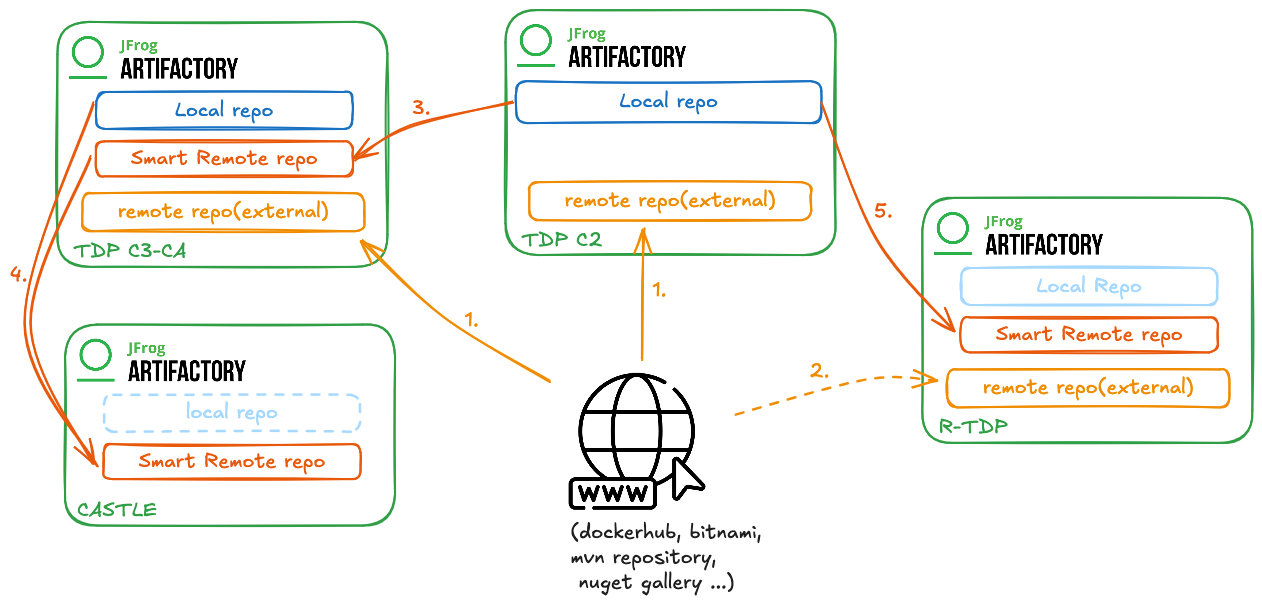
You can request mirroring for the following configurations:
- (1). TDP C2 or C3-CA ← internet (request public repository )
- (3). TDP C3-CA ← TDP C2 (request remote repository )
JFrog Artifactory
| Title | Synthetic information |
|---|---|
| Service | Artifacts Repository |
| Owner | SRE/Software Solution |
| Status/Availability | GA |
| SLA | 99% |
| Security Level | C2 (GA) / C3-CA (GA) |
Visibility
Artifactory repositories can be configured to be visible to specific users or groups, ensuring that sensitive artifacts are only accessible to authorized personnel.
- Only remote repositories should be Public.
- Inner source and sharable repositories should be Internal.
- By default, all repositories and projects should Private.
Cleanup
To Request a cleanup for your repository, please submit a general request through the Post’it request .
The request should be done by someone who have a manager right on the requested repositories. He should provide the criteria of cleanup, such as the age of artifacts, the type of artifacts, or specific naming patterns.
JFrog Xray
| Title | Synthetic information |
|---|---|
| Service | Software Composition Analysis |
| Owner | Software Factory |
| Status/Availability | GA |
| SLA | 99% |
| Security Level | C2 and C3-CA |
How to subscribe to Artifactory and Xray?
Access to the Software Factory’s main tools (GitLab, SonarQube, Artifactory) is available through a single offer valid on all platforms: the DevSecOps offer.
This offer is valid on all managed platforms (TDP C2, TDP C3-CA, RTDP, CASTLE, R-CASTLE).
JFrog RACI
- Responsible, Accountable, Consulted, Informed
| Action | Factory Support | Business admin | Project team admin | Project team member | Request * |
|---|---|---|---|---|---|
| Create Artifactory Project and delegate management to the project | R/A | R (request) | request project | ||
| Create permission | R/A | R (request) | request permission | ||
| Create repository | R/A | R (request) | C | request repository creation | |
| Manage repo permission | R/A | I | NA |
TDP Global Policies
TDP C2 Policies
The following global Xray policies are currently configured on TDP C2:
vulnerability-block
This policy is configured at global level and is used to detect vulnerabilities.
It applies only to critical vulnerabilities and can be used to fail builds when such vulnerabilities are detected.
It does not block artifact downloads, but it can enforce controls in CI/CD workflows.vulnerability-check
This policy is configured at global level and is used to detect vulnerabilities. It applies to vulnerabilities of all severities and currently does not block downloads. It is intended for detection and reporting purposes.cross-tribe-malicious-package
This policy is configured at global level and is used to prevent the use of malicious dependencies across the platform.
It actively blocks downloads when a package is identified as malicious.block-targeted-packages
This policy is configured at global level and is used to prevent the retrieval of known unwanted or unsafe packages.
It actively blocks downloads for a list of specifically targeted package names and versions.
TDP C3/CA Policies
The following global Xray policies are currently configured on TDP C3:
vulnerability-check
This policy is configured at global level and is used to detect vulnerabilities.
It applies to vulnerabilities of all severities and currently does not block downloads. It is intended for detection and reporting purposes.cross-tribe-all-repositories
This policy is configured at global level and is used to prevent the use of malicious dependencies across the platform.
It actively blocks downloads when a package is identified as malicious.block-targeted-packages
This policy is configured at global level and is used to prevent the retrieval of known unwanted or unsafe packages.
It actively blocks downloads for a list of specifically targeted package names and versions.
Only policies configured without a project key are considered global policies.
Policies defined with a project scope are not included in the lists above.
Project scoped policies
You can configure your Xray policies at project level on top of the global existing ones.
If an artifact is blocked and the reason does not match one of the
global policies listed above,
it is possible that an additional scoped policy has been configured for
the corresponding repository, project, or team.
If you are not using projects and wish to use policies, please make a general request to the TDP platform admins. They are able to create a policy that will apply only on your desired repositories.
You can find more information on how to set this up on your project at the Xray use page .
Project or group scoped policies are not managed on the admin side. If you encounter a block that is not explained by the global policies, please check with the relevant project administrators.
Service level Aggrement and operation information
On the TDP C2:
- Maturity Level : GA
- Service Availability: 99%
On the TDP C3-CA:
- Maturity Level : GA
- Service Availability: 99%
Backups
- Frequency: every three hours
- Retention period: one month
- Type of redundancy: Geo redundant storage for databases and storage accounts, but not for data disks (provided by K8SaaS ).
SonarQube
- Maturity Level: GA
- Service: 99%
Requests
To Create a new Quality Profile:
- You can request to create a new Quality Profile
.
- provide the language and the name of the new quality profile.
- You can request to Extend an existing
Quality Profile.
- provide the parent quality profile
- You can request to Create a Quality Profile from XML .
The request should be granted the permission to manage the newly created profile.
If you want to request access for a group or other users, please specify it in the request.
Links
Once you suscribe to the Software Factory DevSecOps offer’s, you will hava access to SonarQube.
- Link to connect to SonarQube on C2 data instance : https://quality-analysis.thalesdigital.io/sonar/
- Link to connect to SonarQube on C3 data instance : https://sonarqube.tdp.infra.thales .
Service Level
On the TDP C2:
- Maturity Level : GA
- Service Availability: 99%
On the TDP C3-CA:
- Maturity Level : GA
- Service Availability: 99%
On the RTDP:
- Maturity Level : EA
- Service Availability: 99%
Backups
- Frequency: every three hours
- Retention period: one month
- Type of redundancy: Geo redundant storage for databases and storage accounts, but not for data disks (provided by K8SaaS ).
Coverity
LIST OF FEATURES
| Feature Name | Level of availability (EA/GA) | Value |
|---|---|---|
| SAST | GA | static application security testing |
What is the pricing ?
Coverity comes in a StandAlone offer, which is separate from the DevSecOps offer.
How to subscribe?
To subscribe to Coverity, follow these steps:
Via the TrustNest Self Service Portal (service-now.com)
As a project manager you must create a new request for all the team members using PostIT
Fill in the form and make sure to provide the name of the project that will be created for you in Coverity
Send the request
Once your accesses are created, you can consult the Coverity online documentation and the NextGen CI/CD steps for Coverity .
Backups
- Frequency: daily
- Retention period: 30 days
Service Level
Maturity Level : EA
Service Availability: 99%
Security Level : EA (C3 to be reached)
Service Monitoring
section to be completed
Cosign
| Title | Synthetic information |
|---|---|
| Service | Cryptographic Signing |
| Owner | SRE/Software Solution |
| Status/Availability | EA |
| SLA | 99% |
| Security Level | C2 (EA) / C3-CA (EA) |
- EA : Early Access
Contact
- Ask your question on https://answers.thalesdigital.io
- In case of any issue, use PostIT
- You can also have a look on the TDP FAQ