version v7.2.
For up-to-date documentation, see the
latest version.
Artifactory
9 minute read
1. Application
| Reference: | LLD – Software Factory as a Product - Artifactory |
| Type & Classification: | Product |
| Step: | Continuous Delivery |
| Bid/Project/Product Name & ID: | Software Factory as a Product (SWaaP) |
| Solution Level: | Digital product |
| Solution Name: | Software Factory as a Product |
| Solution description: | As deployed, create and update a Software Factory |
| Key Products/Solution: |
2. Introduction
2.1 Document purpose
This document is a low level design - LLD which aims to describe how the architecture evoked in high level design - HLD will be implemented. This document will describe the protocols used in the target architecture, how to implement them and any modifications made to their default behavior. Once validated by Thales, this document will then serve as a basis for the implementation of configurations on equipment.
2.2 Document scope
This document is not a manual and is not intended to replace the reference literature describing with great precision all network protocols.
The protocols used will be briefly described as well as the modifications made to their default behavior.
2.3 Referenced documentation
| Document reference | Document Name |
|---|---|
| TASD | Technical Architecture and Security Document of SWaaP |
| SCOM-Artifactory | Software Center Operation Manual of Artifactory |
3. Component general description
This component is part of Software Factory as a Product (SWaaP), and it is visible in the TASD .
This component permits to expose artifacts management services to any Software engineer (end user of SWaaP). It is based on JFrog Artifactory COTS. Those artifacts can be managed using:
- Artifactory UI
- Artifactory API(s) and any compatible CLI.
4. Functional & Business Requirements
No formal list of requirements has been expressed by clients. It is designed and developed based on business use cases.
4.1 Feature summary
| Feature Name | Level of availability (EA/GA) | Value |
|---|---|---|
| Artifacts storage | GA | Store your artifacts for your project needs |
| Artifacts Sharing | GA | Share your artifact |
| Proxy of public artifacts | GA | Access public artifacts from popular repositories like officials mvn, npm, Docker etc. |
| Proxy of other Artifactory repository | GA | Access to lower level of sensitivity Software Factory artifacts. |
4.2 Prerequisites
Every prerequisites of the product are applicable to this component. In detail:
- Kubernetes and Flux. See the TASD §4.1.2 Prerequisites for supported version.
- PostgreSQL 14 or later - check official documentation .
4.3 Variability
The component is delivered with no set of plugin. Only this configuration is supported.
Any plugin is considered as unsupported. Installing an unsupported plugin expose the Operations team to a risk: the product may break the compatibility unexpectedly. As soon as one unsupported plugin is installed, the Product team can no longer guarantee support and may charge part or full support effort as Professional Service.
As with any Software Factory component, a plugin may no longer be supported during the Software Factory product lifecycle. In this case, this note will be updated, and the release note of the first version in which the plugin was removed will document it as a breaking change.
5. Architecture decision record
Here is a list of decisions:
| Ref. | Date/Status | Description |
|---|---|---|
| ADR-ART-001 | 2022/09 | Add Artifactory as a component of the Software Factory as a Product (SWaaP). See ADR001 in TASD . |
Table 3 - List of architecture decision record.
5.1 ADR-ART-001: Add Artifactory as a component of the product
5.1.1 Status: Accepted
- Creation of sf-package in September 2022
- Recorded in SWF organization in April 2023
5.1.2 Context
- See ADR001 in TASD .
5.1.3 Decision
- Introduce Artifactory in the product from its current implementation on TDP C2 & TDP C3-CA
5.1.4 Consequences
6. Architecture description
6.1 Business architecture and allocation to services
You will find in Figure 1 business architecture for software code and CI/CD engineering allocated to services:
[ ](../../../tasd/allocated_business_archi.drawio.svg)
Figure 1 - Business architecture allocated to services.
Note: in dash, external items.
6.2 Application architecture
Physical architecture is described in Figure 2 :

Figure 2 - Physical architecture
Artifactory is using these external services:
- A Software Factory or mirror for deployment (PRE_001)
- Kubernetes with Flux (PRE_002, PRE_003)
- Persistent storage to store the configuration and cache (PRE_004)
- Ingress with TLS and DNS resolution associated for one entry point and certificates,
classically
https://artifactory.SF-DOMAIN(PRE_005, PRE_006, PRE_007) - Object storage to store artefact (PRE_008); we recommend S3 or Azure Blob Storage but Artifactory supports several filestore . Alternative for non production can be pvc.
- IAM (PRE_009); we recommend SAML SSO. See IAM
- Mail server (PRE_014); you can configure is using Artifactory mail server configuration documentation
- Database (PRE_015); we recommend Managed PostgreSQL database. Alternative can be internal to namespace provided PostgreSQL database that is provided with the product.
Artifactory System Architecture Diagram in Figure 3
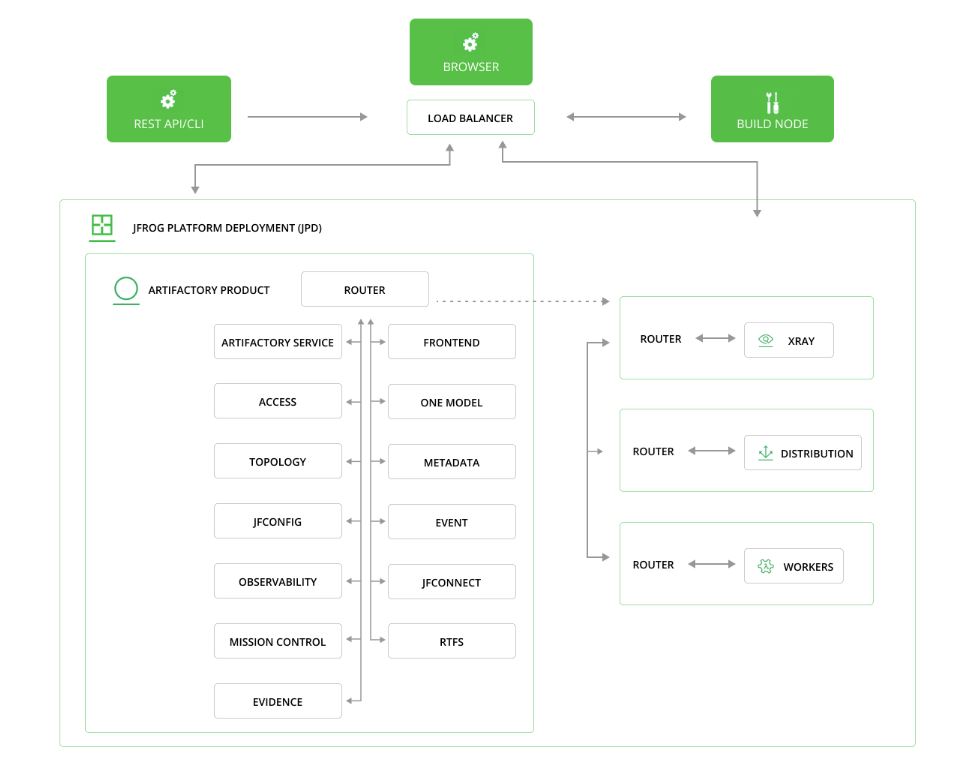
Figure 3 - Artifactory HLD architecture
Artifactory product contains the following microservices:
Artifactory Service is the main application service.
Router - the central hub for communication between all the microservices and all the products in the JPD.
Access - the authentication server and service registry. Manages users, groups, permissions, and access tokens for all products in the JPD.
[NEW] Topology is a service registry that streamlines platform topology management. It is extracted from Access. (from Artifactory version >= 7.104)
[NEW] One Model is a centralized hub for all GraphQL APIs that defines a mechanism for creating and maintaining a unified model of entities managed by the JFrog Platform, promoting a common language used by all JFrog products and services. This also includes a third-party service called Apollo Router. (from Artifactory version >= 7.104)
Event is a distribution mechanism for JFrog products. Distributes webhook events to external systems.
Frontend - the application user interface (UI for the entire JPD).
JFConnect - fetches the entitlements from the subscription into a JPD. See JFConnect Microservice
Metadata - serves the Packages screen in the JPD UI.
Observability consolidates logs and metrics in the service.
[NEW] JFConfig - can be used by other JFrog services to store configuration in a key-value format in DB in a centralized way. (from Artifactory version >= 7.104)
[NEW] Evidence enables the signing of CRD evidences for Artifacts, Builds, Packages, or Release bundles. (from Artifactory version >= 7.111)
[NEW] Artifactory Federation Service (RTFS) synchronizes huge volumes of artifact metadata between customer sites. See Artifactory Federation Service . (from Artifactory version >=7.104 and is disabled by default)
Mission Control is the single access point to manage multiple JPDs. See Installing Mission Control . (available with an Enterprise+ license)
JFBus is an event-streaming service that serves as the primary event processing and communication hub across the JFrog Platform. This service is disabled.
6.2.1 User management
This role matrix has been defined in TASD:
| User role | Description user role | Comment |
|---|---|---|
| UC1 | End user / Software engineer | Person that can write in a solution/product/project tenant |
| UC2 | Reader | Person that can read content of a solution/product/project tenant |
| UC3 | Tenant owner | Person that can administrate a solution/product/project tenant |
| UC4 | Software Factory application admin | Person that can administrate Software Factory instance components |
| UC5 | Software Factory system admin | Person that can administrate the deployment/upgrade of the Software Factory instance |
| UC6 | Software Factory tribe | Person that are delivering asset to deploy/upgrade a Software Factory instance |
For Artifactory, a tenant is a consistent set of repositories / permissions / project(s).
6.2.2 RACI
In addition of global RACI (Responsible, Accountable, Consulted, Informed) of the SWaaP defined in TASD:
| Action | UC4 | UC1 |
|---|---|---|
| Grant access to Artifactory | R/A | |
| Create an Artifactory Permission | R/A | |
| Create an Artifactory repository without assignation to a project | R/A | |
| Manage an Artifactory permissions through Permission system | R/A | |
| Manage repositorie permissions through Permission system | R/A | |
| Create an Artifactory Project | R/A | |
| Create a Repository in the Artifactory Project | R/A | |
| Manage users in the Project | R/A | |
| Assign existing repositories to the Project | R/A | |
| Create a local Artifactory group | R/A | |
| Add a member to a local Artifactory group | R/A | |
| Remove a member from a local Artifactory group | R/A | |
| Consult the list of local Artifactory group members | R/A | |
| Adding a local Artifactory group to a Permission | R/A | |
| Adding a local Artifactory group to a Project | R/A | |
| Increase Project storage quota | R/A |
6.3 Delivery
Component is part of the Software Factory as a Product (SWaaP) delivery. See TASD for more details.
6.3.1 Latest Version
- Latest version editor:
- SWaaP integration part
6.3.2 Version Chart 107.146.17 / Artifactory 7.146.17
- Component registry:
- Helm chart registry: in SF delivery From JFrog
- SWaaP integration part
- Component Merge Request in Reference
- Release changelog
- K6 Test report: pipeline
- Security Report:
6.4 Infrastructure architecture
6.4.1 Software Factory API
Here is a list of services that can be integrated with the Artifactory.
| Ref. | Name | Required | Description |
|---|---|---|---|
| SFE01 | Flux → Git in Software Factory for deployment | Mandatory | Code in a Git server for deployment of the product |
| SFE02 | Flux → Registry in Software Factory for deployment | Mandatory | Registries with helm charts and containers for deployment of the product |
| SFE03 | Object Storage | Highly recommended | Components store data on Object Storage (S3/Azure blob storage) |
| SFE04 | IAM - SAML SSO | Highly recommended | Users should be authenticated using SAML SSO |
| SFE05 | End user notification (SMTP) | Highly recommended | Notification should be sent via mail using SMTP |
| SFE06 | Managed Databases (PostgreSQL) | Mandatory for production | Components store data in a PostgreSQL data base - Alternative is to use deploy embedded data base with the product |
| SFB02 | CLI or Runner → Artifactory | Mandatory | GitLab Runner or CLI should connect to Artifactory using Artifactory public API - NextGen-CICD can manage this API |
| SFE08 | User / applicative admin → Artifactory (and Xray) | Mandatory | User and applicative admin should use Artifactory UI or public API to access to Artifactory or Xray |
| SFI04 | Xray → Artifactory | Mandatory | Xray is integrated in Artifactory (it is accessible through Artifactory UI) |
| SFE10 | Artifactory ← Other Artifactory | Highly recommended | Artifactory remote on a upper sensitive data domain pulling Artifactory repository on a lower sensitive data domain to upper |
7. Operational and maintenance
In this chapter you will find strategy and policy. Detail implementation will be described in the SCOM-Artifactory .
7.1 Life cycle policy
Cadence of version is describe in the Product Lifecycle .
7.2 License
We support and recommend deployment with enterprise + Artifactory license.
7.3 Deployment
The component is deployed as a standard component using Flux and SWaaP packaging. See TASD for more details.
Configuration for the deployment is described in the SCOM-Artifactory .
7.4 IAM
We support and recommend integration with IAM using SAML SSO. This configuration can be done in Artifactory admin UI
7.5 Scaling
We support and recommend a configuration to manage 1k active users. For different sizing case, see JFrog documentation
7.6 Backup / restore
We recommend to manage point in time restore at platform level. Like that it is possible to restore synchronously:
- volumes,
- database,
- and object storage.
For information, JFrog proposes a backup procedure
7.7 Monitoring
This chapter will be completed issue link
7.8 Logging
We recommend to apply the platform logging & SOC management strategy.