version v7.2.
For up-to-date documentation, see the
latest version.
Black Duck Alert (former Synopsys Alert)
11 minute read
1. Application
⚠IMPORTANT NOTICE!
Starting with version 8.0.0 , Synopsys Alert has been renamed Black Duck Alert. For legacy and structure reasons in the current document, any reference to Synopsys Alert product name can be used interchangeable with Black Duck Alert. Outside of this, any code block, reference to a value/parameter should be used “as is”.
| Reference: | LLD – Software Factory as a Product - Black Duck Alert |
| Type & Classification: | Product |
| Step: | Continuous Delivery |
| Bid/Project/Product Name & ID: | Software Factory as a Product (SWaaP) |
| Solution Level: | Digital product |
| Solution Name: | Software Factory as a Product |
| Solution description: | As deployed, create and update a Software Factory |
| Key Products/Solution: |
2. Introduction
2.1 Document purpose
This document is a low level design - LLD which aims to describe how the architecture evoked in high level design - HLD will be implemented. This document will describe the protocols used in the target architecture, how to implement them and any modifications made to their default behavior. Once validated by Thales, this document will then serve as a basis for the implementation of configurations on equipment.
2.2 Document scope
This document is not a manual and is not intended to replace the reference literature describing with great precision all network protocols.
The protocols used will be briefly described as well as the modifications made to their default behavior.
2.3 Referenced documentation
| Document reference | Document Name |
|---|---|
| TASD | Technical Architecture and Security Document of SWaaP |
| SCOM-BlackDuckAlert | Software Center Operation Manual of Black Duck Alert |
3. Component general description
This component is part of Software Factory as a Product (SWaaP), and it is visible in the TASD .
Black Duck Alert enables users to receive Black Duck notifications via a number of commonly used distribution channels, such as email, Slack, Azure Boards, and Jira.
Alert is a web application with a user interface that runs in a browser. It can be orchestrated as part of, and runs in parallel with, your Black Duck deployment. Alert runs as its own application, so logging into Black Duck is not required to use it.
This component permits to expose Black Duck Alert services to any Software engineer (end user of SWaaP). It is mainly based on Black Duck Alert. Black Duck Alert service is exposed using:
- Black Duck Alert UI (the web application)
- Black Duck Alert API (REST API is documented using Swagger UI, accessible via the About page or by using the (Black Duck Alert URL)/swagger-ui/index.html)
4. Functional & Business Requirements
No formal list of requirements has been expressed by clients. It is designed and developed based on business use cases.
4.1 Feature summary
Black Duck Alert allows users to be notified when BlackDuck policy violations are encountered via configured distribution channels.
After configuring your Black Duck provider and notification channels in Alert, users with the ALERT_ADMIN or ALERT_JOB_MANAGER role can create distribution jobs that determine how the notifications are sent from Black Duck to the various Alert channels. Channels are the means by which Alert sends notifications. Alert supports the following channels:
- Azure Boards
- Jira Cloud
- Jira Server
- MS Teams
- Slack
4.1.1 Target Population
Because the Black Duck Alert’s goal is to provide alerts for policy violations detected by Blackduck, the target population is the subset of Blackduck users that require instant notification of policy violations:
- Developers
- Development and DevOps Teams
- Security and Operations Teams
- Managers, compliance officers
4.2 Prerequisites
Every prerequisites of the product are applicable to this component. See the TASD .
- A compatible Black Duck instance (Refer to Black Duck Release Compatibility to view the supported versions of Black Duck)
- A Black Duck API token for Black Duck Alert to receive notifications from Black Duck
- Kubernetes and Flux. See the TASD §4.1.2 Prerequisites for supported version.
4.3 Variability
No variability is supported.
5. Architecture decision record
Here is a list of decisions:
| Ref. | Date/Status | Description |
|---|---|---|
| ADR-SYAL-001 | 2024/02 | Add Synopsys Alert as a component of the Software Factory as a Product (SWaaP). See ADR003 in TASD . |
Table 3 - List of architecture decision record.
5.1 ADR-SYAL-001: Add Synopsys Alert as a component of the product
5.1.1 Status: Accepted
- Creation of sf-package in September 2022
- Recorded in SWF organization in April 2023
5.1.2 Context
- See ADR003 in TASD .
5.1.3 Decision
- Introduce Synopsys Alert in the product.
5.1.4 Consequences
6. Architecture description
6.1 Business architecture and allocation to services
You will find in Figure 1 business architecture for software code and CI/CD engineering allocated to services:

Figure 1 - Business architecture allocated to services.
Note: in dash, external items.
6.2 Application architecture
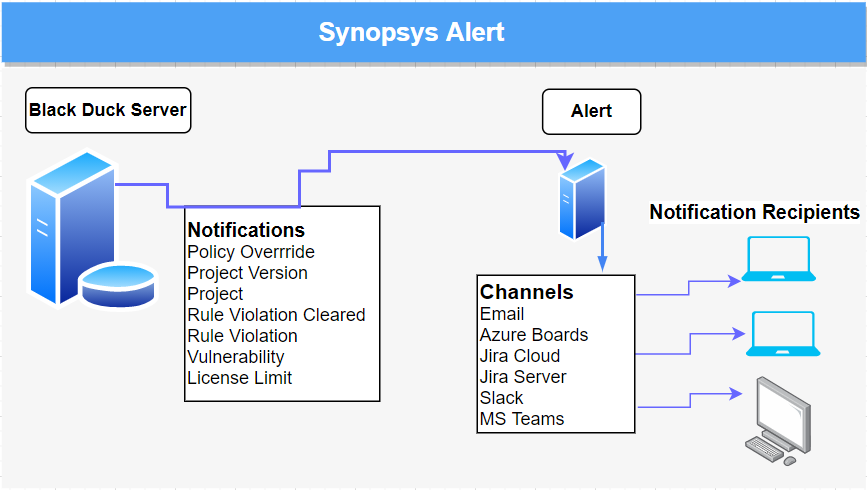
After Alert is configured, it runs continuously in the background receiving notifications from Black Duck and delivering those notifications to configured recipients using the configured channels. Administrators can verify the successful sending of notifications through the Alert Audit screen.
A full Black Duck Alert is deployed on 4 pods (when deployed with externalDatabase = false
and enableStandalone: false):
- Alert Server: pod running the web application
- RabbitMQ: pod running RabbitMQ
- PostgreSQL: (optional) pod hosting database
- CFSSL: (optional) CFSSL is CloudFlare’s PKI/TLS swiss army knife. It is both a command line tool and an HTTP API server for signing, verifying, and bundling TLS certificates.
In the current configuration:
- Alert uses the CFSSL pod deployed by Black Duck install, in the
blackducknamespace (enableStandalone: false) - Alert uses an external database
externalDatabase = false
  postgres:
    isExternal: true
Black Duck Alert is using these external services:
- A Software Factory or mirror for deployment (PRE_001)
- Kubernetes with Flux (PRE_002, PRE_003)
- Persistent storage to store the configuration and cache (PRE_004)
- IAM (PRE_009); we recommend SAML SSO. See IAM
- Mail server (PRE_014); you can configure is using Configuring Email Channel in Alert
- Database (PRE_015); we recommend Managed PostgreSQL database. Alternative can be internal to namespace provided PostgreSQL database that is provided with the product.
As Black Duck Alert is integrated in Black Duck, it doesn’t require a new entry point with TLS and dns resolution.
6.2.1 User management
This role matrix has been defined in TASD:
| User role | Description user role | Comment |
|---|---|---|
| UC1 | End user / Software engineer | Person that can write in a solution/product/project tenant |
| UC2 | Reader | Person that can read content of a solution/product/project tenant |
| UC3 | Tenant owner | Person that can administrate a solution/product/project tenant |
| UC4 | Software Factory application admin | Person that can administrate Software Factory instance components |
| UC5 | Software Factory system admin | Person that can administrate the deployment/upgrade of the Software Factory instance |
| UC6 | Software Factory tribe | Person that are delivering asset to deploy/upgrade a Software Factory instance |
Black Duck Alert users include default users, users added by an administrator, and users managed by external systems such as LDAP or SAML. There are three default users in Black Duck Alert:
- sysadmin (role ALERT_ADMIN) - full system configuration access.
- jobmanager (role ALERT_JOB_MANAGER) - full access to distribution jobs and read permissions for other operational functions.
- alertuser (role ALERT_USER) - read access for distribution jobs only.
Only an administrator can manage and assign roles to users that are managed by external systems such as LDAP or SAML.
6.2.2 RACI / RBAC Model
UC1, UC2, UC3 are not managed in Black Duck Alert, as the users should not have access to this component. As recipients of notifications from Black Duck Alert, these users are managed by the different channels used by Black Duck Alert (ex Email, Azure Boards etc.). Users can configure notifications directly form Black Duck SCA and have no access to Black Duck Alert.
Black Duck Alert has the following predefined roles:
| Role Name | Description | Notes |
|---|---|---|
| ALERT_ADMIN | Provides full user privileges, and full access to Alert’s configuration. The system administrator (sysadmin) default user has this role. | This role cannot be changed. |
| ALERT_JOB_MANAGER | Allows a user to read the provider and channel global configuration, and to test the configuration. This user has full access to distribution jobs and read access to the Audit page and Scheduling page. | The user has read-only access to scheduling. The user cannot view or change the system settings as these are removed from their navigation panel on the left side of Alert. |
| ALERT_USER | Read-only access to distribution jobs to view configuration. | The user cannot view or read data for providers, the global channel settings, scheduling, or system settings. These items are removed from the left side navigation panel. |
| Action | Description | UC5 | UC4 |
|---|---|---|---|
| Configure Black Duck Alert | Provides full user privileges, and full access to Alert’s configuration | R/A | R/A |
6.3 Delivery
Component is part of the Software Factory as a Product (SWaaP) delivery. See TASD for more details.
6.3.1 Latest Version
- Latest version editor
- Reference Component repository
- SWaaP integration part
6.3.2 Version 8.0.0
- Component registry:
- Reference Component repository
- SWaaP integration part
- Component Merge Request in Reference
- Release changelog: TBC on X.Y.Z tag
- K6 Test report: TBC on X.Y.Z tag no test 😱
- Security Report:
6.4 Infrastructure architecture
6.4.1 Software Factory API
Here is a list of services that can be integrated with the Black Duck Alert.
| Ref. | Name | Required | Description |
|---|---|---|---|
| SFE01 | Flux → Git in Software Factory for deployment | Mandatory | Code in a Git server for deployment of the product |
| SFE02 | Flux → Registry in Software Factory for deployment | Mandatory | Registries with helm charts and containers for deployment of the product |
| SFE04 | IAM - SAML SSO | Highly recommended | Users should be authenticated using SAML SSO |
| SFE05 | End user notification (SMTP) | Highly recommended | Notification should be sent via mail using SMTP |
| SFE06 | Managed Databases (PostgreSQL) | Highly recommended | Components store data in a PostgreSQL data base - Alternative is to use deploy embedded data base with the product |
| SFB07 | Runner or CLI → BlackDuck (And Black Duck Alert) | Mandatory | GitLab Runner or CLI should connect to Black Duck Alert using BlackDuck public API |
| SFE13 | User applicative admin → BlackDuck (And Black Duck Alert) | Mandatory | User and applicative admin should use BlackDuck UI or public API to access to Black Duck Alert |
7. Operational and maintenance
In this chapter you will find strategy and policy. Detail implementation will be described in the SCOM.
7.1 Life cycle policy
Cadence of version is describe in the Product Lifecycle .
7.2 License
Black Duck Alert is released under Apache-2.0 license and does NOT require license configuration.
7.3 Deployment
The component is deployed as a standard component using Flux and SWaaP packaging. See TASD for more details.
7.4 IAM
We support and recommend integration with IAM using SAML SSO. Configuring SAML integration requires a user with role ALERT_ADMIN. For information about SAML integration check out Authentication - Configuring LDAP or SAML
7.5 Scaling
7.5.1 CPU and Memory sizing and scaling
Black Duck provides system and container sizing recommendations but does not specify a scaling strategy for Alert. Vertical scaling, increasing each pod resources, is recommended if encountering performance problems and used CPU / Memory are constantly high.
Recommended overall system specifications
- 5 CPU Cores or greater (Note: The unit suffix “m” in the table below stands for thousandth of a core. 1000m or 1000 millicore is equal to 1 core.)
- Minimum of 12GB free disk space plus blackduck-cfssl container disk space. (Review Black Duck requirements to determine the value appropriate for your environment.)
- 5GB RAM or greater
Recommended container specifications
| Container | CPU Core | Memory | Disk Space |
|---|---|---|---|
| Alert Server | 2000m | 2560MB | 5GB |
| RabbitMQ | 1000m | 1024MB | 2GB |
| PostgreSQL | 1000m | 1024MB | 5GB |
| CFSSL (For BD) | 100m | 640MB | As per BD |
Minimum overall system specifications
- 4 CPU Cores (Note: The unit suffix “m” in the table below stands for thousandth of a core. 1000m or 1000 millicore is equal to 1 core.)
- Minimum of 12GB free disk space plus blackduck-cfssl container disk space. (Review Black Duck requirements to determine the value appropriate for your environment.)
- 4.5GB RAM
Minimum container specifications
| Container | CPU Core | Memory | Disk Space |
|---|---|---|---|
| Alert Server | 1000m | 2560MB | 5GB |
| RabbitMQ | 1000m | 1024MB | 2GB |
| PostgreSQL | 1000m | 1024MB | 5GB |
| CFSSL (For BD) | 100m | 640MB | As per BD |
7.6 Backup / restore
We recommend to manage point in time restore at platform level. Like that it is possible to restore synchronously:
- volumes,
- database
Black Duck does not provide a procedure for use with an external database deployment. Backup and restore should be done according to PostgresSQL recommendations and internal procedures. Chapter 26. Backup and Restore
7.7 Monitoring
Monitoring can be done at the pod level using for example Kubernetes’ metrics API Tools for Monitoring Resources . Alert also exposes a diagnostics endpoint, documented using a SwaggerUI. For more information on how to use the diagnostics endpoint, check out the Monitoring section of the Operational Guide for Black Duck Alert: § System health metrics in SCOM-BlackDuckAlert
7.8 Logging
We recommend to apply the platform logging & SOC management strategy.
To change the logging level check of Alert check out Setting the logging level to DEBUG in
Troubleshooting Alert