version v7.2.
For up-to-date documentation, see the
latest version.
Black Duck
15 minute read
1. Application
| Reference: | LLD – Software Factory as a Product - Black Duck |
| Type & Classification: | Product |
| Step: | Continuous Delivery |
| Bid/Project/Product Name & ID: | Software Factory as a Product (SWaaP) |
| Solution Level: | Digital product |
| Solution Name: | Software Factory as a Product |
| Solution description: | As deployed, create and update a Software Factory |
| Key Products/Solution: |
2. Introduction
2.1 Document purpose
This document is a low level design - LLD which aims to describe how the architecture evoked in high level design - HLD will be implemented. This document will describe the protocols used in the target architecture, how to implement them and any modifications made to their default behavior. Once validated by Thales, this document will then serve as a basis for the implementation of configurations on equipment.
2.2 Document scope
This document is not a manual and is not intended to replace the reference literature describing with great precision all network protocols.
The protocols used will be briefly described as well as the modifications made to their default behavior.
2.3 Referenced documentation
| Document reference | Document Name |
|---|---|
| TASD | Technical Architecture and Security Document of SWaaP |
| SCOM-BlackDuck | Software Center Operation Manual of Black Duck |
3. Component general description
This component is part of Software Factory as a Product (SWaaP), and it is visible in the TASD .
The Black Duck Software Integrity Group (SIG) offers a comprehensive suite of services and tools that support customers on their security journey. From customers just starting with security, to customers strengthening an established program, SIG has the expertise, skills, and products necessary for success.
It can be managed using:
- Black Duck UI
- Black Duck APIs
4. Functional & Business Requirements
No formal list of requirements has been expressed by clients. It is designed and developed based on business use cases.
4.1 Feature summary
Black Duck addresses several critical needs in the software development and operations landscape:
- Dependency analysis: identifies direct and transitive dependencies declared by package managers.
- Binary analysis: detects dependencies in post-build artifacts, like firmware and container images, without access to source code.
- Snippet analysis: matches code snippets, such as those included by AI coding tools, back to their original open-source projects.
- CodePrint analysis: identifies dependencies in source files and directories, even when they’re not declared by package managers.
- Container scanning: uses a combination of binary and CodePrint analysis to identify open-source dependencies in container images, layer by layer.
- C/C++ scanning: accurately identifies open-source dependencies and libraries being used in C/C++ applications, even where there is no presence of package managers.
Black Duck offers a range of features and capabilities that empower organizations to effectively manage open-source security and Compliance risks. Let’s delve into some of its key functionalities:
- Vulnerability Detection and Management: Black Duck’s vulnerability detection capabilities enable organizations to identify security Vulnerabilities present in open-source components used in their software applications. It leverages a comprehensive vulnerability database, including the National Vulnerability Database (NVD), to provide accurate and up-to-date vulnerability information. By scanning application code and dependencies, Black Duck identifies known vulnerabilities, allowing organizations to prioritize and remediate them effectively.
- License Compliance: Open-source software is typically governed by specific licenses that dictate how it can be used, modified, and distributed. Ensuring compliance with these licenses is crucial to avoid legal and operational risks. Black Duck automates the process of license compliance by scanning code repositories and detecting the presence of open-source components with their associated licenses. It provides organizations with insights into licensing obligations, enabling them to manage compliance effectively.
- Code Quality and Security Analysis: In addition to vulnerability detection and license compliance, Black Duck offers code quality and Security analysis capabilities. It identifies coding best practices, potential security vulnerabilities, and other quality-related issues in open-source components. This helps organizations improve the overall security and reliability of their software applications.
- Continuous Monitoring and Reporting: Black Duck provides a robust policy management framework that enables organizations to define and enforce their open-source usage policies. It allows organizations to set rules and guidelines for open-source component usage based on security, license, and quality criteria. Black Duck can automatically scan code repositories, flag violations, and provide recommendations to ensure compliance with these policies, thereby promoting good Governance practices.
- Native Integration with Artifactory: Black Duck offers continuous Monitoring and reporting capabilities, allowing organizations to track the security and compliance posture of their software applications throughout the development lifecycle. It provides real-time alerts and notifications about new vulnerabilities or policy violations, enabling proactive risk mitigation. Additionally, Black Duck generates comprehensive reports that help organizations demonstrate compliance, assess risks, and make informed decisions.
4.2 Target Population
Black Duck is targeted towards several key user groups within the software development and IT operations ecosystem:
- DevSecOps Teams: Professionals who integrate security practices within the DevOps process, ensuring security and compliance are maintained throughout the development pipeline.
- Security Analysts: Individuals responsible for identifying, analysing, and mitigating security threats within the organization’s software environment.
- Compliance Officers: Personnel tasked with ensuring that the organization adheres to legal and regulatory requirements related to software usage and open-source licenses.
- Software Developers: Developers who need to ensure that their code and dependencies are secure and compliant from the earliest stages of development.
- IT Operations Teams: Teams managing the deployment and maintenance of software in production environments, who require assurance that deployed applications are secure and compliant.
4.3 Prerequisites
Every prerequisites of the product are applicable to this component. In detail:
- Kubernetes and Flux. See the TASD §4.1.2 Prerequisites for supported version.
- PostgreSQL 15 or later - check official documentation .
- Network flows in accordance with official connectivity documentation
4.4 Variability
No variability is supported.
5. Architecture decision record
Here is a list of decisions:
| Ref. | Date/Status | Description |
|---|---|---|
| ADR-BLD-001 | 2022/09 | Add Black Duck as a component of the Software Factory as a Product (SWaaP). See ADR003 in TASD . |
Table 3 - List of architecture decision record.
5.1 ADR-BLD-001: Add Black Duck as a component of the product
5.1.1 Status: Accepted
- Creation of sf-package in September 2022
- Recorded in [SWF organization] in April 2023
5.1.2 Context
- See ADR003 in TASD .
5.1.3 Decision
- Introduce Black Duck in the product.
5.1.4 Consequences
6. Architecture description
6.1 Business architecture and allocation to services
You will find in Figure 1 business architecture for software code and CI/CD engineering allocated to services:

Figure 1 - Business architecture allocated to services.
Note: in dash, external items.
6.2 Application architecture
Figure 2 - Functional diagram
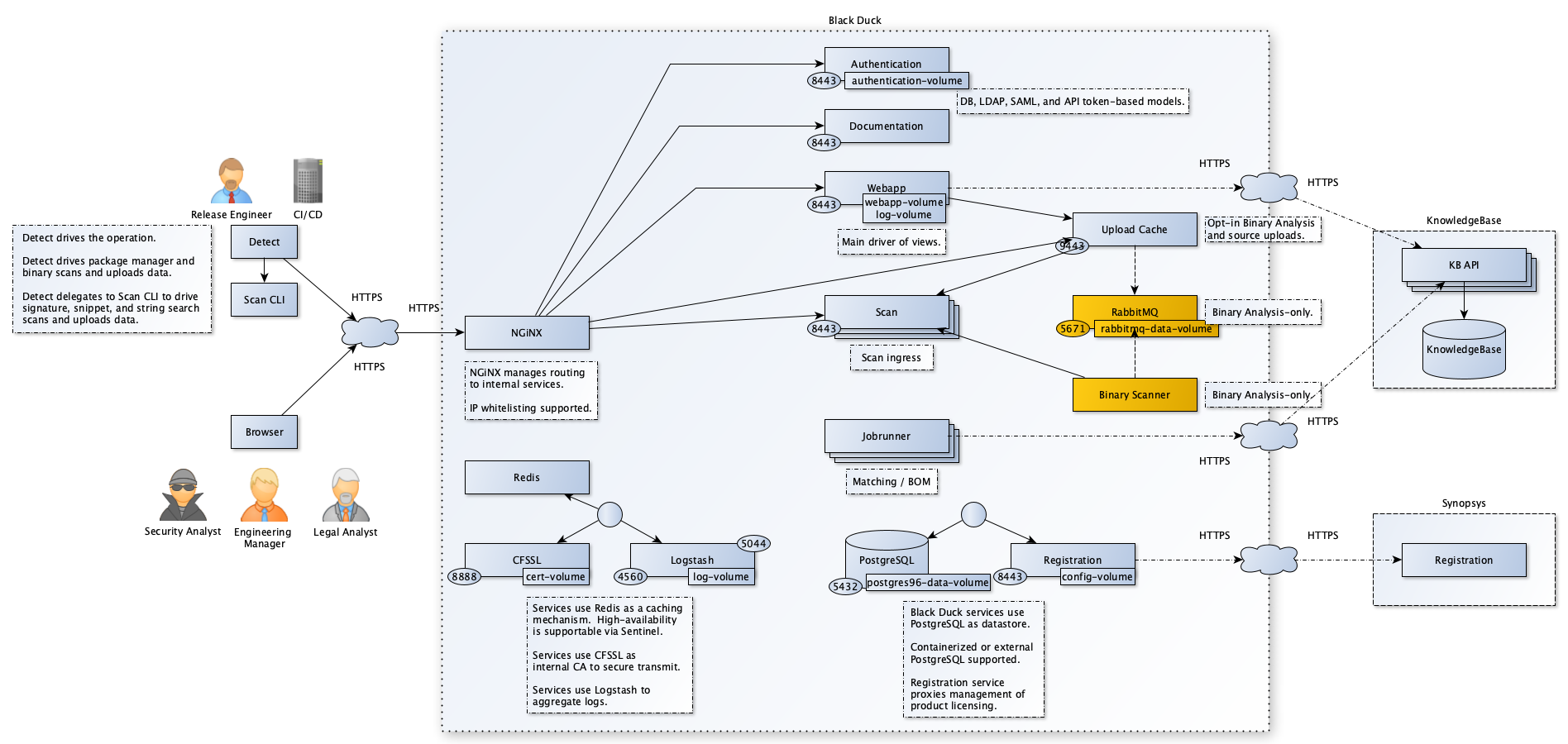
Black Duck consists of several microservices, each responsible for different aspects of artifact scanning and analysis:
Black Duck is using these external services:
- A Software Factory or mirror for deployment (PRE_001)
- Kubernetes with Flux (PRE_002, PRE_003)
- Persistent storage to store the configuration and cache (PRE_004)
- Ingress with TLS and DNS resolution associated for one entry point and certificates,
classically
https://blackduck.SF-DOMAIN(PRE_005, PRE_006, PRE_007) - IAM (PRE_009); we recommend SAML SSO. See IAM
- Database (PRE_015); we recommend Managed PostgreSQL database. Alternative can be internal to namespace provided PostgreSQL database that is provided with the product.
6.2.1 Components
6.2.1.1 Authentication
The authentication service is the container that all authentication-related requests are made against. More on Authentication container
6.2.1.2 Binary scanner
(Required if Black Duck - Binary Analysis is enabled) This container analyzes binary files. More on Binary scanner container
6.2.1.3 BOM engine
The BOM engine container is responsible for building BOMs and keeping them up to date. More on BOM engine container
6.2.1.4 CA
This container uses CFSSL which is used for certificate generation for PostgreSQL, nginx, and clients that need to authenticate to Postgres. It’s also used to generate TLS certificates for the internal containers that make up the application. More on CA container
6.2.1.5 DB
(This container is not included in the Black Duck application if you use an external PostgreSQL instance.) The DB container holds the PostgreSQL database which is an open-source object-relational database system. The application uses the PostgreSQL database to store data. There is a single instance of this container. This is where all of the application’s data is stored. There are two sets of ports for Postgres. One port will be exposed to containers within the Docker network. This is the connection that the application will use. This port is secured via certificate authentication. A second port is exposed outside of the Docker network. This allows a read-only user to connect via a password set using the hub_reportdb_changepassword.sh script. This port and user can be used for reporting and data extraction. Refer to the Report Database guide for more information on the report database. More on DB container
6.2.1.6 Documentation
Supplies documentation for the application. More on Documentation container
6.2.1.7 Integration
The integration service that is responsible for Artifactory integration and Git SCM provider integration scan functionality. More on Integration container
6.2.1.8 Job runner
The Job runner container is the container that is responsible for running all of the application’s jobs. This includes matching, BOM building, reports, data updates, and so on. This container does not have any exposed ports. More on Job runner container
6.2.1.9 Logstash
The Logstash container collects and store logs for all containers. More on Logstash container
6.2.1.10 Match engine
Retrieves component match information from the Cloud Knowledge Base. More on Match engine container
6.2.1.11 RabbitMQ
It facilitates upload information to the binary analysis worker. It also enables the BOM engine container to receive notification to start BOM computation. It exposes ports within the Docker network, but not outside the Docker network. More on RabbitMQ container
6.2.1.12 Redis
This container enables more consistent caching functionality in Black Duck and is used to improve application performance. Redis is enabled by default as a primary cache mechanism. More on Redis container
6.2.1.13 Registration
The container is a small service that handles registration requests from the other containers. At periodic intervals, this container connects to the Black Duck Registration Service and obtains registration updates. More on Registration container
6.2.1.14 Scan
The scan service is the container that all scan data requests are made against. More on Scan container
6.2.1.15 Storage
The storage service provides functionality for many users with the ability to upload files, download files, and define the default file when a file has multiple available versions. More on Storage container
6.2.1.16 Webapp
The webapp container is the container that all Web/UI/API requests are made against. It also processes any UI requests. More on Webapp container
6.2.1.17 WebServer
The WebServer container is a reverse proxy for containers with the application. It has a port exposed outside of the Docker network. This is the container configured for HTTPS. There are config volumes here to allow for the configuration of HTTPS. HTTP/2 and TLS 1.3 are supported. More on WebServer container
6.2.2 User management
This role matrix has been defined in TASD:
| User role | Description user role | Comment |
|---|---|---|
| UC1 | End user / Software engineer | Person that can write in a solution/product/project tenant |
| UC2 | Reader | Person that can read content of a solution/product/project tenant |
| UC3 | Tenant owner | Person that can administrate a solution/product/project tenant |
| UC4 | Software Factory application admin | Person that can administrate Software Factory instance components |
| UC5 | Software Factory system admin | Person that can administrate the deployment/upgrade of the Software Factory instance |
| UC6 | Software Factory tribe | Person that are delivering asset to deploy/upgrade a Software Factory instance |
For Black Duck, a tenant is a project group.
To gain access to Black Duck a user must be first created and given permissions by a user with user administrator role. The user accounts can be local or external. You can find everything related to managing user accounts at this BlackDuck documentation .
To know more about SAML please refer to the documentation. We recommend you configure external accounts through SAML and BlackDuck community website is a step by step guide on how to configure SAML for the Black Duck instance, even if Black Duck is able to manage local users or LDAP users .
We recommend that projects be on boarded as project groups so that permissions can be managed easier and projects can be created as needed, by the project team.
The table can be found in the SCOM-BlackDuck
6.2.3 RACI / RBAC Model
The user or user group can be given global permissions at the Black Duck instance level or project group/project permissions.
We recommend that you use user groups so that all the users in the same project, share the same user groups. We recommend creating 3 user groups for a project group, one for each of the three roles that exist in Software Factory (Project team admin, Project team member and Service account)
We advise that you the following permissions for the following roles, defined at Software Factory level.
The table can be found in the SCOM-BlackDuck
6.3 Delivery
Component is part of the Software Factory as a Product (SWaaP) delivery. See TASD for more details.
6.3.1 Latest Version
- Latest version editor
- Component registry: TBC on main branch
- Helm chart repository
- Reference Component repository
- SWaaP integration part
6.3.2 Version 2025.4.1
- Component registry:
- nginx/controller
- blackduck-webapp
- kduck-storage
- blackduck-scan
- blackduck-registration
- blackduck-redis
- blackduck-postgres
- blackduck-postgres-waiter
- blackduck-nginx
- blackduck-matchengine
- blackduck-logstash
- blackduck-jobrunner
- blackduck-integration
- blackduck-documentation
- blackduck-cfssl
- blackduck-bomengine
- blackduck-binaryscanner
- blackduck-authentication
- Reference Component repository
- SWaaP integration part
- Component Merge Request in Reference
- Release changelog
- K6 Test report: pipeline
- Integration Test report: pipeline
- Security Report:
6.4 Infrastructure architecture
6.4.1 Software Factory API
Here is a list of services that can be integrated with the Black Duck.
| Ref. | Name | Required | Description |
|---|---|---|---|
| SFE01 | Flux → Git in Software Factory for deployment | Mandatory | Code in a Git server for deployment of the product |
| SFE02 | Flux → Registry in Software Factory for deployment | Mandatory | Registries with helm charts and containers for deployment of the product |
| SFE04 | IAM - SAML SSO | Highly recommended | Users should be authenticated using SAML SSO |
| SFE06 | Managed Databases (PostgreSQL) | Mandatory for production | Components store data in a PostgreSQL data base - Alternative is to use deploy embedded data base with the product |
| SFB07 | Runner or CLI → Black Duck | Mandatory | GitLab Runner or CLI should connect to Black Duck using Black Duck public API - NextGen-CICD can manage this API |
| SFE13 | User applicative admin → Black Duck (And Synopsis Alert) | Mandatory | User and applicative admin should use Black Duck UI or public API to access to Black Duck |
| SFE14 | Black Duck ← Black Duck vulnerability database | Mandatory | Black Duck is pulling vulnerability database |
| SFE15 | Black Duck ← Black Duck registering | Mandatory | Black Duck is registering online |
7. Operational and maintenance
In this chapter you will find strategy and policy. Detail implementation will be described in the SCOM-BlackDuck .
7.1 Life cycle policy
Cadence of version is describe in the Product Lifecycle .
7.2 License
Black Duck is under license. May contact purchases for a quotation.
7.3 Deployment
The component is deployed as a standard component using Flux and SWaaP packaging. See TASD for more details.
7.4 IAM
We support and recommend integration with IAM using SAML SSO. To know more about SAML please refer to the documentation.
7.5 Scaling
Always make sure you review the official documentation for system requirements based on your specific implementation BlackDuck documentation .
The SPH values represent the maximum sustained or regular load on the Black Duck system. Although spikes exceeding normal scan load can be handled by the system, customers should avoid regularly exceeding the SPH scan capacity of their Black Duck configuration. In addition, if customers exceed either the project version count or API calls per hour, they should upsize their instance to support their required project version count and API usage. Black Duck project version usage data is available in the Black Duck UI by navigating to Admin > System Information > usage: project. Black Duck does not currently track all API statistics, and so these values are obtained from the external services which interact with and call Black Duck APIs.
| Name | Details | |
|---|---|---|
| 120sph | Scans/Hour: 120 | IOPS: Read: 15,000 / Write: 15,000 |
| SPH % Increase: 0% | Black Duck Services: CPU: 7 core / Memory: 38 GB | |
| APIs/Hour: 3,000 | PostgreSQL: CPU: 4 core / Memory: 16 GB | |
| Project Versions: 13,000 | Total: CPU: 11 core / Memory: 54 GB | |
| 250sph | Scans/Hour: 300 | IOPS: Read: 15,000 / Write: 15,000 |
| SPH % Increase: 20% | Black Duck Services: CPU: 8 core / Memory: 47 GB | |
| APIs/Hour: 7,500 | PostgreSQL: CPU: 6 core / Memory: 24 GB | |
| Project Versions: 15,000 | Total: CPU: 14 core / Memory: 71 GB | |
| 500sph | Scans/Hour: 650 | IOPS: Read: 25,000 / Write: 25,000 |
| SPH % Increase: 30% | Black Duck Services: CPU: 13 core / Memory: 77 GB | |
| APIs/Hour: 18,000 | PostgreSQL: CPU: 16 core / Memory: 64 GB | |
| Project Versions: 18,000 | Total: CPU: 29 core / Memory: 141 GB | |
| 1000sph | Scans/Hour: 1400 | IOPS: Read: 25,000 / Write: 25,000 |
| SPH % Increase: 40% | Black Duck Services: CPU: 25 core / Memory: 172 GB | |
| APIs/Hour: 26,000 | PostgreSQL: CPU: 22 core / Memory: 88 GB | |
| Project Versions: 25,000 | Total: CPU: 47 core / Memory: 260 GB | |
| 1500sph | Scans/Hour: 1600 | IOPS: Read: 25,000 / Write: 25,000 |
| SPH % Increase: 6% | Black Duck Services: CPU: 30 core / Memory: 212 GB | |
| APIs/Hour: 41,000 | PostgreSQL: CPU: 26 core / Memory: 104 GB | |
| Project Versions: 28,000 | Total: CPU: 56 core / Memory: 316 GB | |
| 2000sph | Scans/Hour: 2300 | IOPS: Read: 30,000 / Write: 30,000 |
| SPH % Increase: 15% | Black Duck Services: CPU: 34 core / Memory: 254 GB | |
| APIs/Hour: 50,000 | PostgreSQL: CPU: 32 core / Memory: 128 GB | |
| Project Versions: 35,000 | Total: CPU: 66 core / Memory: 382 GB |
7.6 Backup / restore
We recommend to manage point in time restore at platform level. Like that it is possible to restore synchronously:
- volumes,
- database
Synopsys does not provide a procedure for use with an external database deployment. Backup and restore should be done according to PostgresSQL recommendations and internal procedures. Chapter 26. Backup and Restore
7.7 Monitoring
The Black Duck Heatmap provides an intuitive and powerful solution to capture, present, analyze, distribute, and automate data analysis, problem detection, problem identification, and applying limited solutions that are mapped to known problems. Statistical data from Black Duck is represented in a matrix with hour of day as one axis and day (or date) of month as the other axis. More on this
7.8 Logging
System logs can be retrieved:
- via GUI (for the past 2 or 14 days), by accessing Admin -> System Information
- via log file collection, from the logstash container, in the webapp-logstash pod from /var/lib/logstash/data/ location.
See SCOM-BlackDuck for details.