version v7.2.
For up-to-date documentation, see the
latest version.
Coverity
17 minute read
1. Application
| Reference: | LLD – Software Factory as a Product - Coverity |
| Type & Classification: | Product |
| Step: | Continuous Delivery |
| Bid/Project/Product Name & ID: | Software Factory as a Product (SWaaP) |
| Solution Level: | Digital product |
| Solution Name: | Software Factory as a Product |
| Solution description: | As deployed, create and update a Software Factory |
| Key Products/Solution: |
2. Introduction
2.1 Document purpose
This document is a low level design - LLD which aims to describe how the architecture evoked in high level design - HLD will be implemented. This document will describe the protocols used in the target architecture, how to implement them and any modifications made to their default behavior. Once validated by Thales, this document will then serve as a basis for the implementation of configurations on equipment.
2.2 Document scope
This document is not a manual and is not intended to replace the reference literature describing with great precision all network protocols.
The protocols used will be briefly described as well as the modifications made to their default behavior.
2.3 Referenced documentation
| Document reference | Document Name |
|---|---|
| TASD | Technical Architecture and Security Document of SWaaP |
| SCOM-Coverity | Software Center Operation Manual of Coverity |
3. Component general description
This component is part of Software Factory as a Product (SWaaP), and it is visible in the TASD .
Coverity is a static analysis solution that makes it possible to address software issues early in the development life cycle by analysing source code to identify the following kinds of problems:
- Software quality and security issues
- Violations of common coding standards
A basic Coverity deployment consists of the following two components:
- Coverity Connect – Manages code defects; it uses a database to store analysis results
- Coverity Analysis - the tool for analyzing the code; this is only made available to be downloaded from Coverity Connect GUI by users
It can be managed using:
- Coverity GUI
- Coverity Web Services API and Coverity CLI .
4. Functional & Business Requirements
No formal list of requirements has been expressed by clients. It is designed and developed based on business use cases.
4.1 Feature summary
Coverity addresses several specific needs related to software quality and security, primarily focusing on static code analysis. Here are the key needs that Coverity meets:
- Early Detection of Software Defects
- Problem: Defects in code, such as bugs and logic errors, can lead to software crashes, unexpected behavior, and poor performance. Identifying these issues late in the development cycle can be costly and time-consuming to fix.
- Solution: Coverity Analysis performs static code analysis to identify defects early in the development lifecycle. By analyzing the source code without executing it, Coverity can detect a wide range of issues, including null pointer dereferences, resource leaks, and buffer overflows, among others.
- Improvement of Code Quality
- Problem: Maintaining high code quality is essential for reliable and maintainable software. Poor code quality can lead to technical debt, making the software harder to maintain and extend over time.
- Solution: Code Quality Metrics and Standards: Coverity provides metrics and enforces coding standards, helping developers adhere to best practices and improve the overall quality of the codebase. It highlights areas that need refactoring and provides insights into code complexity and maintainability.
- Security Vulnerability Detection
- Problem: Security vulnerabilities in software can be exploited by attackers, leading to data breaches, system compromises, and other security incidents. Identifying these vulnerabilities manually is challenging and often insufficient.
- Solution: Security Analysis: Coverity includes features for identifying security vulnerabilities in the code. It can detect common security issues like SQL injection, cross-site scripting (XSS), and buffer overflows. This helps organizations ensure their software is secure against potential attacks.
- Continuous Integration and Continuous Deployment (CI/CD) Integration
- Problem: Modern software development practices rely on CI/CD pipelines to automate the build, test, and deployment processes. Integrating static analysis into these pipelines is crucial for maintaining code quality without slowing down development.
- Solution: Automation and Integration: Coverity can be integrated into CI/CD pipelines through its CLI and APIs, allowing automated analysis during the build process. This ensures that code quality checks are performed consistently and efficiently as part of the development workflow.
- Collaboration and Defect Management
- Problem: Effective collaboration among development teams is essential for efficiently resolving defects and improving code quality. Without proper tools, managing defects and tracking their resolution can be challenging.
- Solution: Coverity Connect: Provides a web-based interface for viewing and managing analysis results. It facilitates collaboration by allowing team members to triage defects, assign ownership, and track the status of issues. The platform supports integrations with other defect tracking and project management tools.
- Scalability and Performance
- Problem: Large codebases and complex projects require scalable tools that can handle extensive analysis without significant performance degradation.
- Solution: Scalable Analysis: Coverity is designed to scale with large codebases and complex projects. It offers efficient analysis algorithms and can be configured to run incrementally, analyzing only the changed parts of the codebase to save time.
4.1.2 Target Population
The target population for Coverity includes a wide range of professionals and organizations involved in software development and maintenance. Here are the key segments of the target population:
4.1.2.1 Software Development Teams
Roles:
- Developers: Primary users who write code and need tools to identify and fix defects early in the development process.
- Quality Assurance (QA) Engineers: Professionals who ensure the quality of the software by integrating static analysis into their testing workflows.
- Software Architects: Responsible for maintaining the overall structure and quality of the codebase, benefiting from tools that enforce coding standards and detect architectural issues.
4.1.2.2 Security Teams
Roles:
- Security Engineers: Professionals focused on identifying and mitigating security vulnerabilities within the codebase.
- DevSecOps Teams: Teams integrating security practices into the DevOps process, ensuring that security checks are part of the CI/CD pipeline.
4.1.2.3 Project and Product Managers
Roles:
- Project Managers: Oversee software projects and need tools to monitor code quality metrics, defect trends, and ensure compliance with project requirements.
- Product Managers: Ensure that the product meets quality and security standards, benefiting from insights into the codebase’s health and risk factors.
4.1.2.4 Compliance and Regulatory Teams
Roles:
- Compliance Officers: Ensure that the software development process adheres to industry standards and regulatory requirements.
- Regulatory Affairs Specialists: Focus on meeting specific industry standards, such as MISRA, CERT, and ISO, and rely on tools that provide automated compliance checks.
4.2 Prerequisites
Every prerequisites of the product are applicable to this component. In detail:
- Kubernetes and Flux. See the TASD §4.1.2 Prerequisites for supported version.
- Supports PostgreSQL versions 12–15, including all minor versions - check official documentation .
4.3 Variability
SWaaP is managing no variability on Coverity.
5. Architecture decision record
Here is a list of decisions:
| Ref. | Date/Status | Description |
|---|---|---|
| ADR-COV-001 | 2025/01 | Add Coverity as a component of the Software Factory as a Product (SWaaP). See ARD001 in TASD . |
Table 3 - List of architecture decision record.
5.1 ADR-COV-001: Add Coverity as a component of the product
5.1.1 Status: Accepted
5.1.2 Context
- See ADR005 in TASD .
5.1.3 Decision
- Package TDP C2 deployment of Coverity as a component of SWaaP
5.1.4 Consequences
6. Architecture description
6.1 Business architecture and allocation to services
You will find in Figure 1 business architecture for software code and CI/CD engineering allocated to services:

Figure 1 - Business architecture allocated to services.
Note: in dash, external items.
6.2 Application architecture
Physical architecture is described in Figure 2 :
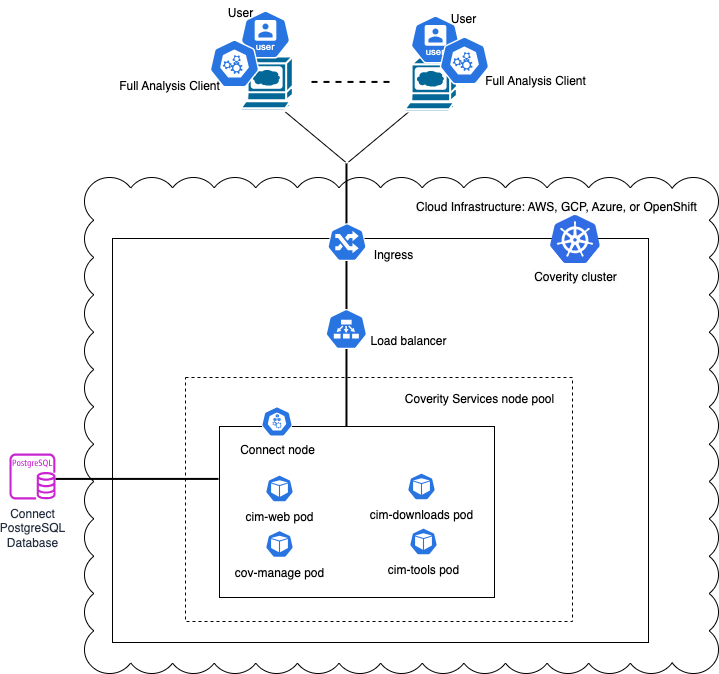
Figure 2 - Physical architecture
Coverity is using these external services:
- A Software Factory or mirror for deployment (PRE_001)
- Kubernetes with Flux (PRE_002, PRE_003)
- Persistent storage to store the configuration and cache (PRE_004)
- Ingress with TLS and DNS resolution associated for one entry point and certificates,
classically
https://coverity.SF-DOMAIN(PRE_005, PRE_006, PRE_007) - IAM (PRE_009); we recommend SAML SSO. See IAM
- Mail server (PRE_014); you can configure is using Coverity mail server notification docs
- Database (PRE_015); we recommend Managed PostgreSQL database. Alternative can be internal to namespace provided PostgreSQL database that is provided with the product.
6.2.1 User management
This role matrix has been defined in TASD:
| User role | Description user role | Comment |
|---|---|---|
| UC1 | End user / Software engineer | Person that can write in a solution/product/project tenant |
| UC2 | Reader | Person that can read content of a solution/product/project tenant |
| UC3 | Tenant owner | Person that can administrate a solution/product/project tenant |
| UC4 | Software Factory application admin | Person that can administrate Software Factory instance components |
| UC5 | Software Factory system admin | Person that can administrate the deployment/upgrade of the Software Factory instance |
| UC6 | Software Factory tribe | Person that are delivering asset to deploy/upgrade a Software Factory instance |
For Coverity, a tenant is a project.
To gain access to Coverity a user must be first created and given permissions by a user with Server Admin role at the Global level. The user accounts can be local or external. You can find everything related to managing user accounts in the documentation .
To know more about how to configure SAML users please refer to the documentation. We recommend you configure external accounts through SAML and follow this step by step guide on how to configure SAML for the Coverity instance. Coverity is also able to manage local users or LDAP users .
6.2.2 RACI
In addition of global RACI (Responsible, Accountable, Consulted, Informed) of the SWaaP defined in TASD, we propose this RACI at usage.
| Action | Description | UC4 | UC3 | UC2 | UC1 |
|---|---|---|---|---|---|
| Create Projects | Be able to create projects | R | R/A | I | |
| Manage Projects | Be able to manage users on projects, create streams and view project history | R/A | I | ||
| Create component maps | Be able to create component maps | R/A | R | ||
| Manage component maps | Be able to manage and view component maps | R/A | R | ||
| Manage streams | Be able to add new streams | R/A | C | ||
| Classify and triage issues | Be able to clasify and triage issues found on projects | R/A | R | ||
| Commit to streams | Be able to commit scan results (snapshots) to streams | I | R/A | ||
| Onboard users | Be able to grant access to users to Coverity GUI | R/A | C | ||
| Create groups for each project | Be able to create the user groups for each project onboarded initially | R/A | I | ||
| Application related settings | Configure Coverity instance | R/A |
In order to give the right permissions for the users you have to understand the permissions hierarchy . The user or user group can be given global permissions at the Coverity instance level or at a lower level - project/stream/component/component map/triage store level.
We recommend that you use user groups so that all the users in the same project share the same user groups. We recommend creating 3 user groups for a project, one for each of the two roles that exist in Software Factory (Tenant owner, End user / Software engineer) and another one for the Service account role.
Coverity has several built-in roles and it comes also with some pre-defined roles. Consult the documentaion to find out more. We advise you to usee some of these roles as in the table below, and there will also be a need to create additional roles with the permissions specified below, that will be then applied Globally or at the level mentioned in the table, on the object specified there. For example we see the Project creator role which is applied at the global level and has the Create projects permission but there are also roles defined at lower levels for example the Triage Issues User role that is applied on the Default Triage Store and has the permissions to View issues, Triage issues and Clasify issues.
There is a Users default group that all Coverity users are added to by default. We advise you give the permissions from this table to this group and for each project created the Users group must have No Access by default
We advise that you give the following permissions for the following roles.
| Role Level | Who | What | Why | Project Role | Component Role | Triage Role | Global Role | Custom Role Permissions | Observations |
|---|---|---|---|---|---|---|---|---|---|
| Project Roles | As a Tenant Owner | I would like to be able to access Coverity instance so that | I can create a project | Project Creator | |||||
| Project Roles | As a Tenant Owner | I would like to be able to access Coverity instance so that | I can view and manage users in my project | Project Owner | |||||
| Project Roles | As a Tenant Owner | I would like to be able to access Coverity instance so that | I can view project’s history | Project Owner | |||||
| Project Roles | As a Tenant Owner | I would like to be able to access Coverity instance so that | I can view and manage my team’s streams | Project Owner | |||||
| Project Roles | As a Tenant Owner | I would like to be able to access Coverity instance so that | I can commit to stream | Project Owner | |||||
| Project Roles | As a Tenant Owner | I would like to be able to access Coverity instance so that | I can preview commits | Project Owner | |||||
| Project Roles | As a Tenant Owner | I would like to be able to access Coverity instance so that | I can view and classify issues in stream and triage strores | Project Owner | |||||
| Project Roles | As a Tenant Owner | I would like to be able to access Coverity instance so that | I can view issues in source | Project Owner | |||||
| Project Roles | As a Tenant Owner | I would like to be able to access Coverity instance so that | I can create and manage component maps | Component Map Creator (custom role) | Create Component Maps | ||||
| Project Roles | As an End user / Software engineer | I would like to be able to access Coverity instance so that | I can view my team’s project | Developer | |||||
| Project Roles | As an End user / Software engineer | I would like to be able to access Coverity instance so that | I can view project’s history | Developer | |||||
| Project Roles | As an End user / Software engineer | I would like to be able to access Coverity instance so that | I can preview commits | Developer | |||||
| Project Roles | As an End user / Software engineer | I would like to be able to access Coverity instance so that | I can view and classify issues | Developer | |||||
| Project Roles | As an End user / Software engineer | I would like to be able to access Coverity instance so that | I can view issues in source | Developer | |||||
| Project Roles | As an End user / Software engineer | I would like to be able to access Coverity instance so that | I can view issues in stream and triage stores | Developer | |||||
| Project Roles | As an End user / Software engineer | I would like to be able to access Coverity instance so that | I can classify issues in stream and triage stores | Developer | |||||
| Project Roles | As an End user / Software engineer | I would like to be able to access Coverity instance so that | I can commit to stream | Commiter | |||||
| Project Roles | As a Tenant owner / Software engineer | I would like to have a Service account with access to Coverity so that | I can create a stream | Stream Map User (custom role) | Create Streams | ||||
| Project Roles | As a Tenant owner / Software engineer | I would like to have a Service account with access to Coverity so that | I can add a stream to a project | Stream Map User (custom role) | Manage Projects | ||||
| Project Roles | As a Tenant owner / Software engineer | I would like to have a Service account with access to Coverity so that | I can commit to stream | Commiter | |||||
| Global Roles | As a Software Factory application admin | I would like to be able to access Coverity instance so that | I can create and manage users and user groups | System Admin | |||||
| Global Roles | As a Software Factory application admin | I would like to be able to access Coverity instance so that | I can create and manage projects and assign users/user groups to them | System Admin | |||||
| Global Roles | As a Software Factory application admin | I would like to be able to access Coverity instance so that | I can create and manage custom roles | System Admin | |||||
| Global Roles | As a Software Factory application admin | I would like to be able to access Coverity instance so that | I can create and manage triage stores (and attributes) | System Admin | |||||
| Global Roles | As a Software Factory application admin | I would like to be able to access Coverity instance so that | I can view and manage policy manager | System Admin | |||||
| Global Roles | As a Software Factory application admin | I would like to be able to access Coverity instance so that | I can manage server parameters | System Admin | |||||
| Global Roles | As a User | I would like to be able to | Access Coverity GUI | Visitor | |||||
| Global Roles | As a User | I would like to be able to | Have no access on any projects enforced | No Access | |||||
| Global Roles | As a User | I would like to be able to | Have access on “Other” component from default component map | Developer (on Default) | This permission has no consequence without permission on projects | ||||
| Global Roles | As a User | I would like to be able to | Have access on default Triage store | Developer (on Default) | This permission has no consequence without permission on projects |
6.3 Delivery
Component is part of the Software Factory as a Product (SWaaP) delivery. See TASD for more details.
6.3.1 Latest Version
- Latest version editor:
- Component registry: TBC on main branch
- Helm chart repository
- SWaaP integration part
6.3.2 Version Chart 2025.9.3 / Coverity 2025.9.3
- Component registry
- Helm chart registry: in SF delivery From Blackduck
- SWaaP integration part
- Component Merge Request in Reference
- Release changelog
- K6 Test report: pipeline
- Security Report:
6.4 Infrastructure architecture
6.4.1 Software Factory API
Here is a list of services that can be integrated with Coverity.
| Ref. | Name | Required | Description |
|---|---|---|---|
| SFE01 | Flux → Git in Software Factory for deployment | Mandatory | Code in a Git server for deployment of the product |
| SFE02 | Flux → Registry in Software Factory for deployment | Mandatory | Registries with helm charts and containers for deployment of the product |
| SFE04 | IAM - SAML SSO | Highly recommended | Users should be authenticated using SAML SSO |
| SFE05 | End user notification (SMTP) | Highly recommended | Notification should be sent via mail using SMTP |
| SFE06 | Managed Databases (PostgreSQL) | Mandatory for production | Components store data in a PostgreSQL data base - Alternative is to use deploy embedded data base with the product |
| SFB06 | CLI or Runner → Coverity | Mandatory | CLI or GitLab Runner should connect to Coverity using Coverity public API - NextGen-CICD can manage this API |
| SFE12 | User / applicative admin → Coverity | Mandatory | User and applicative admin should use Coverity UI or public API to access to Coverity |
7. Operational and maintenance
In this chapter you will find strategy and policy. Detail implementation will be described in the SCOM .
7.1 Life cycle policy
This chapter will be completed issue link .
7.2 License
Official vendor documentation on licensing
7.3 Deployment
The component is deployed as a standard component using Flux and SWaaP packaging. See TASD for more details.
7.4 IAM
We support and recommend integration with IAM using SAML SSO. This configuration can be done in Coverity admin UI .
Documentation on Azure SAML specific configuration
7.5 Scaling
Coverity Connect pod sizing and scaling are different but related considerations. Sizing ensures that the pod resources meet the analysis environment storage and processing workload requirements. Scaling defines pod resource requirements to support growth of the analysis environment over time. The following sections describe how to estimate Coverity Connect pod CPU and memory resources using the following methods:
- Scaling CPU and memory using commits (IDIRs)
- Scaling CPU and memory using view loading times
Scaling CPU and memory using commits (IDIRs)
Medium IDIRs (2.6 GB) defines, for medium projects with 2.6 GB IDIRs, response times for commit pool thread counts in environments with various CPU and memory resource combinations. For various commit pool threads, determine the number of CPU cores and memory needed to obtain an estimated throughput.
Table 1 and Table 2 present resources and performance for medium commit (IDIR) size (2.6 GB)
| Commit pool threads | CPU cores (minimum) | Memory (GB) with default queue size | Memory (GB) with maximum queue size | Throughput (commits/hr) |
|---|---|---|---|---|
| 5 | 8 | 32 | 39 | 110 |
| 10 | 10 | 38 | 45 | 145 |
| 15 | 15 | 80 | 88 | 175 |
| 20 | 20 | 100 | 116 | 239 |
| 25 | 25 | 120 | 128 | 290 |
| 30 | 30 | 144 | 150 | 350 |
Table 1 - Commit throughput for medium IDIRs.
| commitWorkQueueCapacity | Memory (GB) |
|---|---|
| (Default) 80 | 2 |
| 150 | 4 |
| 200 | 5 |
| 250 | 6.5 |
Table 2 - Maximum queue memory usage for medium IDIRs.
Scaling CPU and memory using view loading times
Medium project (10K issues) defines, for a medium size project of 10K issues, response times for concurrent queries submitted in environments with various CPU and memory resource combinations. For various levels of concurrency and 64 GB of memory, determine the number of CPU cores needed to obtain an estimated performance.
Table 3 Presents Query Response Time (s) by concurrency, core count (8|16|24|32) and 64 GB memory for medium size views with around 10k issues.
| Concurrency | 8 | 16 | 24 | 32 | Memory (GB) |
|---|---|---|---|---|---|
| 1 | 1.3 | 1.2 | 1.1 | 1.1 | 64 |
| 50 | 5.3 | 3.5 | 3 | 2.6 | 64 |
| 100 | 9.1 | 6.3 | 5.5 | 4.7 | 64 |
| 150 | 12.9 | 8.6 | 7.7 | 6.6 | 64 |
| 200 | 16.1 | 10.9 | 9.5 | 8.1 | 64 |
| 250 | 17.6 | 11.6 | 10.3 | 8.8 | 64 |
| 300 | 13.3 | 11.2 | 9.6 | 64 | |
| 350 | 14.9 | 12.6 | 10.8 | 64 | |
| 400 | 16.3 | 14 | 11.9 | 64 | |
| 450 | 15 | 12.8 | 64 | ||
| 500 | 16 | 13.7 | 64 | ||
| 550 | 18 | 15.4 | 64 |
Table 3 - View loading throughput-Medium project.
7.6 Backup / restore
We recommend to manage point in time restore at platform level. Like that it is possible to restore synchronously:
- volumes,
- database
Synopsys does not provide a B&R procedure for Cloud Deployment with an external database. Backup and restore should be done according to PostgresSQL recommendations and internal procedures. Chapter 26. Backup and Restore
7.7 Monitoring
7.8 Logging
We recommend to apply the platform logging & SOC management strategy.