version v7.2.
For up-to-date documentation, see the
latest version.
GitLab
13 minute read
1. Application
| Reference: | LLD – Software Factory as a Product - GitLab |
| Type & Classification: | Product |
| Step: | Continuous Delivery |
| Bid/Project/Product Name & ID: | Software Factory as a Product (SWaaP) |
| Solution Level: | Digital product |
| Solution Name: | Software Factory as a Product |
| Solution description: | As deployed, create and update a Software Factory |
| Key Products/Solution: |
2. Introduction
2.1 Document purpose
This document is a low level design - LLD which aims to describe how the architecture evoked in high level design - HLD will be implemented. This document will describe the protocols used in the target architecture, how to implement them and any modifications made to their default behavior. Once validated by Thales, this document will then serve as a basis for the implementation of configurations on equipment.
2.2 Document scope
This document is not a manual and is not intended to replace the reference literature describing with great precision all network protocols.
The protocols used will be briefly described as well as the modifications made to their default behavior.
2.3 Referenced documentation
| Document reference | Document Name |
|---|---|
| TASD | Technical Architecture and Security Document of SWaaP |
| SCOM-GitLab | Software Center Operation Manual of GitLab |
3. Component general description
This component is part of Software Factory as a Product (SWaaP), and it is visible in the TASD .
GitLab is a platform for software development, collaboration, and delivery. GitLab includes a distributed version control based on Git, including features such as access control, bug tracking, software feature requests, task management, and wikis for every project, as well as snippets.
Besides source code management, GitLab as a platform features team planning, DORA metrics, code review workflow, workspaces, continuous integration, code testing and coverage, package registries, code quality reports and many more (all features listed on official site )
4. Functional & Business Requirements
No formal list of requirements has been expressed by clients. It is designed and developed based on business use cases.
4.1 Feature summary
| Feature Name | Level of availability (EA/GA) | Value |
|---|---|---|
| Built-in CI/CD | Available (GA) | GitLab comes with its own DSL (YAML) to write CI/CD Pipelines |
| Project Issue Board | Available (GA) | Easy follow up of your project issues with agile board |
| Cycle Analytics | Available (GA) | Provide information on issues life cycle |
| Preview your changes with review Apps | Available (GA) | Easier reviews |
| Kubernetes integration | Available (GA) | Integrate your kube cluster in GitLab |
| CRON Scheduler for CI/CD Pipeline | Available | Schedule tour pipelines |
| GitLab Pages | Available (GA) | Publish static websites for free with GitLab Pages |
| GitLab Releases | Available | Keep track of releases using GitLab Releases |
| Git LFS 2.0 support | Available | Support of Git large files versioning (Up to 200mb. Consider using Artifactory for larger files) |
| Support of large Merge Requests (MR) | Partially Available | Large MR browsing can become very slow in GitLab Web UI. We advise you to browse them in GitLab Workflow extension for VS Code (5x faster + cache). |
| Mirror code | Available | Be able to mirror code from a lower level of sensitivity Software Factory |
4.2 Prerequisites
Every prerequisites of the product are applicable to this component. In detail:
- Kubernetes and Flux. See the TASD §4.1.2 Prerequisites for supported version.
- PostgreSQL 16 or later - check official documentation
4.3 Variability
No variability is supported.
5. Architecture decision record
Here is a list of decisions:
| Ref. | Date/Status | Description |
|---|---|---|
ADR-GIT-001 | 2022/09 | Add GitLab as a component of the Software Factory as a Product (SWaaP). See ADR001 in TASD . |
Table 3 - List of architecture decision record.
5.1 ADR-GIT-001: Add GitLab as a component of the product
5.1.1 Status: Accepted
- Creation of sf-package in September 2022
- Recorded in [SWF organization] in April 2023
5.1.2 Context
- See ADR001 in TASD .
5.1.3 Decision
- Introduce GitLab in the product from its current implementation on TDP C2 & TDP C3-CA
5.1.4 Consequences
6. Architecture description
6.1 Business architecture and allocation to services
You will find in Figure 1 business architecture for software code and CI/CD engineering allocated to services:

Figure 1 - Business architecture allocated to services.
Note: in dash, external items.
6.2 Application architecture
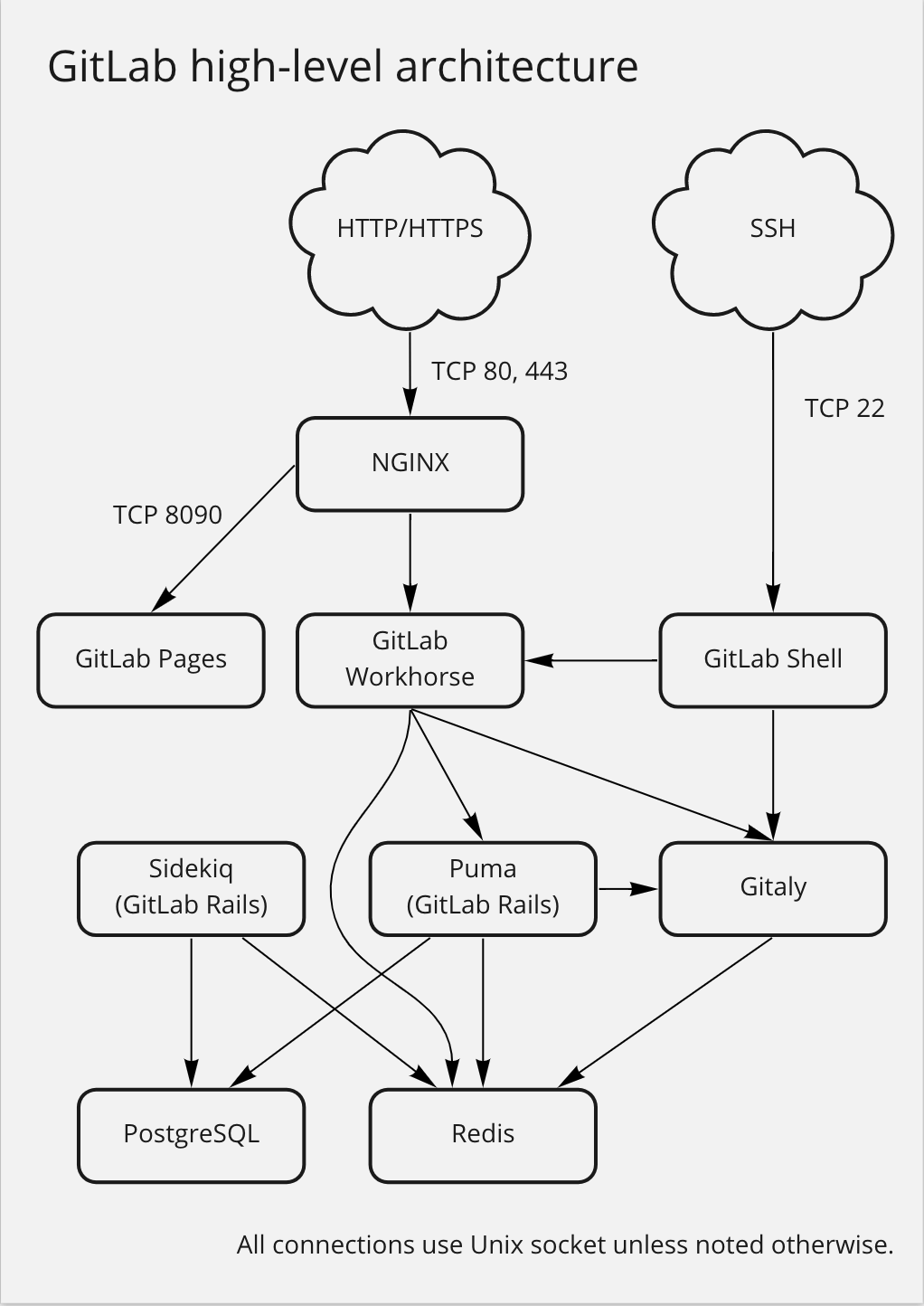
Figure 2 - GitLab High Level Architecture Diagram
Here is a more detailed, low level architecture diagram
 .
.
6.2.1 Layers
GitLab can be considered to have two layers from a process perspective:
Monitoring: Anything from this layer is not required to deliver GitLab the application, but allows administrators more insight into their infrastructure and what the service as a whole is doing.
Core: Any process that is vital for the delivery of GitLab as a platform. If any of these processes halt, a GitLab outage results. For the Core layer, you can further divide into:
- Processors: These processes are responsible for actually performing operations and presenting the service.
- Data: These services store/expose structured data for the GitLab service.
6.2.1.1 Component details
This is a list of the GitLab components that can be configured with SWaaP deployment (GitLab chart). Full list is available in GitLab documentation :
- Database migrations: migrations while upgrading GitLab.
- Gitaly: Git RPC service for handling all Git calls made by GitLab.
- GitLab Exporter: Generates a variety of GitLab metrics.
- GitLab Pages (optional): Hosts static websites.
- GitLab agent (optional): Integrate Kubernetes clusters in a cloud-native way.
- GitLab self-monitoring - Alertmanager: Deduplicates, groups, and routes alerts from Prometheus
- GitLab self-monitoring - Grafana (optional): Metrics dashboard
- GitLab Shell: Handles Git over SSH sessions
- GitLab Workhorse: Smart reverse proxy, handles large HTTP requests
- Inbound email (SMTP) (optional): Receive messages to update issues
- nginx: Routes requests to appropriate components, terminates SSL
- Outbound email (SMTP) (optional, but recommended): Send email messages to users
- Puma (GitLab Rails): Handles requests for the web interface and API
- Redis: Caching service
- Registry (optional): Container registry, allows pushing and pulling of images
- Sidekiq: Background jobs processor
Others components that SWaaP is not supporting:
- Certificate Management: TLS Settings, Let’s Encrypt.
- Elasticsearch: Improved search within GitLab.
- GitLab Geo: Geographically distributed GitLab site.
- MinIO: Object storage service.
- PostgreSQL Exporter: Prometheus endpoint with PostgreSQL metrics
- Praefect: A transparent proxy between any Git client and Gitaly storage nodes.
- Redis Exporter: Prometheus endpoint with Redis metrics
Nota:
- Runners are not deployed integrated in GitLab, but considered as a separate component. See TASD .
6.2.1.2 Integrations
Project integrations can be configured and enabled by project administrators. As a GitLab instance administrator, you can set default configuration parameters for a given integration that all projects can inherit and use, enabling the integration for all projects that are not already using custom settings.
You can update these default settings at any time, changing the settings used for all projects that are set to use instance-level or group-level defaults. Updating the default settings also enables the integration for all projects that didn’t have it already enabled.
These integrations are enabled by default:
Apple App Store Connect: The Apple App Store Integration adds a few CI variables to the CI jobs with access credential information provided by Apple. This information is used to authenticate with Apple when testing the integration or during the build process.
Asana: Webhook event: push
Assembla: Webhook event: push
Atlassian Bamboo: Webhook event: push
Beyond Identity This checks that a provided GPG key ID is authorized to sign Git commits. Data sent: GPG Key, committer email.
Bugzilla: Webhook event: push
Buildkite: Webhook event: push, merge_request, tag_push
Campfire: Webhook event: push
ClickUp: Webhook event: push
Confluence Workspace: None, it is just a sidebar link to the confluence workspace
Custom issue tracker: Webhook event: push
Datadog: Webhook event: pipeline, build, archive_trace
Diffblue Cover: This integration does not directly send any data to third parties. All it does is set a few CI variables . There is a companion CI template which must be configured separately and I think is out of scope here, but it almost certainly does send data to diffblue.
Discord Notifications: Webhook event: push, issue, confidential_issue, merge_request, note, confidential_note, tag_push, pipeline, wiki_page, deployment
Drone: Webhook event: push, merge_request, tag_push
Emails on push: Webhook event: push, tag_push
EWM: Webhook event: push
External wiki: None, it is just a sidebar link to the external wiki
GitGuardian: When a user performs a push, GitLab sends all changed files to GitGuardian API to scan the documents for sensitive data. More details
GitHub: Webhook event: pipeline
GitLab for Jira Cloud app: Documented in this section
GitLab for Slack app: Webhook event: push, issue, confidential_issue, merge_request, note, confidential_note, tag_push, pipeline, wiki_page, deployment, incident, vulnerability
Google Artifact Management: If enabled, GitLab sends to Google Cloud an authentication token payload with the data documented here .
Google Chat: Webhook event: push, issue, confidential_issue, merge_request, no_page
Google Cloud IAM: See the list of data sent through the OIDC custom claims
Google Play: The Google Play Integration adds two CI variables to the CI jobs with access credential information provided by Google. This information is used to authenticate with Google when testing the integration or during the build process.
Harbor: When setting up a Harbor integration on GitLab , we ask the user for a Harbor URL, project name, username, and password. We then use these information when connecting to the Harbor registry: we access the given URL, and send in the username, password, and the project name.
Authas part of the headers:"#{integration.username}:#{integration.password}"project_nameas a parameter when accessing provided URL in the integration:"projects?project_name=#{integration.project_name}"The information sent to Harbor is the same set of data that was supplied when setting up the Harbor integration.irker (IRC gateway): Webhook event: push
Jenkins: Webhook event: push, merge_request, tag_push
JetBrains TeamCity: Webhook event: push, merge_request
JetBrains YouTrack: Webhook event: push
Jira: Webhook event: commit, merge_request
Matrix notifications: Webhook event: push, issue, confidential_issue, merge_request, note, confidential_note, tag_push, pipeline, wiki_page, incident, vulnerability
Mattermost notifications: Webhook event: push, issue, confidential_issue, merge_request, note, confidential_note, tag_push, pipeline, wiki_page, deployment, incident, vulnerability
Mattermost slash commands: Can share data through slash commands . See the slash command presenter classes in
lib/gitlab/slash_commands/presentersandee/lib/ee/gitlab/slash_commands/presentersMicrosoft Teams notifications: Webhook event: push, issue, confidential_issue, merge_request, note, confidential_note, tag_push, pipeline, wiki_page
MockCI: Webhook event: push
Mock monitoring: None, this is dev-only
Packagist: Webhook event: push, merge_request, tag_push
Phorge: Webhook event: push
Pipeline status emails: Webhook event: pipeline
Pivotal Tracker: Webhook event: push
Pumble: Webhook event: push, issue, confidential_issue, merge_request, note, confidential_note, tag_push, pipeline, wiki_page
Pushover: Webhook event: push
Redmine: Webhook event: push
Slack notification (deprecated): Webhook event: push, issue, confidential_issue, merge_request, note, confidential_note, tag_push, pipeline, wiki_page, deployment, incident, vulnerability
Slack slash commands: Can share data through slash commands . See the slash command presenter classes in
lib/gitlab/slash_commands/presentersandee/lib/ee/gitlab/slash_commands/presentersSquash TM: Webhook event: issue, confidential_issue
Telegram: Webhook event: push, issue, confidential_issue, merge_request, note, confidential_note, tag_push, pipeline, wiki_page, incident, vulnerability
Unify Circuit: Webhook event: push, issue, confidential_issue, merge_request, note, confidential_note, tag_push, pipeline, wiki_page
Webex Teams: Webhook event: push, issue, confidential_issue, merge_request, note, confidential_note, tag_push, pipeline, wiki_page
YouTrack:
YouTrack class , which inherits BaseIssueTracker , which inherits Integration(not much code here).
Also included is HasIssueTrackerFields.
The way external issue tracker integrations work is by supplying a URL for the external issue tracker to GitLab and the necessary authorization mechanism (usually API key from third-party issue tracker).
When an external issue tracker is configured, you can use a reference syntax in a commit or MR to link an MR to a YouTrack issue.
So the primary data exchanged would be :
GitLab Merge Request is linked to YouTrack Issue MR is visible in YouTrack. YouTrack Issue link is visible in GitLab MR (or commit)
- ZenTao (deprecated): None, it is just a sidebar link to ZenTao
6.2.1.3 External services
GitLab is using these external services:
- A Software Factory or mirror for deployment (PRE_001)
- Kubernetes with Flux (PRE_002, PRE_003)
- Persistent storage to store the configuration and cache (PRE_004)
- Ingress with TLS and DNS resolution associated for one entry point
and certificates (PRE_005, PRE_006, PRE_007), classically:
https://gitlab.SF-DOMAINfor UI & APIhttps://registry.SF-DOMAINfor container registryhttps://*.pages.SF-DOMAINfor Pageswss://kas.SF-DOMAINfor KAS
- IAM (PRE_009); we recommend SAML SSO but GitLab supports several authentication providers
- Mail server (PRE_014); you can configure is using GitLab mail server configuration documentation
- Database (PRE_015); we recommend Managed PostgreSQL database. See official documentation . Alternative can be internal to namespace provided PostgreSQL database that is provided with the product.
6.2.2 User management
This role matrix has been defined in TASD:
| User role | Description user role | Comment |
|---|---|---|
| UC1 | End user / Software engineer | Person that can write in a solution/product/project tenant |
| UC2 | Reader | Person that can read content of a solution/product/project tenant |
| UC3 | Tenant owner | Person that can administrate a solution/product/project tenant |
| UC4 | Software Factory application admin | Person that can administrate Software Factory instance components |
| UC5 | Software Factory system admin | Person that can administrate the deployment/upgrade of the Software Factory instance |
| UC6 | Software Factory tribe | Person that are delivering asset to deploy/upgrade a Software Factory instance |
For GitLab, a tenant can be a group, a subgroup or a project.
6.2.3 RACI
In addition of global RACI (Responsible, Accountable, Consulted, Informed) of the SWaaP defined in TASD, we propose this RACI at usage.
| Action | Description | UC4 | UC3 | UC2 | UC1 |
|---|---|---|---|---|---|
| Administrate GitLab instance | Administrate GitLab instance | R/A | |||
| Create GitLab group (*) | Create a group to manage on/off boarding, subgroups, projects, epics, boards, runners and group settings | R/A | C/I | ||
| Create GitLab subgroup | Create a subgroup to manage on/off boarding, subgroups, projects, epics, boards, runners and subgroup settings | R/A | C/I | ||
| Create GitLab project | Create a project to manage on/off boarding, issues, boards, code with Git repository (branches, MR, tag), pipeline, security, registry, … | R/A | or R/A if delegate | ||
| Assign Team to group or project | Group and project permission management | R/A | or R/A if delegate | ||
| Assign Single user who is not part of a Team | Assign a user in a group or project | R/A | or R/A if delegate |
We recommend that the on/off boarding of a group/subgroup/project be done by the owner.
6.3 Delivery
Component is part of the Software Factory as a Product (SWaaP) delivery. See TASD for more details.
6.3.1 Latest Version
- Latest version editor:
- Component registry: TBC on main branch
- Helm chart repository
- SWaaP integration part
Version Chart 9.11.3 / GitLab 18.11.2
- Component registry:
- Helm chart registry:
- SWaaP integration part
- Component Merge Request in Reference
- Release changelog
- K6 Test report: pipeline
- Integration Test report: pipeline
- Security Report:
6.4 Infrastructure architecture
6.4.1 Software Factory API
Here is a list of services that can be integrated with GitLab.
| Ref. | Name | Required | Description |
|---|---|---|---|
| SFE01 | Flux → Git in Software Factory for deployment | Mandatory | Code in a Git server for deployment of the product |
| SFE02 | Flux → Registry in Software Factory for deployment | Mandatory | Registries with helm charts and containers for deployment of the product |
| SFE03 | Object Storage | Mandatory for production | Components store data on Object Storage (S3/Azure blob storage) |
| SFE04 | IAM - SAML SSO | Highly recommended | Users should be authenticated using SAML SSO |
| SFE05 | End user notification (SMTP) | Highly recommended | Notification should be sent via mail using SMTP |
| SFE06 | Managed Databases (PostgreSQL) | Mandatory for production | Components store data in a PostgreSQL data base - Alternative is to use deploy embedded data base with the product |
| SFB01 | CLI or Runner → GitLab | Mandatory | CLI or GitLab Runner should connect to GitLab using GitLab public API |
| SFE07 | User / applicative admin → GitLab | Mandatory | User and applicative admin should use GitLab UI or public API to access to GitLab |
| SFI08 | GitLab → Kroki | Mandatory | Direct access Kubernetes service to service; GitLab proxy users request and forward to Kroki |
7. Operational and maintenance
7.1 Life cycle policy
Cadence of version is describe in the Product Lifecycle .
7.2 License
We support and recommend deployment with GitLab Ultimate license.
7.3 Deployment
The component is deployed as a standard component using Flux and SWaaP packaging. See TASD for more details.
7.4 IAM
We support and recommend integration with IAM using SAML SSO. This configuration can be done in chart value . See SCOM-GitLab for more details.
7.5 Scaling
GitLab uses multiple strategies for scaling depending on load and configuration. For details on this, please check out the official documentation .
7.6 Backup / restore
We recommend to manage point in time restore at platform level. Like that it is possible to restore synchronously:
- volumes,
- database,
- and object storage.
For information, GitLab proposes a backup procedure .