version v7.2.
For up-to-date documentation, see the
latest version.
Operations Guide
8 minute read
Referenced documentation
| Document reference | Document Name |
|---|---|
| TASD | Technical Architecture and Security Document of SWaaP |
| LLD-Orchestrator | Low level design of Orchestrator component |
Introduction
The Orchestrator is a component of SWaaP.
The component is in charge of making TDP SWF compliant to host Export Control Projects, helps with TDP meetings regulatory requirements for data protection and privacy across its services. Orchestrator is a solution for labeling, checking assets inside SWaaP. It also allows users to:
- Get a workspace inside SWaaP dedicated to Export Control.
- Track modifications inside this workspace.
Billing and onboarding
Orchestrator component appears in the Software Factory as a Product (SWaaP).
The access management on Orchestrator is described in the Low Level Design and this guide. Because of Orchestrator is based on others tools from SWaaP, we have a natural integration between Orchestrator and Offer Management on the TDP platforms to covers the biling. The rest of the platforms will have their own onboarding and billing process.
Billing & onboarding on TDP
The onboarding for Orchestrator is managed via the PostIT request for Onboard an Export Control Project .
Billing & onboarding on RTDP
The Orchestrator capability is not valable yet on RDTP.
Billing & onboarding on CASTLE
The Orchestrator capability is not valable yet on CASTLE.
Component Deployment and Configuration
Requirements & Pre-requisite
Configuration
Setting Helm Values
Orchestrator component is part of SWaaP. For more information, refer to the Getting Started section in the other repository.
Configuring Kubernetes Secrets
For the orchestrator component to function, some secrets need to be recreated with tokens created in the enabled COTS. By default, the component is installed with dummy K8S secrets.
The procedure of replacing the tokens is as follows:
Export variables with the following names:
    SPRING_DATASOURCE_USERNAME
    SPRING_DATASOURCE_PASSWORD
Create DB Secret in K8S:
kubectl -n orchestrator delete secret orchestrator-database-creds
kubectl create secret generic orchestrator-database-creds --from-literal=db-user=$SPRING_DATASOURCE_USERNAME --from-literal=db-password=$SPRING_DATASOURCE_PASSWORD --namespace orchestrator
Create one token for each COTS with admin rights.
Export variables with the following names:
    ORCHESTRATOR_GITLAB_API_TOKEN
    ORCHESTRATOR_ARTIFACTORY_API_TOKEN
    ORCHESTRATOR_SONARQUBE_API_TOKEN
    (which contain the corresponding tokens created previously)
Execute the following commands:
    - kubectl -n orchestrator delete secret orchestrator-gitlab-token-secret
    - kubectl -n orchestrator delete secret orchestrator-artifactory-token-secret
    - kubectl -n orchestrator delete secret orchestrator-sonarqube-token-secret
    - kubectl create secret generic orchestrator-gitlab-token-secret --from-literal=gitlab-token=$ORCHESTRATOR_GITLAB_API_TOKEN --namespace orchestrator
    - kubectl create secret generic orchestrator-artifactory-token-secret --from-literal=artifactory-token=$ORCHESTRATOR_ARTIFACTORY_API_TOKEN --namespace orchestrator
    - kubectl create secret generic orchestrator-sonaqube-token-secret --from-literal=sonarqube-token=$ORCHESTRATOR_SONARQUBE_API_TOKEN --namespace orchestrator
    - kubectl -n orchestrator rollout restart $(kubectl get deployments -o name -n orchestrator | grep 'orchestrator-api')
Deployment & Update Procedure
The component is deployed as a standard component using Flux and SWaaP packaging.
Orchestrator Prerequisites:
- PostgreSQL DB (>= v15)
- Helm (>= v3)
- K8S Cluster (>= v1.26)
A valid PostgreSQL DB is required for the orchestrator to function. Several values need to be edited (see “Customize Orchestrator” chapter). Install Helm: Install Helm on your local machine. You can download it from the official Helm website, more instructions can be found in the official documentation
Add Helm Repository: Add the helm repository where “orchestrator” chart is located. In this example the orchestrator component is in Artifactory, and to access it a valid Artifactory user/password needs to be provided
helm repo add orchestrator https://artifactory.thalesdigital.io/artifactory/helm-virtual-softwarefactory --username "YOUR_USERNAME" --password "YOUR_PASSWORD"
helm repo update
Install the Orchestrator Helm Chart:
Use the helm install command to deploy the chart to your Kubernetes cluster.
Replace <release-name> with a name for your release and <namespace> with the desired namespace.
helm install orchestrator-api orchestrator/orchestrator --namespace orchestrator --set env=packaging
Verify the Deployment:
helm status orchestrator -n orchestrator
Uninstall the Helm Release:
Use the following command to uninstall the release.
helm uninstall orchestrator --namespace orchestrator
Verify the Uninstallation: Check to ensure that all resources associated with the release have been removed.
kubectl get all -n orchestrator
Settings
After default installation Orchestrator component can be customized as follows.
Copy default values parameters to a new file (ex. orchestrator-customized.yaml)
Make the changes to orchestrator-customized.yaml.
Run the command.
helm upgrade --install orchestrator --n orchestrator -f orchestrator-customized.yaml.
Check the status of your deployed Helm releases.
helm status orchestrator -n orchestrator
The helm values that can be customized are the following:
| Key | Type | Default Value | Description | Valid Values |
|---|---|---|---|---|
| env | string | packaging | Mandatory value to select if azure-kw or K8S secrets will be used | - packaging |
| helm_orchestrator_image_repo | string | nil | Variable used to modify the default registry from where the image is taken | - Any valid Docker registry |
| helm_orchestrator_image_tag | string | nil | Variable used to modify the default image tag | - Any valid image tag from orchestrator project |
| helm_application_ingress_hostname | string | nil | External url of the orchestrator component. If not set Ingress will not be created | - Any valid url |
| Helm_k8s_whitelist | string | Not-Implemented | Ip whitelist for the orchestrator. If not set any ip source can access Orchestrator | - Not Implemented |
| helm_k8s_namespace | string | replace_default_value | The K8S namespace where to deploy the chart | - Any namespace |
| spring_profiles_active | string | replace_default_value | - packaging, dev-c2 | |
| replicas | int | 1 | Number of Orchestrator container replicas | - 1 |
| Cots_artifactory_url | string | replace_default_value | Artifactory url to connect orchestrator to | - Any valid Artifactory url |
| Cots_gitlab_url | string | replace_default_value | GitLab url to connect orchestrator to | - Any valid GitLab url |
| Cots_sonarqube_url | string | replace_default_value | SonarQube url to connect orchestrator to | - Any valid SonarQube url |
| Cots_gitlab_static_token | string | replace_default_value | Token used to verify that the webhook requests comes from the webhook setup by us | - Any value |
| Cots_artifactory_static_token | string | replace_default_value | Token used to verify that the webhook requests comes from the webhook setup by us | - Any value |
| ARTIFACTORY_TOKEN | string | replace_default_value | Artifactory dummy admin token. Replaced during install | - Any valid token |
| GITLAB_TOKEN | string | replace_default_value | GitLab dummy admin token replaced during install | - Any valid token |
| SONARQUBE_TOKEN | string | replace_default_value | SonarQube dummy admin token replaced during install | - Any valid token |
| SERVICE_PRINCIPAL_TENANT_ID | string | replace_default_value | Tenant id where the serviceprincipal is (clientId and clientSecret) | - Any |
| SERVICE_PRINCIPAL_CLIENT_ID | string | replace_default_value | Client ID of the serviceprincipal that will comunicate with RegisterAPI AND will ensure authorization for requests | - Any |
| SERVICE_PRINCIPAL_CLIENT_SECRET | string | replace_default_value | Client secret of the serviceprincipal that will comunicate with RegisterAPI | - Any |
| SERVICE_PRINCIPAL_CLIENT_SCOPE | string | replace_default_value | Scope that will be used to generate a bearer token to call registry API trough apim | - Any |
| ORCHESTRATOR_REGISTRY_API_SUBSCRIPTION_KEY | string | replace_default_value | - Subscription key for registry API | - Any |
| orchestrator_registry_api_url | string | replace_default_value | Url for registry API | - Any valid registry API url |
| Security_admin_token | string | replaced_from_pipeline | Value of header x-api-key to be accepted when Security_api_key_enabled = true | - Any value |
| Security_api_key_enabled | bool | false | Value used to enable the authorization based on x-api-key header. If it is true, … | - true, false |
| Security_azure_ad_enabled | bool | true | Value used to enable the authorization based on AzureActivaDirectory. If it is t… | - true, false |
| SPRING_DATASOURCE_HOST | string | Replace_default_value | Value of PostgreSQL DB host | - Any valid host pointing to the PostgreSQL db |
| SPRING_DATASOURCE_USERNAME | string | Replace_default_value | Value of PostgreSQL Username | - See install instructions, these are replaced… |
| SPRING_DATASOURCE_PASSWORD | string | Replace_default_value | Value of PostgreSQL Password | - See install instructions, these are replaced… |
| helm_k8s_storageClassName | string | default | Any storage class present on the cluster | default,azurefile,azurefile-csi,azurefile-csi-premium, managed, managed-csi, managed-csi-premium |
| helm_k8s_storageAccessMode | string | ReadWriteOnce | Can be ReadWriteOnce ReadWriteMany/ depends on the storage type (storageClass) | ReadWriteOnce, ReadWriteMany |
| helm_k8s_storageSize | string | 5Gi | Storage size | - 5Gi, 10Gi, etc |
Functional Configuration
N/A
Logging
The logging is defined as follows for the SOC:
- New
{sf_workspace_name}export control project was created. - New GitLab project
{project.name}in{sf_workspace_name}export control project. {user}user state update{user.state}in GitLab EC project{project.name}.{user}user added as{user.state}in GitLab EC project{project.name}.{user}user deleted in GitLab EC project{project.name}.- New repo
{repo_key}created in{sf_workspace_name}Artifactory EC project. {user}roles update{roles}in Artifactory EC project{repo_key}.{user}user added as{roles}in Artifactory EC project{repo_key}.{user}user deleted in Artifactory EC project{repo_key}.
More info about logging workflow
The Orchestrator component offers a standard logging policy that can be customized based on specific needs. This policy limits the file size to 10 MB and implements an automatic rolling policy if the size is exceeded.
The Time-To-Live (TTL) for these log files is set to 180 days. However, since the platform storage cannot be controlled, it is the responsibility of the platform to ensure long-term storage policies for specific regulations, such as Export Control.
Monitoring
Spring Boot Actuator is a sub-project of Spring Boot that provides a set of built-in production-ready features to help you monitor and manage your application. Actuator includes several endpoints that allow you to interact with the application, gather metrics, check the health, and perform various management tasks. Spring Boot Actuator provides a variety of built-in endpoints. Below are some of the most commonly used ones:
- /actuator/health: Displays the health status of the application.
- /actuator/info: Displays arbitrary application information.
- /actuator/metrics: Shows ‘metrics’ information for the current application.
- /actuator/env: Displays properties from the
Environment. - /actuator/beans: Displays a complete list of all Spring beans in your application.
For instance, we can check liveness and readiness with /actuator/health endpoint, see image below:
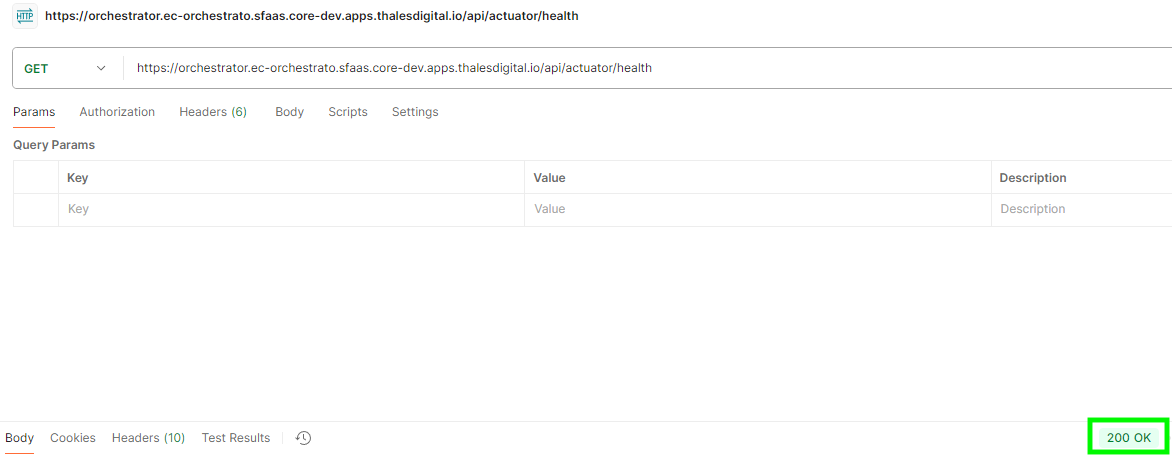
Figure 1 - Response liveness/readiness checking
Business Metrics
For Export Control Compliancy purpose, we store multiple meta-data information and from it we can extract metrics as below :
- Number of Export Control Workspace
- DORA-like metrics: Number of success/failure Export Control Workspace creation