version v7.2.
For up-to-date documentation, see the
latest version.
Orchestrator
30 minute read
1. Application
| Reference: | LLD – Orchestrator |
| Type & Classification: | Product |
| Step: | Labeling SWF assets |
| Bid/Project/Product Name & ID: | Orchestrator |
| Solution Level: | Digital product |
| Solution Name: | Orchestrator |
| Solution description: | Tooling for compliancy with Export Control |
| Key Products/Solution: |
2. Introduction
2.1 Document purpose
This document is a low level design - LLD which aims to describe how the architecture evoked in high level design - HLD will be implemented. This document will describe the protocols used in the target architecture, how to implement them and any modifications made to their default behavior. Once validated by Thales, this document will then serve as a basis for the implementation of configurations on equipment.
2.2 Document scope
This document is not a manual and is not intended to replace the reference literature describing with great precision all network protocols.
The protocols used will be briefly described as well as the modifications made to their default behavior.
2.3 Referenced documentation
| Document reference (in this document) | Document Name |
|---|---|
| TASD | Technical Architecture and Security Document of SWaaP |
| SCOM-Orchestrator | Software Center Operation Manual of Orchestrator |
3. Component general description
TDP (Thales Data Protection) should apply labeling indicating each applicable regulation to a PESCE on its services.
It is important for TDP to demonstrate transparency and compliance with specific regulations related to each service offered by labeling them accordingly. This labeling helps ensure that TDP meets regulatory requirements for data protection and privacy across its services.
By applying the appropriate labeling, TDP showcases its commitment to comply with the regulations concerning data protection and privacy. It also facilitates communication and transparency between TDP and its clients by indicating the regulations taken into consideration to ensure data protection and compliance.
SWF deployed on TDP shall then ensure the labeling is clearly visible and accessible to clients and relevant stakeholders. This allows for a better understanding of the specific regulations associated with each service.
For such a labeling task, the component called Orchestrator is deployed on SWF stack to make TDP SWF compliant to host Export Control Projects.
This component oversees marking SWF envelope/workspace with export control tags, applying associated compliance and checking it. It should fit the requirements listed below.
4. Functional & Business Requirements
No formal list of requirements has been expressed by clients. It is designed and developed based on business use cases.
4.1 Feature summary
| Ref | Titled | Coverage |
|---|---|---|
| TDP-EC-ALL-0280 | PESCE - Multi Labeling | TDP is required to apply labeling indicating each applicable regulation to a PESCE on its services. |
| TDP-EC-ALL-0290 | PESCE - Multi labeling | The Software Factory is required to apply labeling indicating each applicable regulation to a PESCE on the repositories used by the PESCE. |
| TDP-EC-ALL-0310 | A priori service labeling | TDP must ensure the propagation of the labeling following the declaration of a PESCE project. |
| TDP-EC-ALL-0320 | A posteriori service labeling | In the case of retrospective identification, TDP must label all the services used by the PESCE. |
4.2 Prerequisites
Every prerequisites of the product are applicable to this component, but object storage is not a prerequisite (PRE_008). See the TASD .
In detail for PRE_015 prerequisite, the component is supporting this/these version/s of PostgreSQL: See the SCOM .
The component Orchestrator exchange data in both way with Artifactory and GitLab. Orchestrator to Artifactory/GitLab is made through regular API calls, Artifactory and GitLab make calls to Orchestrator through webhooks. So the prerequisites are :
- Webhooks need to be authorized
- Webhook url should be whitelisted
4.3 Variability
No variability is supported.
5. Architecture decision record
Here is a list of decisions:
| Ref. | Date/Status | Description |
|---|---|---|
| ADR-ORCH-001 | 2024/09 | Add Orchestrator as a component of the Software Factory as a Product (SWaaP). See ADR004 in TASD . |
| ADR-ORCH-002 | 2024/08 | Retry Mechanism Policy |
Table 3 - List of architecture decision record.
5.1 ADR-ORCH-001: Add Orchestrator as a component of SWaaP
5.1.1 Status: Accepted
- Creation of sf-package in September 2022
5.1.2 Context
- See ADR004 in TASD .
5.1.3 Decision
- Add Orchestrator as a component of the SWaaP.
5.1.4 Consequences
5.2 ADR-ORCH-002: Retry Mechanism Policy
5.2.1 Status: Accepted
- See Retry mechanism in issue .
5.2.2 Context
sequenceDiagram
participant User
participant Orchestrator
participant Gitlab
participant Artifactory
participant Sonarqube
participant Database
participant OrchestratorScheduler

User ->> Orchestrator: POST /orchestrator/workspaces
Note over Orchestrator, User: {new workspace body}
Orchestrator ->> Gitlab: Creat project
Gitlab ->> Orchestrator: Project creation response
Orchestrator ->>+ Artifactory: Create project
Artifactory ->>- Orchestrator: Project creation response
Orchestrator ->>+ Sonarqube: Create admins group
Sonarqube ->>- Orchestrator: Group creation response
Orchestrator ->>+ Sonarqube: Create users group
Sonarqube ->>- Orchestrator: Group creation response
alt Gitlab or/and Sonarqube or/and Artifactory creation failed
    Orchestrator ->> Database: Store failed request
    Orchestrator ->> User: HTTP 206 Partial content
end

box Retryal mechanism - hourly
participant OrchestratorScheduler
participant Database
end
OrchestratorScheduler ->>+ Database: Get all requests with "status==FAILED"<br> and "retryCount<5"
Database ->>+ OrchestratorScheduler: Return requests
loop Loop For each request
    OrchestratorScheduler ->>+ Gitlab: create project
    Gitlab ->>- OrchestratorScheduler: Project creation result
    OrchestratorScheduler ->>+ Artifactory: create project
    Artifactory ->>- OrchestratorScheduler: Project creation result
    OrchestratorScheduler ->>+ Sonarqube: create admins group
    Sonarqube ->>- OrchestratorScheduler: Group creation result
    OrchestratorScheduler ->>+ Sonarqube: create users group
    Sonarqube ->>- OrchestratorScheduler: Group creation result
    alt all creations succeded
        OrchestratorScheduler ->> Database: update the request with status==SUCCESS
    else at least one creation failed
        OrchestratorScheduler ->> Database: increment request's retryCount by 1
    end

end
See Retry mechanism in issue .
5.2.3 Decision
- Add Retry Mechanism Policy.
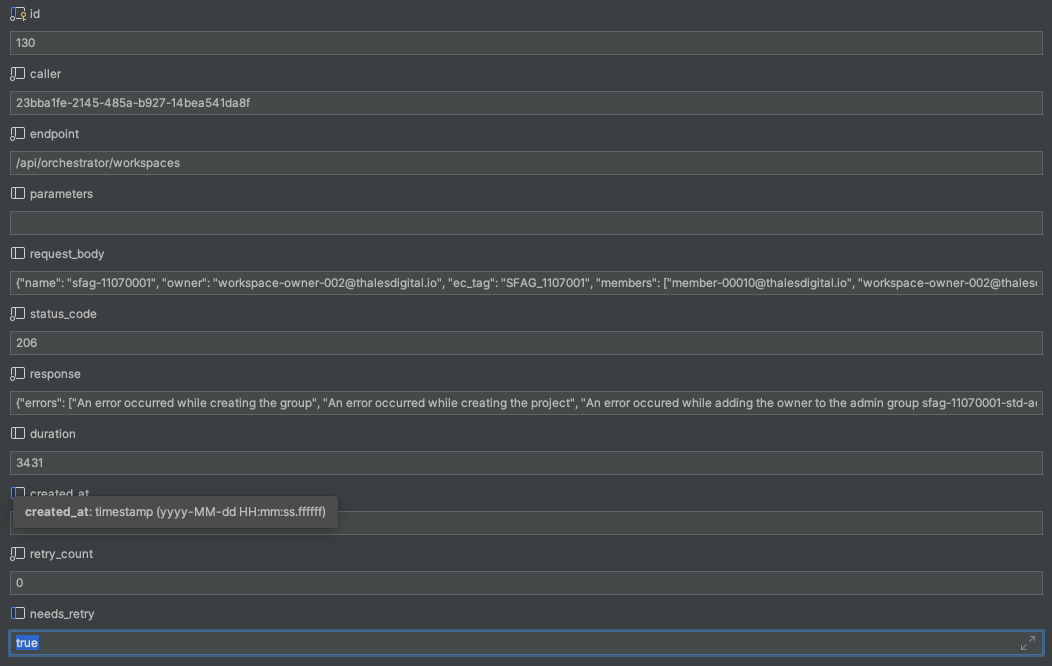
- If a request is “partial success”, we store in our database the request
which will have HTTP/ 206 as HTTP status code, we set the value of “needs retry” = “true”,
we set retry_count to 0 and we also write in the “asset” table on which COTS / Software Factory
Service the workspace creation is ok.
After every hour we take all the requests from database that have “206” HTTP status code,
“needs retry” = true and “retry_count” < 6. For every request, we:
- Check in the “asset” table on which COTS the workspace has been created
- Retry to create the workspace on the other COTS
- If operation 2 ends with success, we set the “needs retry” =false, if not, we increment the value from the “retry_count” column
Description of elements in database for retry mechanism in Figure 0 :

5.2.4 Consequences
6. Architecture description
6.1 Business architecture and allocation to services
You will find in Figure 1 business architecture for software code and CI/CD engineering allocated to services:

Figure 1 - Business architecture allocated to services.
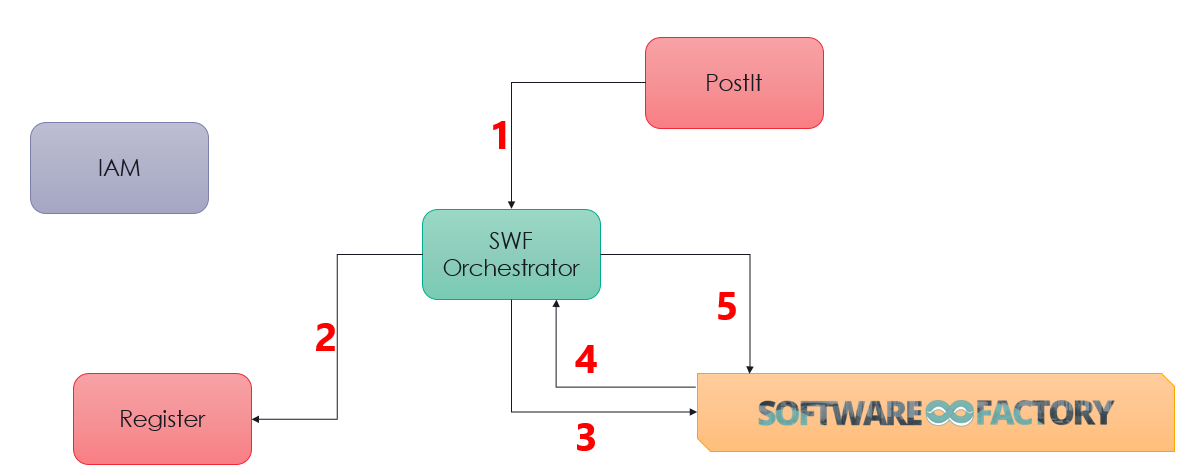
Main sequences are:
- Request a new workspace
- Consult the register
- Perform Software Factory actions
- If an asset is update trigger Orchestrator
- If needed mark the workspace as export control
More detailed sequences diagrams describing the creation and labeling of SWF workspace:
Diagrams about SF workspace creation
Diagrams about SF workspace compliance check and apply
6.2 Application architecture
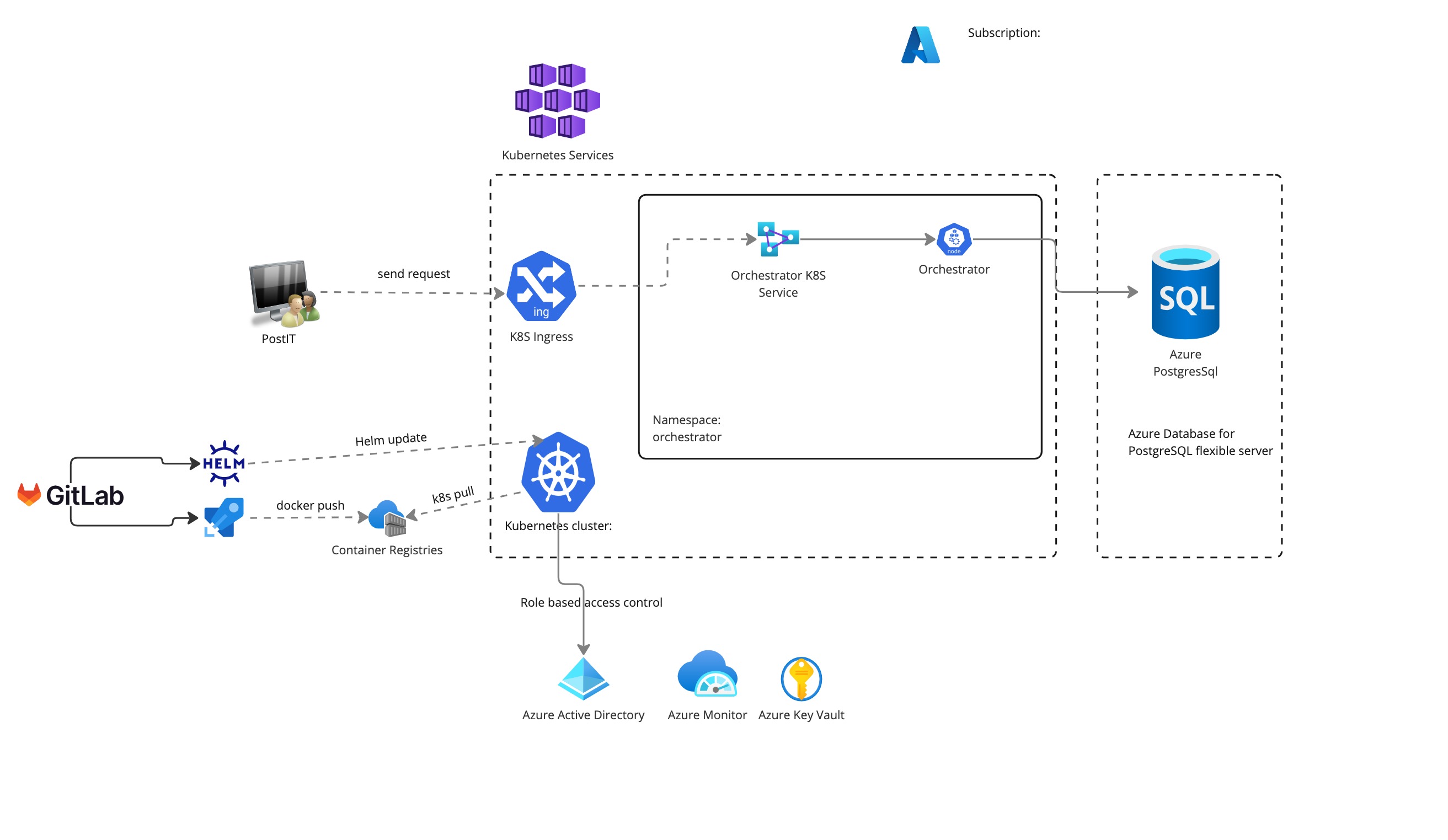
Physical architecture is described in Figure 3 :
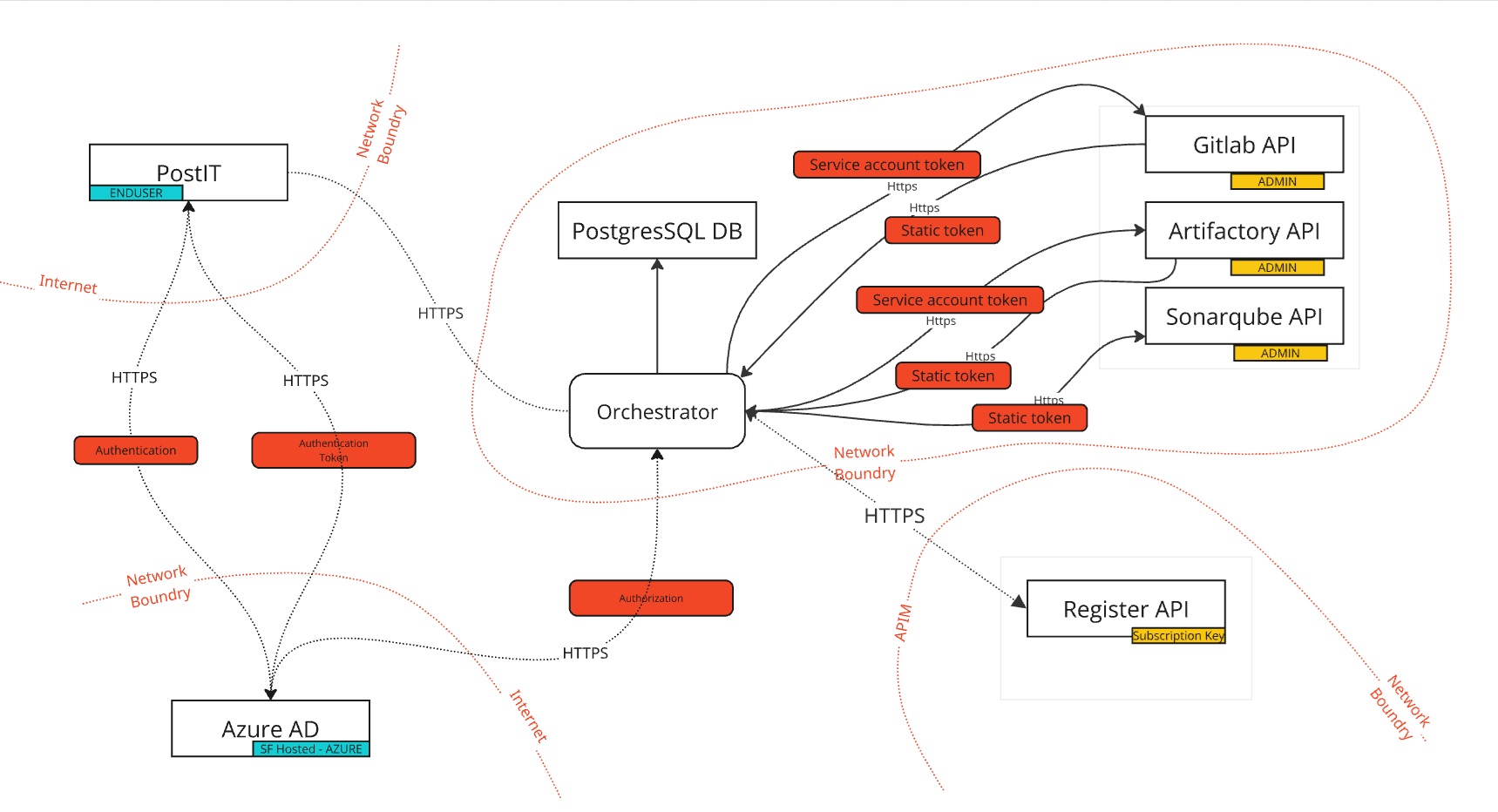
Technical flows is described in Figure 4 :
Database Table is described in Figure 5 :
classDiagram
direction BT
class asset {
   numeric workspace_id
   varchar(200) asset_key
   varchar(50) asset_name
   varchar(200) tool
   timestamp created_on
   timestamp modified_on
   varchar(200) created_by
   varchar(200) modified_by
   numeric asset_parent_id
   varchar(255) asset_url
   numeric id
}
class feature_flag {
   boolean active
   varchar(255) feature_name
}
class flyway_schema_history {
   varchar(50) version
   varchar(200) description
   varchar(20) type
   varchar(1000) script
   integer checksum
   varchar(100) installed_by
   timestamp installed_on
   integer execution_time
   boolean success
   integer installed_rank
}
class h_asset {
   numeric id
   numeric workspace_id
   varchar(200) asset_key
   varchar(50) asset_name
   varchar(200) tool
   timestamp created_on
   timestamp modified_on
   varchar(200) created_by
   varchar(200) modified_by
   numeric asset_parent_id
   varchar(255) asset_url
   varchar(200) operation
   numeric h_asset_id
}
class h_user {
   numeric id
   varchar(200) email
   timestamp created_on
   timestamp modified_on
   varchar(200) created_by
   varchar(200) modified_by
   varchar(200) operation
   numeric h_user_id
}
class h_user_asset {
   numeric user_id
   numeric asset_id
   varchar(250) user_role
   timestamp created_on
   timestamp modified_on
   varchar(200) operation
   numeric h_user_asset_id
}
class h_user_workspace {
   numeric id
   numeric workspace_id
   numeric user_id
   boolean is_owner
   timestamp created_on
   timestamp modified_on
   varchar(200) created_by
   varchar(200) modified_by
   varchar(200) operation
   numeric h_user_workspace_id
}
class h_workspace {
   numeric id
   varchar(200) workspace_key
   varchar(200) name
   varchar(50) tdf_account
   varchar(50) environment
   varchar(200) workspace_type
   timestamp created_on
   timestamp modified_on
   varchar(200) created_by
   varchar(200) modified_by
   varchar(255) exportation_license
   numeric request_id
   varchar(200) operation
   numeric h_workspace_id
}
class h_workspace_retry_status {
   numeric id
   numeric workspace_id
   varchar(200) workspace_name
   varchar(200) workspace_key
   varchar(50) tool_enum
   varchar(50) status
   numeric retry_count
   numeric max_retries
   timestamp last_attempt_at
   text last_error_message
   timestamp created_at
   timestamp updated_at
   varchar(200) operation
   numeric h_workspace_id
}
class user {
   varchar(200) email
   timestamp created_on
   timestamp modified_on
   varchar(200) created_by
   varchar(200) modified_by
   numeric id
}
class user_asset {
   varchar(255) user_role
   timestamp created_on
   timestamp modified_on
   numeric user_id
   numeric asset_id
}
class user_workspace {
   numeric workspace_id
   numeric user_id
   boolean is_owner
   timestamp created_on
   timestamp modified_on
   varchar(200) created_by
   varchar(200) modified_by
   numeric id
}
class workspace {
   varchar(200) workspace_key
   varchar(200) name
   varchar(50) tdf_account
   varchar(50) environment
   varchar(200) workspace_type
   timestamp created_on
   timestamp modified_on
   varchar(200) created_by
   varchar(200) modified_by
   varchar(255) exportation_license
   numeric request_id
   numeric id
}
class workspace_request {
   varchar(200) caller
   varchar(200) endpoint
   varchar(200) parameters
   jsonb request_body
   numeric status_code
   jsonb response
   numeric duration
   timestamp created_at
   numeric retry_count
   boolean needs_retry
   numeric id
}
class workspace_retry_status {
   numeric workspace_id
   varchar(200) workspace_name
   varchar(200) workspace_key
   varchar(50) tool_enum
   varchar(50) status
   numeric retry_count
   numeric max_retries
   timestamp last_attempt_at
   text last_error_message
   timestamp created_at
   timestamp updated_at
   numeric id
}

asset  -->  asset : asset_parent_id
asset  -->  workspace : workspace_id
h_asset  -->  asset : asset_parent_id
h_asset  -->  h_asset : h_asset_id
h_asset  -->  workspace : workspace_id
h_user  -->  h_user : h_user_id
h_user_asset  -->  asset : asset_id
h_user_asset  -->  user : user_id
h_user_workspace  -->  h_user_workspace : h_user_workspace_id
h_user_workspace  -->  user : user_id
h_user_workspace  -->  workspace : workspace_id
h_workspace  -->  h_workspace : h_workspace_id
h_workspace_retry_status  -->  h_workspace : h_workspace_id
h_workspace_retry_status  -->  workspace : workspace_id
user_asset  -->  asset : asset_id
user_asset  -->  user : user_id
user_workspace  -->  user : user_id
user_workspace  -->  workspace : workspace_id
workspace_retry_status  -->  workspace : workspace_id
Figure 5 - Orchestrator WORKSPACES schema
6.2.1 User management
There is no user management in the component Orchestrator, meaning that, the component does not manage users and its roles. In fact, the request header contains an authentication token and then we do a request on Active Directory with it to get Authorization on API Orchestrator.
6.3 Delivery
Component is part of the Software Factory as a Product (SWaaP) delivery. See TASD for more details.
6.3.1 Latest Version
- Component repository
- Latest version Internally
- Reference Component repository
- SWaaP integration part
6.3.2 Version 2.0.3
- Component repository
- Building pipeline
- Component registry
- Helm chart repository
- Reference Component repository
- SWaaP integration part
- Component Merge Request in Reference
- Note : there is no MR on 2025-11-20 for this version yet.
- Component pipeline in Reference
- Release changelog
- K6 Test report
- Security Report:
6.4 Interfaces & Swaggers
6.4.1 Software Factory API
Here is a list of services that can be integrated with the Orchestrator.
| Ref. | Name | Required | Description |
|---|---|---|---|
| SFE01 | Flux → Git in Software Factory for deployment | Mandatory | Code in a Git server for deployment of the product |
| SFE02 | Flux → Registry in Software Factory for deployment | Mandatory | Registries with helm charts and containers for deployment of the product |
| SFE04 | IAM - SAML SSO | Highly recommended | Users should be authenticated using SAML SSO |
| SFE05 | End user notification (SMTP) | Highly recommended | Notification should be sent via mail using SMTP |
| SFE06 | Managed Databases (PostgreSQL) | Mandatory for production | Components store data in a PostgreSQL data base - Alternative is to use deploy embedded data base with the product |
| SFB01 | Runner, CLI or Orchestrator → GitLab | Mandatory | GitLab Runner, CLI or Orchestrator should connect to GitLab using GitLab public API |
| SFB02 | Runner, CLI or Orchestrator → Artifactory | Mandatory | GitLab Runner, CLI or Orchestrator should connect to Artifactory using Artifactory public API |
| SFB05 | Runner, CLI or Orchestrator → SonarQube | Mandatory | GitLab Runner, CLI or Orchestrator should connect to SonarQube using SonarQube public API |
| SFI06 | GitLab → Orchestrator | Mandatory | GitLab should connect to Orchestrator |
| SFI07 | Artifactory → Orchestrator | Mandatory | Artifactory should connect to Orchestrator |
| SFE18 | Orchestrator ← User or ITSM | Highly recommended | Orchestrator expose an API to manage SF workspace that can be consumed by ITSM, user, … |
| SFE19 | Orchestrator → Export Control Register | Recommended for EC | Check related project in Platform Register. |
6.4.2 Orchestrator Swagger
openapi: 3.0.0
info:
  title: Orchestrator API
  version: 1.0.0
servers:
  - url: https://orchestrator.thalesdigital.io
paths:
  /orchestrator/workspaces:
    post:
      tags:
        - Workspace
      summary: Create Workspace
      operationId: createWorkspace
      requestBody:
        required: true
        content:
          application/json:
            schema:
              $ref: '#/components/schemas/WorkspaceRequest'
      responses:
        '201':
          description: Successful operation
          content:
            application/json:
              schema:
                $ref: '#/components/schemas/WorkspaceResponse'
        '206':
          description: Partial success
          content:
            application/json:
              schema:
                $ref: '#/components/schemas/WorkspaceResponse'
        '400':
          description: Invalid request
          content:
            '*/*':
              schema:
                $ref: '#/components/schemas/WorkspaceResponse'
        '401':
          description: Unauthorized
        '404':
          description: Not Found
          content:
            '*/*':
              schema:
                $ref: '#/components/schemas/WorkspaceResponse'
        '409':
          description: Conflict
          content:
            '*/*':
              schema:
                $ref: '#/components/schemas/WorkspaceResponse'
        '500':
          description: Internal Server Error
          content:
            '*/*':
              schema:
                $ref: '#/components/schemas/WorkspaceResponse'
  /orchestrator/gitlabGroupWebhook:
    post:
      tags:
        - Project
      summary: Create Export Control project
      operationId: handleGitlabGroupWebHook
      parameters:
        - in: header
          name: x-gitlab-token
          schema:
            type: string
          required: true
          description: gitlab token
      requestBody:
        required: true
        content:
          application/json:
            schema:
              type: string
              additionalProperties:
                type: object
      responses:
        '200':
          description: Successful operation
          content:
            application/json:
              schema:
                $ref: '#/components/schemas/WorkspaceResponse'
        '400':
          description: Invalid request
          content:
            '*/*':
              schema:
                $ref: '#/components/schemas/WorkspaceResponse'
        '401':
          description: Unauthorized
        '403':
          description: Forbidden
          content:
            '*/*':
              schema:
                $ref: '#/components/schemas/WorkspaceResponse'
        '404':
          description: Not Found
          content:
            '*/*':
              schema:
                $ref: '#/components/schemas/WorkspaceResponse'
        '500':
          description: Internal Server Error
          content:
            '*/*':
              schema:
                $ref: '#/components/schemas/WorkspaceResponse'
  /orchestrator/artifactoryProjectWebhook:
    post:
      tags:
        - Project
      summary: Create Export Control project
      operationId: handleArtifactoryGroupWebHook
      parameters:
        - in: header
          name: x-jfrog-event-auth
          schema:
            type: string
          required: true
          description: artifactory token
      requestBody:
        required: true
        content:
          application/json:
            schema:
              type: string
              additionalProperties:
                type: object
      responses:
        '200':
          description: Successful operation
          content:
            application/json:
              schema:
                $ref: '#/components/schemas/WorkspaceResponse'
        '400':
          description: Invalid request
          content:
            '*/*':
              schema:
                $ref: '#/components/schemas/WorkspaceResponse'
        '401':
          description: Unauthorized
        '403':
          description: Forbidden
          content:
            '*/*':
              schema:
                $ref: '#/components/schemas/WorkspaceResponse'
        '404':
          description: Not Found
          content:
            '*/*':
              schema:
                $ref: '#/components/schemas/WorkspaceResponse'
        '500':
          description: Internal Server Error
          content:
            '*/*':
              schema:
                $ref: '#/components/schemas/WorkspaceResponse'
components:
  schemas:
    WorkspaceRequest:
      type: object
      properties:
        ec_tag:
          type: string
          description: The id of the workspace.
          x-constraints: "@EcTagValidatorConstraint"
        name:
          type: string
          description: The name of the workspace.
          x-constraints: "@WorkspaceNameValidatorConstraint"
        owner:
          type: string
          description: The owner of the workspace.
          x-constraints: "@EmailValidatorConstraint"
        members:
          type: array
          description: The list of user of the workspace.
          x-constraints: "@EmailListValidatorConstraint"
          items:
            type: string
          default: [ ]
        tdfAccount:
          type: string
          description: The tdf account of the target asset.
          x-constraints: "@TdfAccountValidatorConstraint"
        profileType:
          type: string
          x-constraints: "@NotEmpty"
          $ref: '#/components/schemas/ProfileType'
    COTSResponse:
      type: object
      properties:
        cotsName:
          type: String
        assetID:
          type: string
        assetName:
          type: string
        assetUrl:
          type: string
        usersNotAdded:
          type: array
          items:
            type: string
        error:
          type: string
        message:
          type: string
    ProfileType:
      default: STANDARD
      type: string
      enum:
        - STANDARD
        - EXPORT_CONTROL
    Workspace:
      type: object
      properties:
        name:
          type: string
          description: Workspace name
        profile:
          $ref: '#/components/schemas/ProfileType'
          description: Profile associated with this workspace
    WorkspaceResponse:
      type: object
      properties:
        message:
          type: object
          description: Response message (JSON generic)
        workspace:
          $ref: '#/components/schemas/Workspace'
          description: Created or modified workspace
          nullable: true
        errors:
          type: array
          items:
            type: string
        okTools:
          type: array
          items:
            type: string
        cotsResponse:
          type: array
          items:
            $ref: '#/components/schemas/COTSResponse'
  securitySchemes:
    Bearer:
      type: http
      scheme: bearer
security:
  - Bearer: [ ]
6.4.2 Register Swagger
openapi: 3.0.1
info:
  title: Project Registry API
  description: ''
  version: '1.0'
servers:
  - url: https://trustnest-test.azure-api.net/registry
paths:
  /project:
    post:
      tags:
        - projectRegistration
      summary: createProject
      operationId: createproject
      parameters:
        - name: Content-Type
          in: header
          description: Media
          required: true
          schema:
            enum:
              - application/json
            type: string
      requestBody:
        description: "{\n    \"id\":\"EC_00013\",\n    \"projectType\": \"ExportControl\",\n    \"atttributes\": {\n      \"exportationLicense\": \"EAR\",\n      \"responsible\": \"loic.jardin@thalesdigital.io\"\n    }\n}"
        content:
          application/json:
            schema:
              $ref: '#/components/schemas/registry_example'
            example:
              id: EC_00013
              projectType: ExportControl
              atttributes:
                exportationLicense: EAR
                responsible: loic.jardin@thalesdigital.io
      responses:
        '201':
          description: Project create successfully
  /project/{project-id}:
    get:
      tags:
        - projectRegistration
      summary: getProject
      operationId: getproject
      parameters:
        - name: project-id
          in: path
          description: Project Id
          required: true
          schema:
            type: string
      responses:
        '200':
          description: Successful operation
          content:
            application/json:
              schema:
                $ref: '#/components/schemas/registry_example'
        '400':
          description: 'Request was malformed or invalid. '
        '401':
          description: Unauthorized. Check your credentials.
        '403':
          description: Client does not have permission to access the requested resource.
        '404':
          description: "Requested resource does not exist on the server.\n"
        '500':
          description: Server down
components:
  schemas:
    registry_example:
      type: object
      properties:
        id:
          type: string
        projectType:
          type: string
        atttributes:
          type: object
          properties:
            exportationLicense:
              type: string
            responsible:
              type: string
      example:
        id: EC_00017
        projectType: ExportControl
        atttributes:
          exportationLicense: EAR
          responsible: loic.jardin@thalesdigital.io
      x-apim-schema-name: registry example
  securitySchemes:
    apiOcpApim:
      type: apiKey
      name: Ocp-Apim-Subscription-Key
      in: header
    Bearer:
      type: http
      name: bearerToken
      scheme: bearer
      in: header
  security:
    - apiOcpApim: []
    - Bearer: [ ]
7. Operational and maintenance
In this chapter you will find strategy and policy.
Detail implementation will be described in the section Component Deployment and Configuration of SCOM . about Configuration, Deployment customization and Removal.
7.1 Life cycle policy
The Life cycle of the component orchestrator follows Semantic Versioning (MAJOR.MINOR.PATCH) same as SWaaP version.
Cadence of version is describe in the Product Lifecycle .
7.2 License
This is a thales of the shell component that implies no license.
7.3 Deployment
The component is deployed as a standard component using Flux and SWaaP packaging. See TASD for more details.
7.4 IAM
Identity and Access Management (IAM) for the Orchestrator secured through Azure involves controlling access to the API’s resources and ensuring that only authorized users and systems can interact with it. Azure provides various IAM services, particularly through Azure Active Directory (Azure AD), to ensure security and control. The Orchestrator leverages Azure Active Directory (Azure AD) for authentication and authorization. Azure AD provides the following mechanisms:
OAuth 2.0 & OpenID Connect:
The API uses OAuth 2.0 for secure token-based authentication.
Clients requesting access to the API must first authenticate through Azure AD and obtain an access token.
7.5 Scaling
The Orchestrator component use a Managed Database which can scale vertically by increasing the number of CPUs and memory and can scale horizontally by creating read replicas (scale read workloads onto separate Managed Database instances).
7.6 Backup / restore
We recommend to manage point in time restore at platform level. Like that it is possible to restore synchronously:
- volumes
- database
7.7 Monitoring
7.8 Logging
We recommend to apply the platform logging & SOC management strategy.
Annexes
Create Software Factory Export Control project
A Software Factory export control project is a sf_workspace with tags and compliance checks.
1 - Pre-requisites and limitations
1.1 - Pre-requisites
- GitLab personal access token with admin rights.
- Artifactory identity token with admin rights.
- Users involved in a sf_workspace already exist on Software Factory COTS.
1.2 - COTS limitations
1.1.1 - Artifactory limitations
sf_workspace name must start with a lowercase letter and only contains letters, numbers and ‘-’, otherwise project naming won’t work on Artifactory so we need to perform a naming validation before the Artifactory project creation.
Artifactory project creation doesn’t support value “0” for field
storage_quota_bytes(this will make an HTTP error 400 occurs ) with the following message :"message" : "Project Quota cannot be lower than `1073741824` bytes. Input: 0"
2 - Summary of actions to be taken for each COTS
- GitLab
- A group with proper configuration (shared runners disabled + a project maintainer)
- Topics
- Projects with topics attached
- Group webhook for compliance check and apply (triggered by repository push, wiki and issue)
- Artifactory
- A project with proper configuration with a project administrator
- Repositories with propeties attached
- Instance webhook properly filtering repositories for compliance check and apply (applied to artifact creation, modification and deletion)
3 - SF_workspace creation
⚠️ All the next sequence diagrams are in the same batch.
3.1 - Connect to Azure to get token to connect to Register API
sequenceDiagram
    Orchestrator->>Azure: GET  https://login.microsoftonline.com/{tenant_id}/oauth2/v2.0/token
    Note over Orchestrator, Azure : client_id: { client_id}<br/>client_secret: {client_secret}<br/>scope: api://{scope_id}/.default<br/>grant_type: client_credentials
    Azure->>Orchestrator: Response Ok
    Note over Orchestrator,Azure: Bearer {token}
Full response from Azure:
{
  "token_type": "Bearer",
  "expires_in": 3599,
  "ext_expires_in": 3599,
  "access_token": "TOKEN_VALUE"
}
3.2 - Define sf_workspace and Registry check
sequenceDiagram
   create actor PO as Project Owner
   PostIT->>PO: Send SF Form
   PO->>PostIT: Ask new SF EC Project
   Note over PO,PostIT: sf_workspace_name,ec_project_tag,<br/>sf_workspace_owner,([user_list])
   PostIT->>Orchestrator: POST /project
   Note over PostIT,Orchestrator: "name": "${sf_workspace_name}",<br/>"ec_tag": "${ec_project_tag}",<br/>"owner": "${sf_workspace_owner}",<br/>("users": ${[user_list]})
   Orchestrator->>Registry: GET /project/{ec_project_tag}
   destroy Registry
   Registry-->>Orchestrator: Response Ok
   Note over Registry,Orchestrator: {"_attachments": "attachments/",<br/>"_etag": "\"2800a197-0000-0d00-0000-665d7ae90000\"",<br/>"_rid": "-JNzAL5s2KqDhB4AAAAAAA==",<br/>"_self": <br/>"dbs/-JNzAA==/colls/-JNzAL5s2Ko=/docs/-JNzAL5s2KqDhB4AAAAAAA==/",<br/>"_ts": 1717402345,<br/>"atttributes": {<br/>"exportationLicense": "EAR",<br/>"responsible": "loic.jardin@thalesdigital.io"<br/>},<br/>"id": "EC_00101",<br/>"projectType": "ExportControl"<br/>}<br/>
   par Initial Checks
       create participant GitLab
       Orchestrator->> GitLab: find owner
       GitLab->> Orchestrator: owner found -> check OK
       destroy GitLab
       GitLab-->> Orchestrator: owner NOT FOUND -> check KO
       create participant Artifactory
       Orchestrator->> Artifactory: find owner
       Artifactory->>Orchestrator: owner found -> check OK
       destroy Artifactory
       Artifactory-->> Orchestrator: owner NOT FOUND -> check KO
       create participant SonarQube
       Orchestrator->>SonarQube: find owner
       SonarQube->> Orchestrator: owner found -> check OK
       destroy SonarQube
       SonarQube-->> Orchestrator: owner NOT FOUND -> check KO
   end
   Note over Orchestrator: owner MUST BE in all COTS
   alt Create check OK
       Orchestrator->>Orchestrator: Create new DB entry
       Note right of Orchestrator: sf_workspace_name:<br/>ec_project_tag,ec_el,sf_workspace_owner
   else Create check KO
       Orchestrator->>PostIT: Return Error
   end
3.3 - GitLab objects
sequenceDiagram
    create participant GitLab
    Orchestrator->>GitLab: POST /groups
    Note over Orchestrator,GitLab : "name": "ec-${sf_workspace_name}",<br/>"path": "ec-${sf_workspace_name}",<br/>"auto_devops_enabled": "false",<br/>"description": "Welcome on Export Control<br/> Group ec-${sf_workspace_name} Export License:${ec_el}<br/> EC Tag:${ec_tag}",<br/>"subgroup_creation_level":"owner",<br/>"project_creation_level":"maintainer",<br/>"request_access_enabled":false,<br/>"membership_lock":true,<br/>"prevent_forking_outside_group":true,<br/>"visibility":"private",<br/>"wiki_access_level":"private"
    GitLab-->>Orchestrator: Response Ok
    Note over Orchestrator,GitLab: gitlab_group_id (id), <br/>gitlab_group_name(name)
    Orchestrator->>GitLab: PUT /groups/{gitlab_group_id}
    Note over Orchestrator,GitLab : "shared_runners_setting":"disabled_and_unoverridable"
    GitLab-->>Orchestrator: Response Ok
    Orchestrator->>GitLab: POST /groups/{gitlab_group_id}/members
    Note over Orchestrator,GitLab : "username":"${sf_workspace_owner}",<br/>"access_level":50
    GitLab-->>Orchestrator: Response Ok
    loop each user in user_list
        Orchestrator->>GitLab: POST /groups/{gitlab_group_id}/members
        Note over Orchestrator,GitLab : "username":"${user}",<br/>"access_level":30
    end
    GitLab-->>Orchestrator: Response Ok
    Orchestrator->>GitLab: POST /groups/{gitlab_group_id}/hooks
    Note over Orchestrator,GitLab : "url": "${orchestrator_hook_url}",<br/>"name": "Export Control compliance",<br/>"description":"Mandatory hook for Export Control Project",<br/>"push_events":true,<br/>"issues_events":true,<br/>"member_events":true,<br/>"wiki_page_events":true
%% It's better to use systemhook on project create/update if we validate gitlab dedicated for EC only.
%% https://docs.gitlab.com/ee/administration/system_hooks.html#repository-update-events
    GitLab-->>Orchestrator: Response Ok
    Orchestrator->>GitLab: POST /topics
    Note over Orchestrator,GitLab : "name":"ec-${ec_tag}",<br/>"title":"${ec_tag}",<br/>"description":"Dedicated tag for Export Control"
    destroy GitLab
    GitLab-->>Orchestrator: Response Ok
    Orchestrator->>Orchestrator: Update DB Entry
    Note right of Orchestrator: ec-${sf_workspace_name}:<br/>gitlab:<br/>gitlab_group_id,path,[user_list]
3.4 - Artifactory
sequenceDiagram
    create participant Artifactory
    Orchestrator->>Artifactory: POST /access/api/v1/projects
    Note over Orchestrator,Artifactory : "display_name": "ec-${sf_workspace_name}",<br/>  "description": "Welcome on Export Control<br/> Group ec-${sf_workspace_name} Export License:${ec_el} EC Tag:${ec_tag}",<br/>  "admin_privileges": {<br/>    "manage_members": true,<br/>    "manage_resources": true,<br/>    "index_resources": true<br/>},<br/>  "storage_quota_bytes": 1073741824000 (1TB by default),<br/>  "project_key": "ec-${sf_workspace_name}"
    Artifactory-->>Orchestrator: Response Ok
    Note over Orchestrator,Artifactory : project_key
    Orchestrator->>Artifactory: PUT /access/api/v1/projects/{project_key}/users/{sf_workspace_owner}
    Note over Orchestrator,Artifactory : "name": "sf_workspace_owner",<br/>  "roles": ["project admin"]"
    Artifactory-->>Orchestrator: Response Ok
    loop each user in user_list
        Orchestrator->>Artifactory: PUT /access/api/v1/projects/{project_key}/users/{user}
        Note over Orchestrator,Artifactory : "name": "user",<br/>  "roles": ["developer"]"
    end
    destroy Artifactory
    Artifactory-->>Orchestrator: Response Ok
    Orchestrator->>Orchestrator: Update DB Entry
    Note right of Orchestrator: ec-{sf_workspace_name}:<br/>artifactory:<br/>project_key,[user_list]
3.5 - End of sequence request
sequenceDiagram
    alt Response OK
        Orchestrator->>PostIT: Return Ok
    else Response KO
        Orchestrator->>PostIT: Return Error with output
        Note over Orchestrator,PostIT: http_status_code, <br/>http_response
    end
    create participant SOC
    Orchestrator->>SOC: New event
    Note over Orchestrator,SOC: New ${sf_workspace_name} export control project was created.
    destroy SOC
    SOC->>Orchestrator: Response Ok
    create actor PO as Project Owner
    PostIT->>PO: Request response
    destroy PO
    PO->>PostIT: Close Request
4 - SF_workspace Compliance check and apply
4.1 - GitLab Webhook
4.1.1 - GitLab part
sequenceDiagram
    GitLab->>Orchestrator: Trigger webhook (on push, issue or wiki)
    Note over GitLab,Orchestrator: project.namespace,<br/>project_id,<br/>project.name
    Orchestrator->>Orchestrator: Fetch project data for project.namespace

    alt project not in orchestrator database
        Orchestrator->>Orchestrator: Add DB entry
        Note right of Orchestrator: sf_workspace_name:<br/>gitlab:<br/>gitlab_group_id:<br/>project_id,project.name,date
        Orchestrator->>SOC: New event to SOC (project create)
        Note over Orchestrator,SOC: New GitLab project ${project.name}<br/> in ${sf_workspace_name} export control project.
    end
    Orchestrator->>GitLab: PUT /projects/{project_id}
    Note over GitLab,Orchestrator: topics:<br/>["exportcontrol","${ec_el}","ec-${ec_tag}"]
    GitLab-->>Orchestrator: Response Ok
    Orchestrator->>GitLab: GET /projects/{project_id}/users
    GitLab-->>Orchestrator: Response Ok
%% NOT SURE WE HAVE THE STATE HERE
    Note over GitLab,Orchestrator: "username": "john_smith","state": "active",<br/>"username": "jack_smith","state": "blocked"
%% check user exitence
    Orchestrator->>Orchestrator: Check new and old user_list
    alt user.state change
        Orchestrator->>Orchestrator: Update user.state
        Orchestrator->>SOC: New event
        Note over Orchestrator,SOC: ${user} user state update ${user.state}<br/> in GitLab EC project ${project.name}.
    else User in new user_list and not in old user_list
        Orchestrator->>Orchestrator: Add DB entry
        Note right of Orchestrator : sf_workspace_name:<br/>gitlab:<br/>gitlab_group_id:<br/>project_id:<br/>user_list:user,state,date
        Orchestrator->>SOC: New event
        Note over Orchestrator,SOC: ${user} user added as ${user.state}<br/> in GitLab EC project ${project.name}.
    else User not in new user_list and in old user_list
        Orchestrator->>Orchestrator: Delete user
        Orchestrator->>SOC: New event
        Note over Orchestrator,SOC: ${user} user deleted<br/> in GitLab EC project ${project.name}.
    end
4.1.2 - SonarQube part
Create SonarQube GROUPS and manage MEMBERS at Orchestrator/EC workspace creation
sequenceDiagram
    create participant SonarQube
    Orchestrator->>SonarQube: POST /api/v2/authorizations/groups
    Note over SonarQube, Orchestrator : {"name" : "{workspace-name}, "description", """}
    Note over SonarQube, Orchestrator : "Create group for regular users"
    SonarQube-->>Orchestrator: Response Ok
    Note over Orchestrator,SonarQube : group_id
    Orchestrator->>SonarQube: POST /api/v2/authorizations/groups
    Note over SonarQube, Orchestrator : {"name" : "{workspace-name}-admin, "description", """}
    Note over Orchestrator,SonarQube : "Create group for administration"
    SonarQube-->>Orchestrator: Response Ok
    Note over Orchestrator,SonarQube : admin_group_id
    Orchestrator->>SonarQube: GET /v2/users-management/users?q={sf_workspace_owner_email}
    SonarQube-->>Orchestrator: {... id: string, login: string, email: string ...}
    Note over Orchestrator,SonarQube : use user.id to perform request
    Orchestrator->>SonarQube: POST /api/v2/authorizations/group-memberships
    note over SonarQube, Orchestrator: {"userId" : "{user.id}", "groupId" : {admin_group_id}}
    Note over SonarQube, Orchestrator : "Add workspace_owner in admin_group with sonarqube.login"
    SonarQube-->>Orchestrator: Response Ok
    Orchestrator->>SonarQube: POST /api/v2/authorizations/group-memberships
    note over SonarQube, Orchestrator: {"userId" : "{user.id}", "groupId" : {group_id}}
    Note over SonarQube, Orchestrator : "Add workspace_owner in user_group"
    SonarQube-->>Orchestrator: Response Ok
    loop each member in member_list
        Orchestrator->>SonarQube: GET /v2/users-management/users?q={member_email}
        SonarQube-->>Orchestrator: {... id: string, login: string, email: string ...}
        Note over Orchestrator,SonarQube : use user id to perform request
        Orchestrator->>SonarQube: POST /api/v2/authorizations/group-memberships
        note over SonarQube, Orchestrator: {"userId" : "{user.id}", "groupId" : {group_id}}
        Note over Orchestrator,SonarQube : "Add member in user_group with user.id"
    end
    destroy SonarQube
    SonarQube-->>Orchestrator: Response Ok
    Orchestrator->>Orchestrator: Update DB Entries
    Note right of Orchestrator: sf_workspace_name:<br/>SonarQube:<br/>admin_group_id,[owner]
    Note right of Orchestrator: sf_workspace_name:<br/>SonarQube:<br/>user_group_id,[owner, member_list]
SonarQube PROJECT creation on GitLab webhook trigger
sequenceDiagram
    Orchestrator->>SonarQube: POST /api/v2/authorizations/groups
    Note over Orchestrator,SonarQube: {"name": "ec-${project.name}, "description": ""}
    SonarQube->>Orchestrator: Response Ok
    loop each permission in [scan, securityhotspotadmin, codeviewer, issuadmin, user]
        Orchestrator->>SonarQube: POST api/permissions/remove_group/projectKey={projectKey}&groupName=sonar-users&permission={permission}
        SonarQube-->>Orchestrator: Response Ok
        Note over Orchestrator,SonarQube: All users are added to sonar-users group and this group has permission defaulted on each project, <br>so we remove that behavior to isolate EC projects
    end
    Orchestrator->>SonarQube: POST api/permissions/remove_group/projectKey={projectKey}&groupName={groupName}&permission={permission}
    Note over Orchestrator,SonarQube: "name": "${project.name},<br/>"project":"ec_${project.name}",<br/>"visibility":"private"

    loop each permission in [scan, securityhotspotadmin, codeviewer, issuadmin, user]
        Orchestrator->>SonarQube: POST api/permissions/add_group/projectKey={projectKey}&groupName={groupName}&permission={permission}
        SonarQube-->>Orchestrator: Response Ok
        Note over Orchestrator,SonarQube: "groupName":"${groupName}",<br/>"permission":"${permission}",<br/>"projectKey":"ec_${projectKey}"
    end

    loop each permission in [admin, user]
        Orchestrator->>SonarQube: POST api/permissions/add_group/projectKey={projectKey}&groupName={groupName}-admin&permission={permission}
        SonarQube-->>Orchestrator: Response Ok
        Note over Orchestrator,SonarQube: "groupName":"${groupName}",<br/>"permission":"${permission}",<br/>"projectKey":"ec_${projectKey}"
    end

    Orchestrator->>SonarQube: POST api/project_tags/set?project={projectKey}&tags={ec_,tag02,tag03}
    Note over Orchestrator,SonarQube: "project":"ec_${projectKey}-admin",<br/>"tags":"ExportControl,${ec_el},ec-${ec_tag}"
    SonarQube->>Orchestrator: Response Ok
4.1.3 - Coverity part
Not used in v-2.0.0
sequenceDiagram
    Orchestrator->>Coverity: POST /projects
    Note over Orchestrator,Coverity: TBD,<br/>"name":"ec_${project.name}",<br/>"description": "Export Control <br/>Group ${sf_workspace_name} <br/>Export License:${ec_el} EC Tag:${ec_tag}"
    Coverity->>Orchestrator: Response Ok
    loop each user in user_list
        Orchestrator->>Coverity: PUT /projects/ec_{project.name}
        Note over Orchestrator,Coverity: TBD,<br/>"roleAssignments": [<br/>"group": {"name":"user_ec_${project.name}"},<br/>"roleAssignmentType": "group",<br/>"roleName": "user_ec_${project.name}",<br/>"username":"${user}"
    end
    Coverity->>Orchestrator: Response Ok

    Orchestrator->>SOC: New event : Refresh user list in GitLab Export Control project ${sf_workspace_name} : [user_list]
    SOC->>Orchestrator: Response Ok
4.2 - Artifactory Webhook
sequenceDiagram
    Artifactory->>Orchestrator: Trigger webhook (Artifact event deployed, moved, copied)
    Note over Artifactory,Orchestrator: payload.data.repo_key<br/>payload.data.path
    Orchestrator->>Orchestrator: Fetch project data for payload.data.path
    alt {repo_key} not in Orchestrator database
        Orchestrator->>Orchestrator: Add DB Entry
        Note right of Orchestrator: sf_workspace_name:<br/>artifactory:<br/>project_key:<br/>[payload.data.repo_key,date]
        Orchestrator->>SOC: New event for repository creation in export control project to SOC
        Note over Orchestrator,SOC: New repo {repo_key} created in ${sf_workspace_name} Artifactory EC project.
    end
    Orchestrator->>Artifactory: PUT /api/storage/{repo_key}/{path}
    Note over Artifactory,Orchestrator: properties=export_control={ec_el},{ec_project_tag}
    Artifactory-->>Orchestrator: Response Ok
    Orchestrator->>Artifactory: GET /access/api/v1/projects/{project_key}/users
    Artifactory-->>Orchestrator: Response Ok
    Note over Artifactory,Orchestrator: "name": "user1", "roles": ["developer"],<br/>"name": "user2", "roles": ["developer"]
            Orchestrator->>Orchestrator: Check new and old user_list
            alt roles change
                Orchestrator->>Orchestrator: Update roles
                Orchestrator->>SOC: New event
                Note over Orchestrator,SOC: ${user} roles update ${roles}<br/> in Artifactory EC project ${repo_key}.
            else User in new user_list and not in old user_list
                Orchestrator->>Orchestrator: Add DB entry
                Note right of Orchestrator : sf_workspace_name:<br/>artifactory:<br/>project_key:<br/>repo_key:<br/>user_list:roles,date
                Orchestrator->>SOC: New event
                Note over Orchestrator,SOC: ${user} user added as ${roles}<br/> in Artifactory EC project ${repo_key}.
            else User not in new user_list and in old user_list
                Orchestrator->>Orchestrator: Delete user
                Orchestrator->>SOC: New event
                Note over Orchestrator,SOC: ${user} user deleted<br/> in Artifactory EC project ${repo_key}.
            end
Appendix
A.1 - API documentation for all cots
- Doc API SonarQube
- Doc API GitLab
- Doc API Coverity , for Coverity it’s better if we adapt this project bootstrap .
A.2 - GitLab default topic configuration
Create Export Control topic :
POST /topics
{
  "name": "exportcontrol",
  "title": "Export Control",
  "description": "Dedicated topic for Export Control project."
}
Create Export Control certification topic :
POST /topics
{
  "name": "ue2021-821",
  "title": "UE 2021/821",
  "description": "Dedicated topic related to (UE) 2021/821 certification."
}
A.3 - Artifactory default webhook configuration
Default instance Webhook configuration
POST event/api/v1/subscriptions
{
  "key": "ExportControlWebhook",
  "description": "Triggers Export control compliance check when a new artifact is created",
  "enabled": true,
  "event_filter": {
    "domain": "artifact",
    "event_types": [
      "deployed",
      "moved",
      "copied"
    ],
    "criteria": {
        "anyLocal": true,
        "anyFederated": true,
        "anyRemote": false,
        "includePatterns": ["ec_*"],
        "excludePatterns": [],
        "repoKeys": []
    }
  },
  "handlers": [
      {
        "handler_type": "webhook",
        "url": "${orchestrator_hook_url}",
        "secret": "TBD",
        "proxy": "TBD"
      }
    ]
}
* NB: Hook URL (values of orchestrator_hook_url) has to point to a valid and up URL.
Matrix between Scenario Testing and User Testing Acceptance
1. Matrix
| Coverage ST/UAT | ST010 | ST011 | ST020 | ST030 | ST040 | ST050 | ST060 | ST070 | ST071 | ST072 | ST073 | ST080 | ST081 | ST082 |
|---|---|---|---|---|---|---|---|---|---|---|---|---|---|---|
| UAT010 | ||||||||||||||
| UAT011 | X | |||||||||||||
| UAT012 | X | |||||||||||||
| UAT013 | X | |||||||||||||
| UAT014 | X | |||||||||||||
| UAT015 | X | |||||||||||||
| UAT020 | X | |||||||||||||
| UAT021 | X | |||||||||||||
| UAT022 | X | X | X | X | X | X | X | |||||||
| UAT023 | X | X | X | X | ||||||||||
| UAT024 | X | X | X | |||||||||||
| UAT030 | X | X | ||||||||||||
| UAT031 | X | X | ||||||||||||
| UAT032 | X | X | ||||||||||||
| UAT033 | X | X | ||||||||||||
| UAT034 | X | X | ||||||||||||
| UAT110 | ||||||||||||||
| UAT120 | ||||||||||||||
| UAT121 | ||||||||||||||
| UAT122 | ||||||||||||||
| UAT123 | ||||||||||||||
| UAT124 |
2. User Testing Acceptance
Orchestrator 1.0.x
UAT010
GIVEN an Export Control project team
WHEN the SW lead requests the creation of a workspace related to a project which has not been
declared on Platform Register
THEN the workspace is not created and an error is issued.
Note:
Check if the project has been declared in the TDP register
- If yes, store the project key and associated export control regulation to apply to workpsace creation
- If not, reject the workspace creation order
UAT011
GIVEN an Export Control project team and Project declared on platform register
WHEN the SW lead requests the creation of a workspace with a project name already existing for
other workspace
THEN the workspace is not created and an error is issued.
Note:
Check if the project name used for workspace creation is not already existing:
- If it does not exist already, store the project name with the associated project key
- If this name is already used, reject the workspace creation order
UAT012
GIVEN an Export Control project team and Project declared on platform register
WHEN the SW lead requests the creation of a workspace with a project name with uppercase
or invalid character
THEN the workspace is not created and an error is issued.
Note: message to be added in postit form to cast the name automatically
without uppercase when validate the form (allowed characters are \"^[a-z][a-z0-9]{1,31}\")
UAT013
GIVEN an Export Control project team, Project declared on platform register and a SW lead who does not have access to all SW COTS WHEN the SW lead requests the creation of a workspace including spaces on COTS he has no access to THEN the workspace is not created and an error is issued.
Note:
Check if the owner is in all the COTS :
- If not in all the COTS, an error is issued and no workspace creation order is sent to COTS.
- If in all the COTS, create the workspace with this owner
UAT014
GIVEN a Regional SwaaS
WHEN a SWF asset creation fails due to timeout or 500
THEN it is logged and be retried every hours (up to 5 retries)
Note:
- If something fails (other than name invalid character or user access), it is logged in the database.
- After a moment (defined by us) the cron will read the database for rows with needsRetry set to true
- It will retry to do the request and if success set the needsRetry to false
UAT015
GIVEN an Export control project team and a SW lead onboarded on all SWF COTS to be used by dev team WHEN the SW lead request workspace creation with correct name for a project declared on platform register THEN the workspace is created and acknowledge is sent back with the project name.
UAT020
GIVEN an Export control project team, Project declared on platform register and a SW lead onboarded on all SWF COTS to be used by dev team WHEN the SW lead requests workspace creation with correct name THEN a GitLab group and an Artifactory project are created and description updated with the project ID, project name and project export license AND asset creation is stored with associated creation date.
UAT021
GIVEN an Export control project team, Project declared on platform register and a SW lead onboarded on all SWF COTS to be used by dev team WHEN the SW lead requests workspace creation with correct name THEN a GitLab group and an Artifactory project are created and compliant to the project export control regulation AND asset creation is stored with associated creation date.
UAT022
GIVEN an Export Control project team and an associated export control workspace
WHEN a SWF asset is created in the workspace
THEN SF asset space is kept compliant to the project export control regulation
when any user action is performed (in the limit of the user charter)
AND the new asset is stored with the creation date.
UAT023
GIVEN an Export Control project team and an associated export control workspace
WHEN a GitLab project is created manually in the workspace
THEN SF asset space is tagged and is kept compliant to the project export control regulation
when any user action is performed (in the limit of the user charter
AND the new asset is stored with the creation date.
UAT024
GIVEN an Export Control project team and an associated export control workspace
WHEN an Artifactroy repository is created manually in the workspace
THEN SF asset space is tagged and is kept compliant to the project export control regulation
when any user action is performed (in the limit of the user charter)
AND the new asset is stored with the creation date.
UAT030
GIVEN an Export Control project team and an associated export control workspace
WHEN SW users receive access to his workspace
THEN users can access only the part of the workspace corresponding to COTS he has access to
AND the COTS user list is stored with the action date.
Note:
Check if the user is in all the COTS :
- If not in all the COTS, an error is issued and user has access to the intersection of the workspace and the list of COTS he has access to.
- If in all the COTS, create the full workspace with this user
UAT031
GIVEN an Export Control project team and an associated export control workspace
WHEN the workspace owner gives access to workspace to a new onboarded user manually
through a COTS in the workspace
THEN the user has access only to COTS workspace and included in the list of users of the COTS
as soon as a nex action is done in the asset
AND the update operation date is stored.
UAT032
GIVEN an Export Control project team, an associated export control workspace and
an onboarded user who has access partially to the workspace
WHEN the workspace owner gives access to another COTS in the workspace
THEN the user access is granted with this additional COTS workspace and included
in the COTS list of users as soon as a nex action is done in the asset
AND the update operation date is stored.
UAT033
GIVEN an Export Control project team and an associated export control workspace
WHEN the workspace owner removes access to workspace to a user manually through a COTS
in the workspace
THEN the user has no longer access only to COTS workspace and is removed
from the list of users of the COTS as soon as a nex action is done in the asset
AND the update operation date is stored.
UAT034
GIVEN an Export Control project team, an associated export control workspace
and an onboarded user who has access partially to the workspace
WHEN the workspace owner removes access to another COTS in the workspace for that user
THEN the user has no longer access only to COTS workspace and is removed
from the list of users of the COTS as soon as a nex action is done in the asset
AND the update operation date is stored.
Orchestrator 1.1.x
UAT110 (C3 Optional)
GIVEN an Export Control project team, project declared on platform register and no existing workspace for that project WHEN the SW lead requests the creation of a workspace related to a project which has not been declared on Platform Register and with a valid name THEN the workspace is created on a SWF service instanced in platform space which is compliant with his data confidentiality level.
UAT120
GIVEN an Export Control project team, project declared on platform register and no existing workspace for that project WHEN the SW lead requests the creation of a workspace with a project name with invalid character (other than uppercases) THEN the workspace is not created and an error is issued.
UAT121
GIVEN an Export Control project team, project declared on platform register
and no existing workspace for that project
WHEN the SW lead requests the creation of a workspace with a project name with uppercases
THEN the uppercases are exchanged with lowercases and if valid
and not already existing for another workspace, a workspace is created,
acknowledge with workspace name is sent back.
Note: message to be added in post-it form to cast the name automatically
without uppercase when validate the form ( allowed caracters are \"^[a-z][a-z0-9]{1,31}\")
UAT122
GIVEN an Export Control project team, project declared on platform register, no existing workspace for that project and a SW lead who does not have access to all SW COTS WHEN the SW lead requests the creation of a workspace including spaces on COTS he has no access to THEN an error is issued.
Check if the owner is in all the COTS :
- If owner does not submitted to offer including all COTS, an error is issued and no workspace creation order is sent to COTS.
- If owner has a COTS account (does submitted to offer including all COTS + have done a first login), create the workspace with this owner Warning: no OM accessible from TDP C3-CA and other platform.
UAT123
GIVEN an Export Control project team and an associated export control workspace
WHEN a first action is done in the workspace
THEN the SonarQube project is created and kept compliant to the project export control regulation
when any user action is performed (in the limit of the user charter)
AND the new asset is stored with the creation date.
UAT124
GIVEN an Export Control project team and an associated export control workspace
WHEN a SonarQube asset is created manually in the workspace
THEN SonarQube space is kept compliant to the project export control regulation
when any user action is performed (in the limit of the user charter)
AND the new asset is stored with the creation date.