version v7.2.
For up-to-date documentation, see the
latest version.
GitLab Runner
9 minute read
1. Application
| Reference: | LLD – Software Factory as a Product - GitLab Runner |
| Type & Classification: | Product |
| Step: | Continuous Delivery |
| Bid/Project/Product Name & ID: | Software Factory as a Product (SWaaP) |
| Solution Level: | Digital product |
| Solution Name: | Software Factory as a Product |
| Solution description: | As deployed, create and update a Software Factory |
| Key Products/Solution: |
2. Introduction
2.1 Document purpose
This document is a low level design - LLD which aims to describe how the architecture evoked in high level design - HLD will be implemented. This document will describe the protocols used in the target architecture, how to implement them and any modifications made to their default behavior. Once validated by Thales, this document will then serve as a basis for the implementation of configurations on equipment.
2.2 Document scope
This document is not a manual and is not intended to replace the reference literature describing with great precision all network protocols.
The protocols used will be briefly described as well as the modifications made to their default behavior.
2.3 Referenced documentation
| Document reference | Document Name |
|---|---|
| TASD | Technical Architecture and Security Document of SWaaP |
| LLD-GitLab | Low level design of GitLab component |
| SCOM-GitLab | Software Center Operation Manual of GitLab |
| SCOM-Runner | Software Center Operation Manual of GitLab Runner |
3. Component general description
This component is part of Software Factory as a Product (SWaaP).
GitLab Runner is an application that works with GitLab CI/CD to run jobs in a pipeline. It acts as an agent that executes the jobs defined in your GitLab CI/CD configuration.
With current packaging of the runner as a SWaaP component, a platform team will have to duplicate the runner directory in order to instantiate several managed dedicated runners.
This document is related to runner as a component but not runner as a service. Multiple deployment in different clusters need to be validated to assess the level of the service and associated deployement process needs to be described.
4. Functional & Business Requirements
No formal list of requirements has been expressed by clients. It is designed and developed based on business use cases.
4.1 Feature summary
GitLab Runner’s most used features.
- Run multiple jobs concurrently.
- Use multiple tokens with multiple servers (even per-project).
- Limit the number of concurrent jobs per-token.
- Jobs can be run:
- Locally
- Using Docker containers.
- Using Docker containers and executing job over SSH.
- Using Docker containers with autoscaling on different clouds and virtualization hypervisors.
- Connecting to a remote SSH server.
- Allows customization of the job running environment.
- Automatic configuration reload without restart.
This component runs the Kubernetes executor to use Kubernetes clusters for builds. The executor calls the Kubernetes cluster API and creates a pod for each GitLab CI job.
4.2 Prerequisites
Every prerequisites of the product are applicable to this component. In detail:
- Kubernetes and Flux. See the TASD §4.1.2 Prerequisites for supported version.
4.3 Variability
No variability is supported.
5. Architecture decision record
Here is a list of decisions:
| Ref. | Date/Status | Description |
|---|---|---|
| ADR-RUN-001 | 2024/09 | Add GitLab Runner as a component of the Software Factory as a Product (SWaaP). See ADR004 in TASD . |
Table 3 - List of architecture decision record.
5.1 ADR-RUN-001: Add GitLab Runner as a component of the product
5.1.1 Status: Accepted
5.1.2 Context
- See ADR004 in TASD .
5.1.3 Decision
- Introduce GitLab Runner in the product for Kubernetes deployment
5.1.4 Consequences
6. Architecture description
6.1 Business architecture and allocation to services
You will find in Figure 1 business architecture for software code and CI/CD engineering allocated to services:

Figure 1 - Business architecture allocated to services.
Note: in dash, external items.
6.2 Application architecture
The diagram in Figure 2 shows how runners are registered and how jobs are requested and handled. It also shows which actions use registration, authentication, and job tokens.
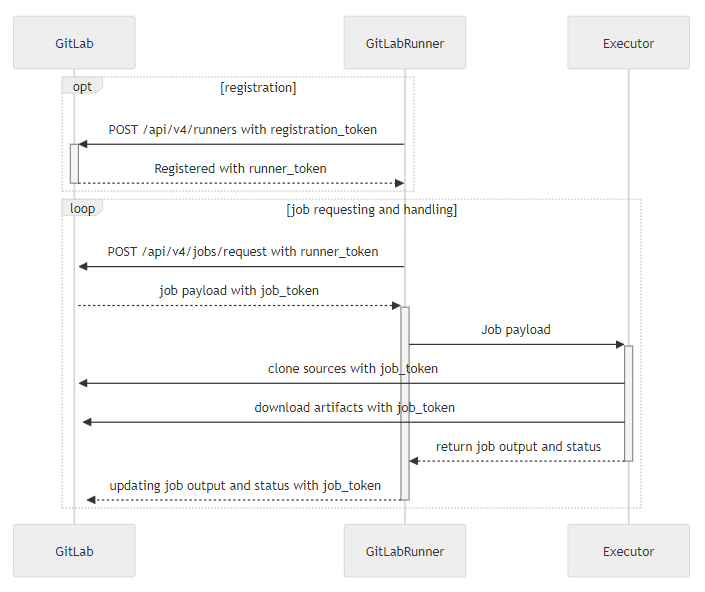
Figure 2 - Runner registration and job handling
GitLab Runner is using these external services:
- Kubernetes with Flux (PRE_002, PRE_003)
- Persistent storage to store the configuration and cache (PRE_004)
GitLab Runner has the following types of runners, which are available based on who you want to have access:
- Instance runners are available to all groups and projects in a GitLab instance.
- Group runners are available to all projects and subgroups in a group.
- Project runners are associated with specific projects. Typically, project runners are used by one project at a time.
6.2.1 Instance runners
Instance runners are available to every project in a GitLab instance.
Use instance runners when you have multiple jobs with similar requirements. Rather than having multiple runners idling for many projects, you can have a few runners that handle multiple projects.
6.2.2 Group runners
Use group runners when you want all projects in a group to have access to a set of runners.
Group runners process jobs by using a first in, first out queue.
6.2.3 Project runners
Use project runners when you want to use runners for specific projects. For example, when you have:
Jobs with specific requirements, like a deploy job that requires credentials. Projects with a lot of CI activity that can benefit from being separate from other runners. You can set up a project runner to be used by multiple projects. Project runners must be enabled for each project explicitly.
Project runners process jobs by using a first in, first out (FIFO) queue.
6.2.4 User management
This role matrix has been defined in TASD:
| User role | Description user role | Comment |
|---|---|---|
| UC1 | End user / Software engineer | Person that can write in a solution/product/project tenant |
| UC2 | Reader | Person that can read content of a solution/product/project tenant |
| UC3 | Tenant owner | Person that can administrate a solution/product/project tenant |
| UC4 | Software Factory application admin | Person that can administrate Software Factory instance components |
| UC5 | Software Factory system admin | Person that can administrate the deployment/upgrade of the Software Factory instance |
| UC6 | Software Factory tribe | Person that are delivering asset to deploy/upgrade a Software Factory instance |
For GitLab Runner, a tenant is an instance of a runner (Group or Project).
6.2.5 RACI
In addition of global RACI (Responsible, Accountable, Consulted, Informed) of the SWaaP defined in TASD:
| Action | Description | UC4 | UC3 | UC2 | UC1 |
|---|---|---|---|---|---|
| Deploy a instance runner on a C2 platform | SF admin deploy an instance runner (alias shared runner) | R/A | I | I | |
| Activate an instance runner on a project on C2 platform | Project owner activate an instance runner in GitLab | R/A | I | ||
| Use an instance runner on a project on C2 platform | Project owner and/or Software engineer consume it defining the project pipeline | R/A | R/A | ||
| Deploy a group/project runner | and project owner activate it in GitLab | R/A | I | ||
| Activate an group/project runner on a project | Project owner activate group/project runner in GitLab | R/A | I | ||
| Use an group/project runner on a project | Project owner and/or Software engineer consume it defining the project pipeline | R/A | R/A |
6.3 Delivery
Component is part of the Software Factory as a Product (SWaaP) delivery. See TASD for more details.
6.3.1 Latest Version
- Latest version editor
- Component registry : gitlab-runner
- Helm chart repository
- SWaaP integration part
6.3.2 Chart 0.88.2 / GitLab Runner 18.11.2
- Building pipeline: pipeline
- Component registry: gitlab-runner
- Helm chart registry: in SF Artifactory
- SWaaP integration part
- Component Merge Request in Reference
- Release changelog
- K6 Test report: light load heavy load
- Integration Test report: pipeline
- Security Report:
6.4 Infrastructure architecture
6.4.1 Software Factory API
Here is a list of services that can be integrated with the GitLab Runner.
| Ref. | Name | Required | Description |
|---|---|---|---|
| SFE01 | Flux → Git in Software Factory for deployment | Mandatory | Code in a Git server for deployment of the product |
| SFE02 | Flux → Registry in Software Factory for deployment | Mandatory | Registries with helm charts and containers for deployment of the product |
| SFE03 | Object Storage | Highly recommended | Components store data on Object Storage (S3/Azure blob storage) |
| SFB01 | Runner or CLI → GitLab | Mandatory | GitLab Runner or CLI should connect to GitLab using GitLab public API - NextGen-CICD can manage part of this API |
| SFB02 | Runner or CLI → Artifactory | Mandatory | GitLab Runner or CLI should connect to Artifactory using Artifactory public API - NextGen-CICD can manage this API |
| SFB03 | Runner or CLI → Artifactory (for Xray) | Mandatory | GitLab Runner or CLI should connect to Xray using Artifactory public API - NextGen-CICD can manage this API |
| SFB05 | Runner or CLI → SonarQube | Mandatory | GitLab Runner or CLI should connect to SonarQube using SonarQube public API - NextGen-CICD can manage this API |
| SFB06 | Runner or CLI → Coverity | Mandatory | GitLab Runner or CLI should connect to Coverity using Coverity public API - NextGen-CICD can manage this API |
| SFB07 | Runner or CLI → Black Duck (And Synopsis Alert) | Mandatory | GitLab Runner or CLI should connect to Black Duck using Black Duck public API - NextGen-CICD can manage this API |
| SFB04 | Runner → External service | Highly recommended | GitLab Runner should connect to any service required by projects |
7. Operational and maintenance
In this chapter you will find strategy and policy. Detail implementation will be described in the SCOM.
7.1 Life cycle policy
Cadence of version is describe in the Product Lifecycle .
7.2 License
We support and recommend deployment with GitLab Ultimate license.
7.3 Deployment
The component is deployed as a standard component using Flux and SWaaP packaging. See TASD for more details.
7.4 IAM
Not applicable because there is no endpoint exposed by runner.
7.5 Scaling
7.6 Backup / restore
Specify the backup policy and strategy used here; reference the document if applicable. –>
7.7 Monitoring
GitLab Runner is instrumented with native Prometheus metrics, which can be exposed via an embedded HTTP server on the /metrics path. The server - if enabled - can be scraped by the Prometheus monitoring system or accessed with any other HTTP client.
The exposed information includes:
Runner business logic metrics (e.g., the number of currently running jobs) Go-specific process metrics (garbage collection stats, goroutines, memstats, etc.) general process metrics (memory usage, CPU usage, file descriptor usage, etc.) build version information The metrics format is documented in Prometheus’ Exposition formats specification.
These metrics are meant as a way for operators to monitor and gain insight into your runners. For example, you might be interested to know if an increase in load average on the runner host is related to an increase in processed jobs. Or perhaps you are running a cluster of machines, and you want to track build trends so you can make changes to your infrastructure.
7.8 Logging
The GitLab Runner service sends logs to syslog on Linux systems and system event log on Windows systems. To view the logs, use the native tools for the OS you’re running.
On Linux systems, you can use the command journalctl to get the runner logs:
journalctl --unit=gitlab-runner.service -n 100 --no-pager
If GitLab Runner runs as a Windows service on a Windows system, it writes to the system event logs. To view them, open Event Viewer (eventvwr.msc) and go to Windows Logs → Application, where the log source is gitlab-runner. On Windows Server Core, you can view the latest 100 entries with:
get-eventlog Application -Source gitlab-runner -Newest 100 | format-table -wrap -auto
When using Kubernetes executor you can access the logs of the pods directly through tools like
kubectl:
kubectl logs gitlab-runner-pod