version v7.2.
For up-to-date documentation, see the
latest version.
SonarQube
13 minute read
1. Application
| Reference: | LLD – Software Factory as a Product - SonarQube |
| Type & Classification: | Product |
| Step: | Continuous Delivery |
| Bid/Project/Product Name & ID: | Software Factory as a Product (SWaaP) |
| Solution Level: | Digital product |
| Solution Name: | Software Factory as a Product |
| Solution description: | As deployed, create and update a Software Factory |
| Key Products/Solution: |
2. Introduction
2.1 Document purpose
This document is a low level design - LLD which aims to describe how the architecture evoked in high level design - HLD will be implemented. This document will describe the protocols used in the target architecture, how to implement them and any modifications made to their default behavior. Once validated by Thales, this document will then serve as a basis for the implementation of configurations on equipment.
2.2 Document scope
This document is not a manual and is not intended to replace the reference literature describing with great precision all network protocols.
The protocols used will be briefly described as well as the modifications made to their default behavior.
2.3 Referenced documentation
| Document reference | Document Name |
|---|---|
| TASD | Technical Architecture and Security Document of SWaaP |
| SCOM-SonarQube | Software Center Operation Manual of SonarQube |
3. Component general description
This component is part of Software Factory as a Product (SWaaP), and it is visible in the TASD .
SonarQube is a Code Quality Assurance tool that collects and analyzes source code and provides reports for the code quality of your project. It combines static and dynamic analysis tools and enables quality to be measured continually over time. Everything from minor styling choices, to design errors are inspected and evaluated by SonarQube. This provides users with a rich searchable history of the code to analyze where the code is messing up and determine whether or not it is styling issues, code defeats, code duplication, lack of test coverage, or excessively complex code. The software will analyze source code from different aspects and drills down the code layer by layer, moving module level down to the class level, with each level producing metric values and statistics that should reveal problematic areas in the source code that needs improvement.
SonarQube also ensures code reliability, Application security, and reduces technical debt by making your code base clean and maintainable. SonarQube also provides support for 27 different languages, including C, C++, Java, JavaScript, PHP, GO, Python, and much more. SonarQube also provides CI/CD integration and gives feedback during code review with branch analysis and pull request decoration.
More information can be found on SonarQube webiste
SonarQube service is exposed using:
- SonarQube UI
- SonarQube API and any compatible CLI.
4. Functional & Business Requirements
No formal list of requirements has been expressed by clients. It is designed and developed based on business use cases.
4.1 Feature summary
Features of SonarQube are:
- Doesn’t just show you what’s wrong, but also offers quality and management tools to actively helps you correct issues
- Focuses on more than just bugs and complexity and offers more features to help the programmers write code, such as coding rules, test coverage, de-duplications, API documentation, and code complexity all within a dashboard
- Gives a moment-in-time snapshot of your code quality today, as well as trends of past and potentially future quality indicators. Also provides metrics to help you make the right decisions
There are a few tiers to SonarQube, which will depend on how much you want the software to do and for what level of development you want to do with the software. A brief breakdown is as follows:
- Community edition: The starting point for adopting code quality in CI/CD
- Developer Edition: Maximum Application security, and value from SonarQube across branches and PRS
- Enterprise Edition: Manage application portfolio, enable code quality and security at an enterprise level
- Data Center Edition: High Availability for global deployments
More information about SonarQube feature and tiers can be found on SonarQube website .
4.2 Prerequisites
Every prerequisites of the product are applicable to this component. In detail:
- Kubernetes and Flux. See the TASD §4.1.2 Prerequisites for supported version.
- PostgreSQL 14 or later - check official documentation
⚠️ In addition, there is specific requirement on nodes to allow enough performances on files opening and memory map. Details are available here
4.3 Variability
4.3.1 Supported plugins
Plugins play a crucial role in SonarQube’s functionality, enhancing its capabilities. However, they also present certain operational challenges.
Updating a plugin can impact project analysis results, which can affect customer deliverables or internal product gates. It is essential to plan and communicate plugin updates carefully to avoid unplanned changes and potential operation rollbacks.
Here are the supported plugins:
| Plugin Name | Version |
|---|---|
| C++ (Community) (cxx) | 2.2.0 |
| Checkstyle (checkstyle) | 10.21.1 |
| Dependency-Check (dependencycheck) | 5.0.0 |
Creedengo-csharp-sonarqube | 2.1.0 |
Creedengo-java | 2.1.1 |
Creedengo-javascript | 2.0.0 |
Creedengo-php | 2.0.1 |
Creedengo-python | 2.0.1 |
| Findbugs (findbugs) | 4.4.2 |
| PMD (pmd) | 4.0.1 |
| SonarQube CNES Report (cnesreport) | 5.0.1 |
YAML Analyzer (yaml) | 1.9.1 |
| ADA plugin | 26.0 |
4.3.1.1 Conditions to be supported
To be supported, a plugin must meet the following conditions:
- be actively maintained (have at least one release in the last 365 days)
- be open source
- be aligned with the product strategy
- have no critical or major vulnerability
When supported, the plugin will be added to this document.
4.3.2 Unsupported plugins
Any plugin (in-house developed or open source) that is not in the Supported plugins section is considered unsupported.
Installing an unsupported plugin expose you to a risk of breaking the compatibility unexpectedly. As soon as one unsupported plugin is installed, the Software Factory team can no longer guarantee support and may charge part or full support effort as Professional Service.
4.3.2.1 Announcing a plugin’s removal
As with any Software Factory component, a plugin may no longer be supported during the Software Factory product lifecycle if it doesn’t meet the conditions to be supported.
The deprecated plugins will be announced in the product release notes with:
- the version in which the plugin was announced as deprecated
- the version in which the plugin will be removed
- if removing the plugin is considered a breaking change
5. Architecture decision record
Here is a list of decisions:
| Ref. | Date/Status | Description |
|---|---|---|
| ADR-SON-001 | 2024/07 | Add SonarQube as a component of the Software Factory as a Product (SWaaP). See ADR004 in TASD . |
Table 3 - List of architecture decision record.
5.1 ADR-SON-001: Add SonarQube as a component of the product
5.1.1 Status: Accepted
- Creation of sf-package in September 2022
- Recorded in SWF organization in April 2023
5.1.2 Context
- See ADR004 in TASD .
5.1.3 Decision
- Introduce SonarQube in the product from its current implementation on TDP C2 & TDP C3-CA
5.1.4 Consequences
6. Architecture description
6.1 Business architecture and allocation to services
You will find in Figure 1 business architecture for software code and CI/CD engineering allocated to services:

Figure 1 - Business architecture allocated to services.
Note: in dash, external items.
6.2 Application architecture
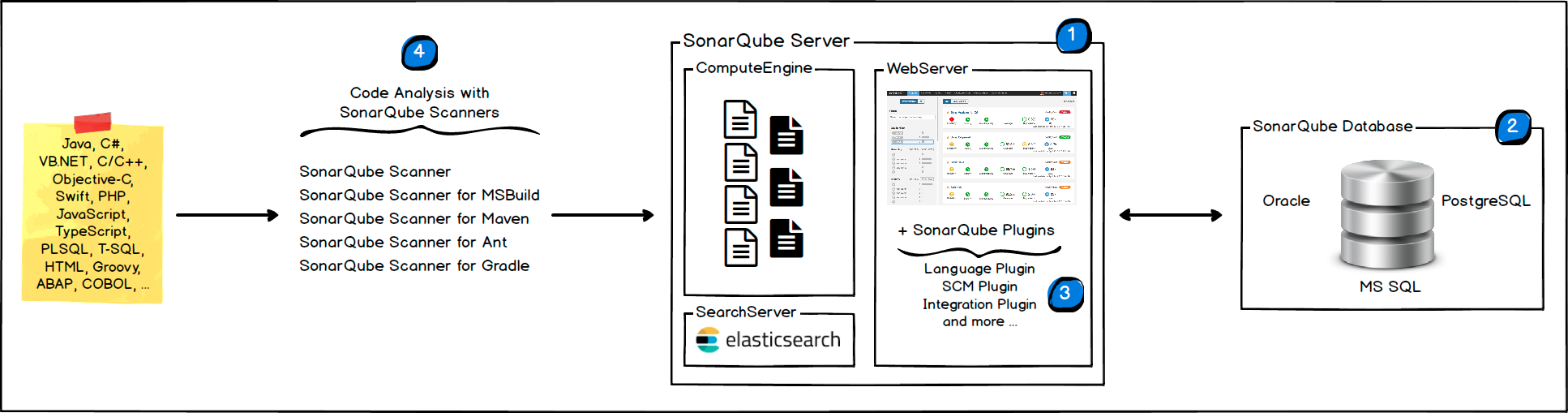
Figure 2 - SonarQube High Level Architecture Diagram
You can find a more detailed, low level architecture diagram on the SonarQube documentation
The SonarQube Platform is made of 4 components:
One SonarQube Server starting 3 main processes:
- Web Server for developers, managers to browse quality snapshots and configure the SonarQube instance
- Search Server based on Elasticsearch to back searches from the UI
- Compute Engine Server in charge of processing code analysis reports and saving them in the SonarQube Database
One SonarQube Database to store:
- the configuration of the SonarQube instance (security, plugins settings, etc.)
- the quality snapshots of projects, views, etc.
Multiple SonarQube Plugins installed on the server, possibly including language, SCM, integration, authentication, and governance plugins
One or more SonarScanners running on your Build / Continuous Integration Servers to analyze projects
SonarQube is using these external services:
- A Software Factory or mirror for deployment (PRE_001)
- Kubernetes with Flux (PRE_002, PRE_003)
- Persistent storage to store the configuration and cache (PRE_004)
- Ingress with TLS and DNS resolution associated for one entry point and certificates,
classically
https://sonarqube.SF-DOMAIN(PRE_005, PRE_006, PRE_007) - IAM (PRE_009); we recommend SAML SSO. See IAM
- Mail server (PRE_014); you can configure is using SonarQube mail server configuration documentation
- Database (PRE_015); we recommend Managed PostgreSQL database. Alternative can be internal to namespace provided PostgreSQL database that is provided with the product.
6.2.1 User management
This role matrix has been defined in TASD:
| User role | Description user role | Comment |
|---|---|---|
| UC1 | End user / Software engineer | Person that can write in a solution/product/project tenant |
| UC2 | Reader | Person that can read content of a solution/product/project tenant |
| UC3 | Tenant owner | Person that can administrate a solution/product/project tenant |
| UC4 | Software Factory application admin | Person that can administrate Software Factory instance components |
| UC5 | Software Factory system admin | Person that can administrate the deployment/upgrade of the Software Factory instance |
| UC6 | Software Factory tribe | Person that are delivering asset to deploy/upgrade a Software Factory instance |
Table 4 - List of roles defined in TASD.
For SonarQube, a tenant can be a project.
To gain access to SonarQube a user must be first created and given permissions by a Software Factory application admin that has the permission to Administer System. The user accounts can be local or external.
You can find everything related to managing user accounts in the documentation .
To know more about SAML please refer to the documentation. We recommend you configure external accounts through SAML, even if SonarQube is able to manage local users .
By default SonarQube comes with two user groups:
- sonar-administrators
- sonar-users
💡 Important: All users are automatically added to the sonar-users by default. This group can’t be changed.
We recommend to restrict the global permissions on this group and remove all the global permissions except the Create (Projects/Applications/Portfolios).
For the sonar-administrators group we recommend all global permissions to be checked as per the following table.
| Group | Global Permissions |
|---|---|
| sonar-administrators | Administer System |
| sonar-administrators | Administer>All Quality Gates |
| sonar-administrators | Administer>All Quality Profiles |
| sonar-administrators | Execute Analysis |
| sonar-administrators | Create>Projects |
| sonar-administrators | Create>Applications |
| sonar-administrators | Create>Portfolios |
| sonar-users | Create>Projects |
| sonar-users | Create>Applications |
| sonar-users | Create>Portfolios |
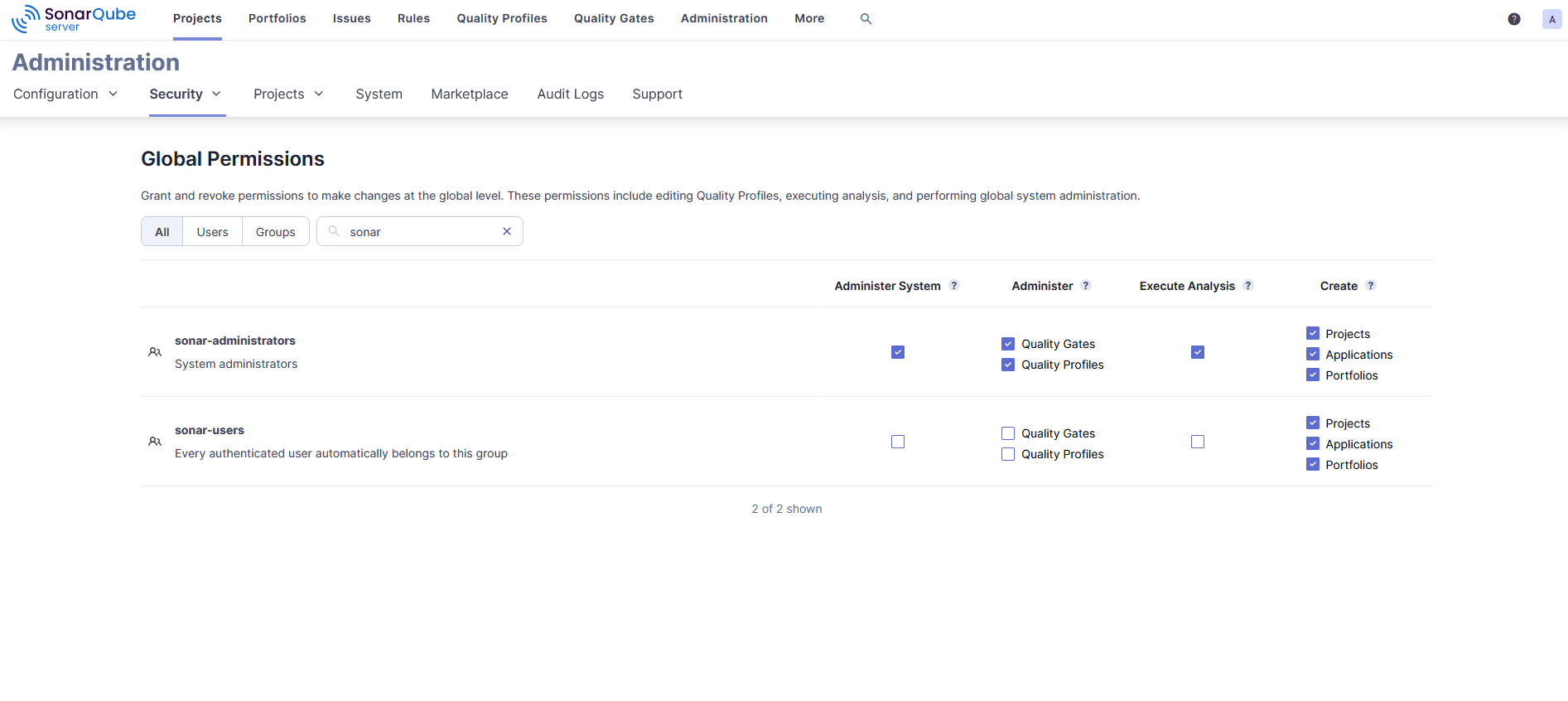
Figure 3 - SonarQube Global Permissions setup
Additionally you will need to change the defaut Permission Template that is applied at project creation to have NO project permissions checked for all user groups (including sonar-users) and to have ALL project permissions checked for the sonar-administrators as shown below.
| Group | Project Permission Template |
|---|---|
| sonar-administrators | Browse |
| sonar-administrators | See Source Code |
| sonar-administrators | Administer Issues |
| sonar-administrators | Administer Security Hotspots |
| sonar-administrators | Administer |
| sonar-administrators | Execute Analysis |
| sonar-users | No Permission |
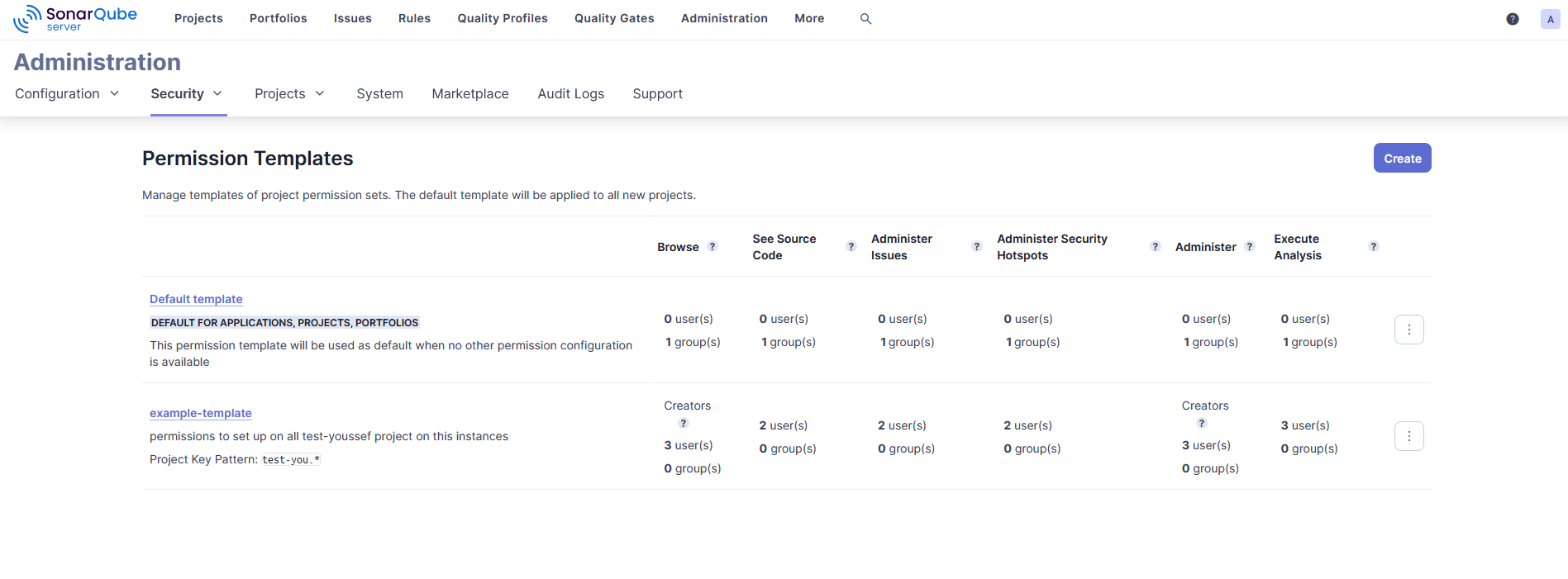
Figure 4 - SonarQube Permission Template setup
⚠️ Warning:
For existing projects we strongly advise to apply this new Permission Template otherwise wrong permissions are already assigned to your projects through the previous teplate.
As a security measure we recommend to change the name of the sonar-administrators group. This group should be mapped to the UC4 - Software Factory application admin and have all the global permissions.
⚠️ Warning:
We strongly advise you to follow these recommendations these recommendations for the sonar-users and the sonar-administrators default groups otherwise you expose the platform to high security risks due to a faulty RBAC model that translates into users being able to see and change projects they are not members of.
We recommend that per project, except the permissions enabled through the Permission Template for sonar-administrators, Tenant Owners (UC3) and End user / Software engineer (UC1) are granted the following permissions on their projects:
| Who | What | Project Permissions |
|---|---|---|
| UC3 | Browse own Project | Browse |
| UC3 | See source code of own Project | See Source Code |
| UC3 | Administer issues in own Project | Administer Issues |
| UC3 | Administer security hotspots in own Project | Administer Security Hotspots |
| UC3 | Administer own Project settings | Administer |
| UC3 | Setup and execute analysis on own Project | Execute Analysis |
| UC1 | Browse own Project | Browse |
| UC1 | See source code of own Project | See Source Code |
| UC1 | Administer issues in own Project | Administer Issues |
| UC1 | Administer security hotspots in own Project | Administer Security Hotspots |
| UC1 | Setup and execute analysis on own Project | Execute Analysis |
Table 5 - List of permissions per role.
6.2.2 RACI
In addition of global RACI (Responsible, Accountable, Consulted, Informed) of the SWaaP defined in TASD:
| Action | Description | UC4 | UC3 | UC2 | UC1 |
|---|---|---|---|---|---|
| Administrate SonarQube instance | R/A | ||||
| Create project | R/A | C | C | ||
| Assign Team to SonarQube project (project permission management) | R/A | I | I | ||
| Run sonar analysis | C | R/A | |||
| Analyze sonar results | R/A | R | R | ||
| Create a quality profile | R/A | R | I | ||
| Add quality profile owners | R/A | R | I | ||
| Custom quality profile management per project | R/A | I | |||
| Update, Assign, delete a custom quality profile to my project | R/A | R | |||
| Assign a quality profile to my project | R/A | ||||
| Create a quality gate | R/A | R | I | ||
| Add quality gate owners | R/A | R | I | ||
| Custom quality gate management per project | R/A | I | |||
| Update, Assign, delete a custom quality gate to my project | R/A | ||||
| Get access to SonarQube | R/A | ||||
| Manage permissions on my project | R/A | ||||
| Create a local group | R/A | ||||
| Manage users in a local group | R/A | ||||
| Delete users in a local group | R/A | ||||
| See users in a local group | R/A | ||||
| Manage permissions through groups | R/A | ||||
| Delete a project | R/A | ||||
| Manage (Create, Update, Delete) Application | R/A | ||||
| Manage (Create, Update, Delete) Portfolio | R/A |
Table 6 - List of RACI for the roles.
6.3 Delivery
Component is part of the Software Factory as a Product (SWaaP) delivery. See TASD for more details.
6.3.1 Latest Version
- Latest version editor
- SWaaP integration part
6.3.2 Version Chart 2025.1.7 / SonarQube 2025.1.7
- Component registry:
- Helm chart registry: in SF delivery From SonarQube
- SWaaP integration part
- Component Merge Request in Reference
- Release changelog
- K6 Test report: pipeline
- Security Report:
6.4 Infrastructure architecture
6.4.1 Software Factory API
Here is a list of services that can be integrated with the SonarQube.
| Ref. | Name | Required | Description |
|---|---|---|---|
| SFE01 | Flux → Git in Software Factory for deployment | Mandatory | Code in a Git server for deployment of the product |
| SFE02 | Flux → Registry in Software Factory for deployment | Mandatory | Registries with helm charts and containers for deployment of the product |
| SFE04 | IAM - SAML SSO | Highly recommended | Users should be authenticated using SAML SSO |
| SFE05 | End user notification (SMTP) | Highly recommended | Notification should be sent via mail using SMTP |
| SFE06 | Managed Databases (PostgreSQL) | Mandatory for production | Components store data in a PostgreSQL data base - Alternative is to use deploy embedded data base with the product |
| SFB05 | CLI or Runner → SonarQube | Mandatory | CLI or GitLab Runner should connect to SonarQube using SonarQube public API |
| SFE11 | User / applicative admin → SonarQube | Mandatory | User and applicative admin should use SonarQube UI or public API to access to SonarQube |
7. Operational and maintenance
In this chapter you will find strategy and policy. Detailed implementation will be described in the SCOM.
7.1 Life cycle policy
Cadence of version is described in the Product Lifecycle .
When upgrading major versions of SonarQube, keep in mind that:
- Business projects use SonarQube reports as an official document in their customer deliveries
- ED109 / DO178-C Business projects use SonarQube reports as a proof for Quality Assurance
- For any project, this is a breaking change for their pipelines
Hence, we recommend to follow this agenda:
- Announce the change 3 months prior to the production deployment date (you can use SWaaP release note for communication)
- Open a test instance on the target version 1 month prior to the production deployment date (this can be your dev or staging environment)
- Communicate to SonarQube users 1 month prior to the production deployment date that they can assess the impact on this new instance
- Once the version is released to production, shut down the test instance
7.2 License
We support and recommend the Enterprise Edition license.
The number of lines of code can be (in millions): 1, 5, 10, 20, 30, 50, 100 and above.
The price curve is logarithmic.
With Enterprise Edition, two non-production licenses are granted in addition to the production license.
7.3 Deployment
The component is deployed as a standard component using Flux and SWaaP packaging. See TASD for more details.
7.4 IAM
We support and recommend integration with IAM using SAML SSO. This configuration can be done in SonarQube admin UI
7.5 Scaling
It is possible to scale the pods. Currently we are using default scaling.
7.6 Backup / restore
We recommend to manage point in time restore at platform level. Like that it is possible to restore synchronously:
- volumes,
- database,
- and object storage.
For information, SonarQube proposes a backup procedure
7.7 Monitoring
Instance monitoring information are officially documented on the SonarQube Docs
7.8 Logging
For information related to Server logs, Server ID and system info you can access this official page