version v7.2.
For up-to-date documentation, see the
latest version.
Xray
18 minute read
1. Application
| Reference: | LLD – Software Factory as a Product - Xray |
| Type & Classification: | Product |
| Step: | Continuous Delivery |
| Bid/Project/Product Name & ID: | Software Factory as a Product (SWaaP) |
| Solution Level: | Digital product |
| Solution Name: | Software Factory as a Product |
| Solution description: | As deployed, create and update a Software Factory |
| Key Products/Solution: |
2. Introduction
2.1 Document purpose
This document is a low level design - LLD which aims to describe how the architecture evoked in high level design - HLD will be implemented. This document will describe the protocols used in the target architecture, how to implement them and any modifications made to their default behavior. Once validated by Thales, this document will then serve as a basis for the implementation of configurations on equipment.
2.2 Document scope
This document is not a manual and is not intended to replace the reference literature describing with great precision all network protocols.
The protocols used will be briefly described as well as the modifications made to their default behavior.
2.3 Referenced documentation
| Document reference | Document Name |
|---|---|
| TASD | Technical Architecture and Security Document of SWaaP |
| LLD-Artifactory | Low level design of Artifactory component |
| SCOM-Xray | Software Center Operation Manual of Xray |
3. Component general description
This component is part of Software Factory as a Product (SWaaP), and it is visible in the TASD .
JFrog Xray is an advanced security and compliance analysis tool designed to provide deep insights into the vulnerabilities and license compliance issues within software artifacts. As a complementary product to JFrog Artifactory, Xray integrates seamlessly to enhance security measures across the software development lifecycle (SDLC). It offers continuous scanning and monitoring of all artifacts stored in the repository, including those within Docker images, Java archives, and more, ensuring comprehensive protection and compliance from code to production.
Xray is completely integrated with Artifactory . It can be managed using:
- Artifactory UI
- Xray APIs and JFrog CLI.
4. Functional & Business Requirements
No formal list of requirements has been expressed by clients. It is designed and developed based on business use cases.
4.1 Feature summary
JFrog Xray addresses several critical needs in the software development and operations landscape:
Security Vulnerabilities: Early detection of security vulnerabilities in dependencies and binaries. Xray ensures that issues are identified as soon as they are declared, preventing insecure code from progressing through the SDLC.
License Compliance: Continuous monitoring for license violations to ensure that all software components comply with legal and organizational standards, avoiding potential legal risks associated with the use of open-source software.
Impact Analysis: Provides detailed impact analysis to understand how a vulnerability in one component affects others, allowing for informed decision-making and prioritization of remediation efforts.
Automated Governance: Facilitates automated and continuous governance and auditing of software artifacts, ensuring compliance with security policies and standards throughout the SDLC.
Comprehensive Scanning: Recursively scans all layers of software artifacts, including nested components, to provide a thorough analysis of potential security and compliance issues.
4.2 Target Population
JFrog Xray is targeted towards several key user groups within the software development and IT operations ecosystem:
DevSecOps Teams: Professionals who integrate security practices within the DevOps process, ensuring security and compliance are maintained throughout the development pipeline.
Security Analysts: Individuals responsible for identifying, analyzing, and mitigating security threats within the organization’s software environment.
Compliance Officers: Personnel tasked with ensuring that the organization adheres to legal and regulatory requirements related to software usage and open-source licenses.
Software Developers: Developers who need to ensure that their code and dependencies are secure and compliant from the earliest stages of development.
IT Operations Teams: Teams managing the deployment and maintenance of software in production environments, who require assurance that deployed applications are secure and compliant.
4.3 Prerequisites
Every prerequisites of the product are applicable to this component. In detail:
- Kubernetes and Flux. See the TASD §4.1.2 Prerequisites for supported version.
- PostgreSQL 14 or later - see database integration .
4.4 Variability
SWaaP is managing no variability on Xray.
5. Architecture decision record
Here is a list of decisions:
| Ref. | Date/Status | Description |
|---|---|---|
ADR-XRAY-001 | 2022/09 | Add Xray as a component of the Software Factory as a Product (SWaaP). See ADR004 in TASD . |
Table 3 - List of architecture decision record.
5.1 ADR-XRAY-001: Add Xray as a component of the product
5.1.1 Status: Accepted
- Creation of sf-package in September 2022
- Recorded in SWF organization in April 2023
5.1.2 Context
- See ADR004 in TASD .
5.1.3 Decision
- Introduce Xray in the product from its current implementation on TDP C2 & TDP C3-CA
5.1.4 Consequences
6. Architecture description
6.1 Business architecture and allocation to services
You will find in Figure 1 business architecture for software code and CI/CD engineering allocated to services:

Figure 1 - Business architecture allocated to services.
Note: in dash, external items.
6.2 Application architecture
Physical architecture is described in Figure 2 :
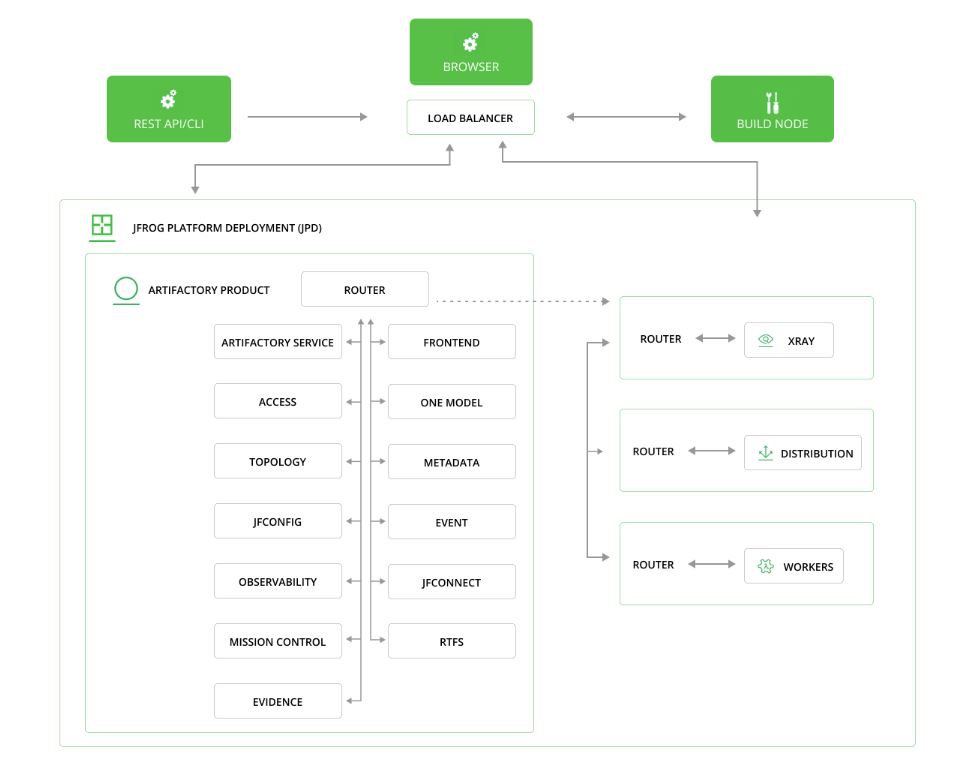
Figure 2 - Logical Architecture of Xray
Xray is using these external services:
- A Software Factory or mirror for deployment (PRE_001).
- Kubernetes with Flux (PRE_002, PRE_003).
- Persistent storage to store the configuration and cache (PRE_004).
- Database (PRE_015); we recommend Managed PostgreSQL database. Alternative can be internal to namespace provided PostgreSQL database that is provided with the product.
- Integration with Artifactory.
As Xray is integrated to Artifactory, there is no new need of ingress entry point, IAM or mail server.
6.2.1 Main Features and Functionality
Early Detection: Xray identifies security vulnerabilities and license violations as early as the dependency declaration stage and blocks builds with security issues from development. Automated and continuous governance and auditing of software artifacts and dependencies throughout the software development lifecycle from code to production.
Self-hosted, Cloud, Hybrid or Multi-Cloud Solution: Xray is available self-hosted (self-managed) and on the cloud. Xray Cloud is hosted on your choice of Amazon Web Services, Google Cloud Platform, or Microsoft Azure, allowing you to maintain infrastructure with automated server backups, free updates, and guaranteed uptime.
Deep Recursive Scanning: Xray recursively scans artifacts, builds, and Release Bundles in your system, drilling down to analyze even the smallest binary component that affects your software. For example, when analysing a Docker image, if Xray finds that it contains a Java application it will also analyze all the .jar files used in this application.
Continuous Impact Analysis: Xray analyzes how an issue in one component affects all others in your company and displays the chain of impact in a component graph, allowing you to have a clear understanding of the impact one component has on another. It is continuously updated with new security vulnerabilities, performing an impact analysis to determine all artifacts affected by the issue.
Native Integration with Artifactory: Xray is the only security scanning tool that is natively integrated with JFrog Artifactory. As a complementary product to JFrog Artifactory, Xray has access to the wealth of metadata Artifactory stores which, combined with deep recursive scanning, puts Xray in a unique position to analyze the relationships between binary artifacts and provide radical transparency into your component architecture to reveal the impact that a vulnerability in one component has on any other.
Vulnerability Database: Xray comes with JFrog’s vulnerabilities database, which integrates data from vulnerability databases and security advisories including NVD, GitHub, Ubuntu, Debian, Red Hat, PHP, and is enriched by the JFrog Security Research team to give more specific and detailed information on the vulnerability, its use cases, and options for mitigation.
Custom API-Driven Automation: Through an open REST API, Xray lets you define a custom regimen of automated analysis for all components in your system.
Dependencies Scan: Scan your sources’ dependencies using the JFrog CLI for vulnerabilities and license violations.
On-Demand Binary Scan: Point to a binary in your local file system and receive a report that contains a list of vulnerabilities and licenses for that binary using the JFrog CLI.
SBOM: Enable DevSecOps engineers to understand and analyze the dependencies of their components. To learn more, see Xray SBOM Report.
JFrog Security CVE Research and Enrichment: JFrog’s security research team helps you with enhanced analysis on CVE findings in a way that allows you to focus on the most important issues with the capability of finding the best resources invested in fixing them. For more information, see JFrog Security CVE Research and Enrichment.
Component’s Operational Risk: Provides you with additional data on OSS components that will help you gain insights into the risk level of the components in use. For more information, see Components Operational Risk.
JFrog Advanced Scans: Includes IaC security, secrets detection, contextual analysis, and detection of OSS library and services misconfiguration or misuse. For more information, see JFrog Advanced Security.
Universal Artifact Analysis: In line with JFrog’s universal approach, JFrog Xray performs artifact analysis for all major package formats across the CI/CD pipeline. Xray understands each package type, knows how to unpack it, and what every underlying layer contains.
6.2.2 Following package formats with new formats added regularly are supported
| Package | Description |
|---|---|
| Go | Xray scans and indexes your Go Registries, Go Modules and Go packages including recursive analysis, component graph integration and providing detailed metadata information. |
| Conda | Xray scans Conda packages that contain Python packages and their dependencies for security vulnerabilities, license compliance and operational risk. |
| PHP | Xray recursively scans your PHP Composer packages in your registries, Zip files or Docker/OCI Containers whether they are local or remote. Xray also checks for any dependencies in your PHP builds. |
| Maven | Scan your Maven project dependencies using Xray and view vulnerabilities directly from within the IntelliJ IDE, with the JFrog IntelliJ Maven Plugin. |
| Bower | Xray scans your Bower packages and performs impact analysis to keeps all components in your organization safe from any violations. |
| Gradle | Recursively scan the different layers of your Gradle packages and their dependencies, and use Xray’s component graph to display the impact of any detected issues on your services and applications. |
| Ivy | Xray scans your Ivy packages and performs impact analysis to keeps all components in your organization safe from any violations. |
| SBT | Recursively scan your SBT packages and identify all components in your organization that are affected by a vulnerability, and monitor components for new issues and vulnerabilities that are detected. |
| npm | Xray identifies each JavaScript file within your npm packages and performs matching and analysis on each one to ensure that your npm application is safe to use. Learn more about the npm integration with Xray (npm audit). |
| NuGet | Xray scans NuGet packages, recursively going through the layers of dependencies to discover issues and vulnerabilities at any depth. |
| PyPI | Xray recursively opens the different layers of your Python packages and their dependencies, discovering any issues and vulnerabilities that may affect your organization. |
| Docker | Xray identifies every component contained within every layer of your Docker images. This includes identifying the packages deployed on the OS in the base image layer. |
| OCI | Xray identifies every component contained within every layer of your OCI images. This includes identifying the packages deployed on the OS in the base image layer. Helm charts and WASM as OCI artifacts are not supported. |
| Debian | Xray identifies the Debian packages deployed on your Debian or Ubuntu OS that’s running on the base layer of your Docker or OCI containers. Each component is scanned for issues and vulnerabilities giving you maximum visibility into your software dependencies. |
| RPM | Xray identifies the RPM packages deployed on your RedHat or CentOS OS that’s running on the base layer of your Docker or OCI containers. Each component is scanned for issues and vulnerabilities giving you maximum visibility into your software dependencies. |
| RubyGems | Xray provides transparency into your software architecture, recursively scanning RubyGems packages through all levels of dependency to discover issues and vulnerabilities. |
| Alpine | Xray scans and indexes your Alpine Repositories and Alpine Packages, including recursive analysis, component graph integration, and providing detailed metadata information. |
| Conan | Xray scans Conan Packages and Conan Builds for issues and vulnerabilities. Xray identifies these issues in the conanmanifest.txt file. For more information, see Conan and C/C++ Support in Xray. |
| C/C++ | Xray scans C/C++ dependencies in C/C++ builds to identify vulnerabilities in these builds. For more information, see Conan and C/C++ Support in Xray. |
| Google Distroless Images | Xray scans Google Distroless Images that only contain your application and its runtime dependencies. |
| Cargo | Xray scans Rust Cargo packages. Xray supports SCA for Rust binary ELF files (compiled with cargo-auditable) providing their SBOM including licenses and vulnerabilities. When in Docker or OCI containers, Rust binaries can also be scanned for contextual analysis. |
| CRAN | Xray scans CRAN packages (R packages) to detect security vulnerabilities, ensure license compliance, and evaluate operational risks. |
| Hugging Face ML | Xray supports SCA for Hugging Face ML models, detects their license, and if the model is identified as malicious (shown as “Malicious Packages”). Malicious model detection covers the models that are susceptible to deserialization attack: Keras H5, Paddle, PyTorch, Pickle, Numpy, JobLib, Dill, TensorFlow SavedModel, Zip-based models (ex. MLeap). |
| Terraform state | Applicable only with JFrog Advanced Security. JFrog Advanced Security scans Terraform state in the Artifactory Terraform BE repository for Cloud services configuration issues (see JFrog Advanced Security: Exposure Scanning Categories). |
| Chainguard Images | Xray supports Chainguard image scanning for SBOM and SCA. |
6.2.3 Sub components
The Xray service consists of several microservices, each responsible for different aspects of artifact scanning and analysis:
Indexer
Responsible for the indexing process, which includes:
- Recursively extracting artifacts and builds
- Collecting artifact metadata from accompanying files
- Building an artifact components graph representation
Persist
Responsibilities include:
- Matching the given components graph with public component information
- Completing component naming
- Storing graph data and component metadata in PostgreSQL
Policy Enforcer
Responsible for generating violations by matching analysis data with Xray Watches and Policies.
Analysis
Responsible for enriching component metadata such as vulnerabilities, licenses, and versions.
Server
Responsibilities include:
- Generating violations by matching analysis data with watches and policies
- Hosting the API and UI endpoints
- Running scheduled jobs such as the database synchronization process
Router
Responsible for communication between all the microservices and cross-product.
6.2.4 User management
The user management for Xray is done in Artifactory. Artifactory permits to manage roles with a finer granularity. For more information please consult the Artifactory Users Management
6.2.5 RACI
This role matrix has been defined in TASD:
| User role | Description user role | Comment |
|---|---|---|
| UC1 | End user / Software engineer | Person that can have Read/Deploy/Delete/Annotate resources within Repositories, Builds and Release Bundles tenant |
| UC2 | Reader | Person that can have Read resources within Repositories, Builds and Release Bundles tenant |
| UC3 | Tenant owner | Person that can have Read/Deploy/Delete/Annotate/Manage Xray Metadata/Manage resources within Repositories, Builds and Release Bundles tenant |
| UC4 | Software Factory application admin | Person that can administrate Software Factory instance components |
| UC5 | Software Factory system admin | Person that can administrate the deployment/upgrade of the Software Factory instance |
| UC6 | Software Factory tribe | Person that are delivering asset to deploy/upgrade a Software Factory instance |
For Xray, a tenant is a repository.
In addition of global RACI (Responsible, Accountable, Consulted, Informed) of the SWaaP defined in TASD:
| Action | Description | UC4 | UC3 | UC2 | UC1 |
|---|---|---|---|---|---|
| General Xray Configuration | R/A | I/C | |||
| Ignore Global Violation | R/A | I | |||
| Manage Xray Data | R/A | I/C | |||
| Manage Reports | R/A | I | R | ||
| Manage Watches | R/A | I | |||
| Manage Policies | R/A | I | |||
| Xray Messages and Monitoring | R/A |
6.3 Delivery
Component is part of the Software Factory as a Product (SWaaP) delivery. See TASD for more details.
6.3.1 Latest Version
- Latest version editor
- Component registry : TBC on main branch
- Helm chart repository
- SWaaP integration part
6.3.2 Version Chart 103.137.31 / Xray 3.137.31
Component registry:
Helm chart registry: in SF delivery From JFrog
K6 Test report: pipeline
Security Report:
6.4 Infrastructure architecture
6.4.1 Software Factory API
Here is a list of services that can be integrated with Xray.
| Ref. | Name | Required | Description |
|---|---|---|---|
| SFE01 | Flux → Git in Software Factory for deployment | Mandatory | Code in a Git server for deployment of the product |
| SFE02 | Flux → Registry in Software Factory for deployment | Mandatory | Registries with helm charts and containers for deployment of the product |
| SFE06 | Managed Databases (PostgreSQL) | Highly recommended | Components store data in a PostgreSQL data base - Alternative is to use deploy embedded data base with the product |
| SFB03 | Runner or CLI → Xray | Mandatory | GitLab Runner or CLI should connect to Xray using Xray public API - NextGen-CICD can manage this API |
| SFE08 | User applicative admin → Artifactory (and Xray) | Mandatory | User and applicative admin should use Artifactory UI or public API to access to Artifactory or Xray |
| SFI04 | Xray → Artifactory | Mandatory | Xray is integrated in Artifactory (it is accessible through Artifactory UI) |
6.4.2 Database integration
Xray supports the following versions of PostgreSQL:
- 16.x (from version 3.107)
- 15.x (from version 3.78.9)
- 14.x
- 13.x (from version 3.18)
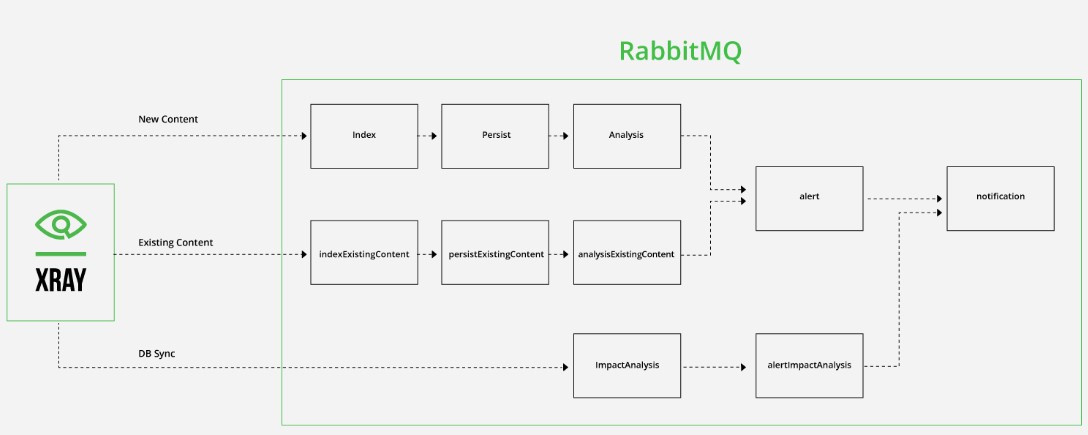
6.4.3 RabbitMQ integration
RabbitMQ is installed as part of the Xray installation for every node. In a High Availability (HA) architecture setup.
Below is a low-level architecture diagram showcasing all the components, their nature, their location, and technical flows.
How JFrog Xray uses RabbitMQ Xray has multiple crucial roles, such as scanning, impact analysis, and database sync. These roles require simultaneous flows to be processed by the different Xray services. Xray uses RabbitMQ to manage these different flows while tracking communication between services.
RabbitMQ manages 3 main types of queues in Xray:
6.4.3.1 New Content
Responsible for events related to new content added to the system. For example, uploading a new Artifact to a repository that is marked for indexing -> will create a message in the Index queue.
6.4.3.2 Existing Content
Responsible for the content which already exists in the system. For example, reindexing a repository will send messages to this queue.
6.4.3.3 Retry
Failed messages will be sent to this queue and will stay there for a TTL. Once the TTL has elapsed, the messages will be returned to the original queue. The queue names are defined by the service name and the queue type (new content queues name do not have any suffix).For example – ‘indexExistingContent’, and ‘alertRetry’ while ‘persist’ has no suffix. This naming convention is useful when debugging RabbitMQ queues since the queue name is predictable.
7. Operational and maintenance
In this chapter you will find strategy and policy. Detail implementation will be described in the SCOM.
7.1 Life cycle policy
Cadence of version is describe in the Product Lifecycle .
7.2 License
As Xray is integrated with Artifactory, it’s inherit Artifactory license.
7.3 Deployment
The component is deployed as a standard component using Flux and SWaaP packaging. See TASD for more details.
7.4 IAM
We support and recommend integration with IAM using SAML SSO. This configuration is done in Artifactory .
7.5 Scaling
Xray system requirements depend on the size of your environment, specifically the number of indexed artifacts and artifacts/builds processed per day.
| Number of Indexed Artifacts | Processor Requirements | Memory Requirements | Disk Space Requirements |
|---|---|---|---|
| Up to 100k | Xray and DB: 6 cores | Xray and DB: 24 GB | Xray and DB: 500 GB (SSD, 3000 IOPS) |
| JFrog Advanced Security: 6 cores | JFrog Advanced Security: 24 GB | JFrog Advanced Security: 500 GB (SSD, 3000 IOPS) | |
| Up to 1M | Xray (x2 nodes): 4 cores | Xray (x2 nodes): 8 GB | Xray (x2 nodes): 300 GB |
| DB: 8 cores | DB: 32 GB | DB: 500 GB (SSD, 3000 IOPS) | |
| JFrog Advanced Security (x2 nodes): 8 cores | JFrog Advanced Security (x2 nodes): 24 GB | JFrog Advanced Security (x2 nodes): 300 GB | |
| Up to 2M | Xray (x3 nodes): 6 cores | Xray (x3 nodes): 12 GB | Xray (x3 nodes): 300 GB |
| DB: 16 cores | DB: 32 GB | DB: 1 TB (SSD, 3000 IOPS) | |
| JFrog Advanced Security (x4 nodes): 8 cores | JFrog Advanced Security (x4 nodes): 24 GB | JFrog Advanced Security (x4 nodes): 300 GB | |
| Up to 10M | Xray (x3 nodes): 8 cores | Xray (x3 nodes): 24 GB | Xray (x3 nodes): 300 GB |
| DB: 16 cores | DB: 64 GB | DB: 2.5 TB (SSD, 3000 IOPS) | |
| JFrog Advanced Security (x8 nodes): 8 cores | JFrog Advanced Security (x8 nodes): 24 GB | JFrog Advanced Security (x4 nodes): 300 GB | |
| Over 10M | Contact JFrog Support for sizing requirements |
- Processor Requirements: Specifies the number of CPU cores required for Xray, Database (DB), and JFrog Advanced Security components.
- Memory Requirements: Specifies the RAM (memory) required for Xray, Database (DB), and JFrog Advanced Security components.
- Disk Space Requirements: Specifies the disk space requirements, including SSD type and IOPS (Input/Output Operations Per Second) for Xray, Database (DB), and JFrog Advanced Security components.
Note: For environments with over 10 million indexed artifacts and 50,000 artifacts/builds per day, contact JFrog Support for specific sizing requirements.
Xray system limitation based on the maximum xray-2xlarge.yaml (biggest size) file
Note: This size is intended for large organizations. It can be increased with adding replicas:
autoscaling:
  enabled: true
  minReplicas: 3
  maxReplicas: 12
  targetCPUUtilizationPercentage: 200
  targetMemoryUtilizationPercentage: 800
7.6 Backup / restore
In the official JFrog documentation, the backup and restore processes for Xray are not referenced in a separate topic. JFrog Xray uses the same PostgreSQL database as the Artifactory product, for which the vendor provides detailed information on these processes.
We recommend to have point in time restore principle set at platform level to get consistency regarding database and volumes backup at platform level.
Data corruption is managed by the COTS and can be detecting watching logs. Can contact editor support through the product support
In case of irremediable data loss/alteration, we have to restore from the same point in time backup database and volumes.
7.7 Monitoring
Please check documentation from Operations Guide
Official documentation JFrog:
7.8 Logging
7.9 Operating procedures
Please check documentation from Operations Guide
Annex
References from official JFrog-Xray Docs
Supported Installation Methods:
Other links: