version v7.2.
For up-to-date documentation, see the
latest version.
Docker image pull
2 minute read
Pulling Docker Images from Artifactory
Docker Hub limits the number of Docker image pulls to 100 per 6 hours per IP address for anonymous users.
GitLab Instance Runners provided by the Software Factory use a single IP to pull images from Docker Hub.
When the pull rate limit is reached, the following error message will appear:
ERROR: Job failed:
prepare environment: waiting for pod running: pulling image "image:tag":
image pull failed [...] 429 Too Many Requests - Server message: toomanyrequests: You have reached your pull rate limit.
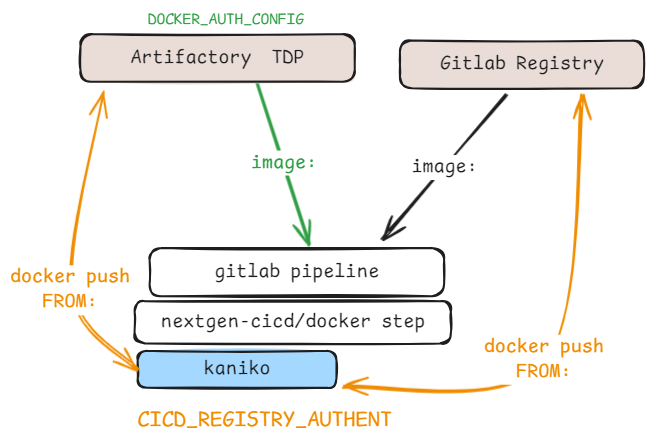
To be able to pull Docker images (image: in .gitlab-ci.yml) from private registries
(for example from artifactory.thalesdigital.io), you need to set up the CICD GitLab variable
DOCKER_AUTH_CONFIG.
- Select your platform to know the url of your Artifactory and log into it with your service account
- Select the public Docker repository
- In the top right corner, select Set Me Up
- Select Generate Token & Create Instructions
- At the bottom of the page, copy the last snippet that contains “auths”
- Define a CI/CD variable in the GitLab UI
- Key:
DOCKER_AUTH_CONFIG - Value: Paste the snippet from Artifactory and replace
"https://artprod.mycompany"by url of your instance.
- Key:
This should look like (for TDP C2):
{
  "auths": {
    "https://artifactory.thalesdigital.io" : {
      "auth": "<artifactory_secret>",
      "email": "<service_account_email_address>"
    }
  }
}
You can also generate the <artifactory_secret> value as below :
echo -n "<SVC_USERNAME>:<SVC_ARTIFACTORY_TOKEN>" | base64 -w 0
<SVC_USERNAME>: Service Account username<SVC_ARTIFACTORY_TOKEN>: Artifactory token generated with the service account
For more information, refer to the offial documentation How to configure Artifactory Docker private repo in the GitLab Pipeline to pull the base image
You could now [Configure your job] to pull the image from Artifactory in your .gitlab-ci.yml file:
image: <artifactory_url>/docker/<image>:<tag>
NextGen CI CASE
CICD_REGISTRY_AUTHENTis the variable used by kaniko in NextGen CICD Docker Step to be able to pull (FROM:inDockerfile) and push built Docker images.
For example :
- To be able to build a Docker image on top of a Thales Trusted Container Base Images , you need to add Artifactory credentials.
- To be able to pushed built image to GitLab registry, you need to add GitLab credentials.
- Key:
CICD_REGISTRY_AUTHENT - Value :
json { "auths": { "artifactory.thalesdigital.io": { "auth": "<artifactory_secret>" }, "${CI_REGISTRY}": { "username": "${CI_REGISTRY_USER}", "password": "${CI_REGISTRY_PASSWORD}" }, } } <artifactory_secret>: SeeDOCKER_AUTH_CONFIGCI_REGISTRY,CI_REGISTRY_USERareCI_REGISTRY_PASSWORDpredefined GitLab variables .
- Key: