version v7.2.
For up-to-date documentation, see the
latest version.
Artifactory mirroring
3 minute read
For a global overview of repositories, mirroring concepts, Smart Remote repositories, and cache behavior, refer to the main Artifactory documentation .
This page focuses only on the practical “how to” to configure repository mirroring.
Why mirror Artifactory repositories?
Artifactory repository mirroring allows you to reuse a source repository from another Artifactory instance through a remote (typically Smart Remote) repository.
With mirroring, you can:
- Ensure high availability and redundancy of your repositories
- Speed up download times via local caching
- Use a single Artifactory URL for convenience
- Centralize artifact management within your team’s preferred Artifactory
- Expose less sensitive repositories to more sensitive environments
- Leverage existing IS/IT trust relationships with the target Artifactory
For more on the overall concept, see the mirroring section in the main documentation.
Example: Mirroring Process
The diagram below shows a typical process for mirroring a repository from a source Artifactory
to a target Artifactory using a remote (Smart Remote) repository.
This is the flow you will implement when following the procedure below.
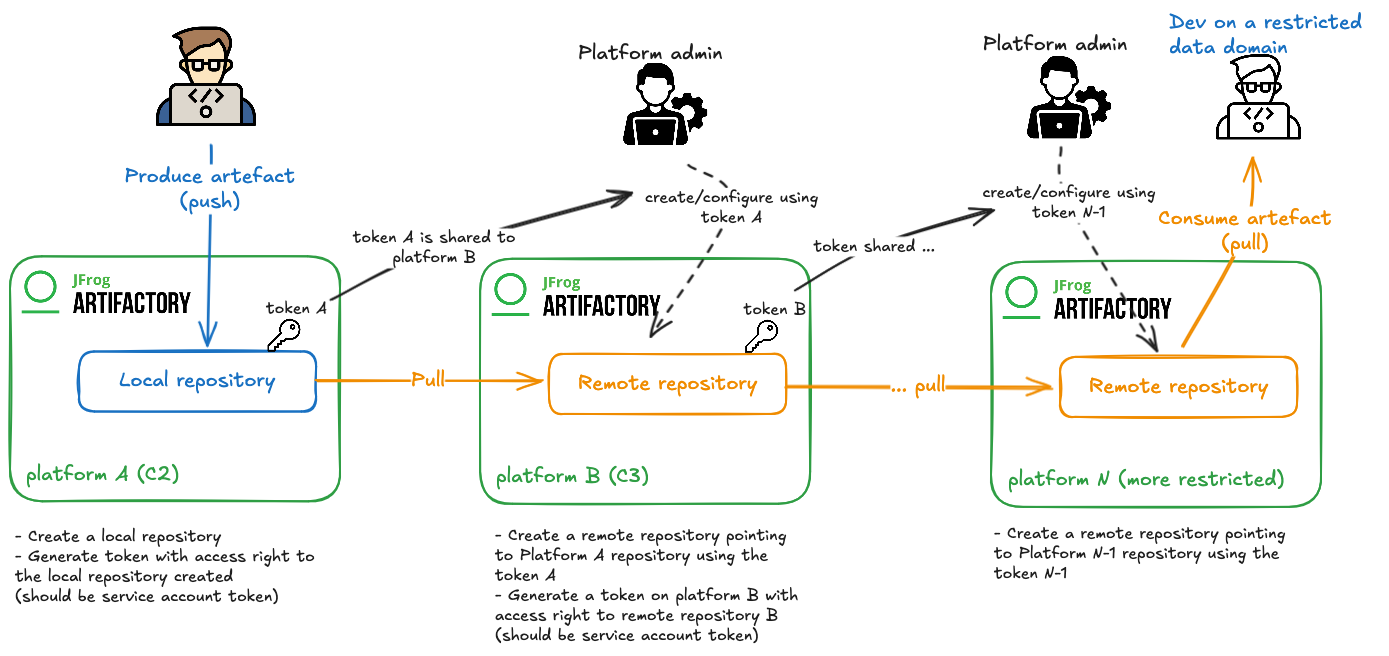
Prerequisites
You will need:
- A source Artifactory (where a local repository already exists or will be created)
- A target Artifactory (where you want to consume the mirrored content)
- A service account on the source Artifactory with at least read permissions on the relevant repository
Platform/instance administrators may need to assist with some of these steps depending on your permissions.
How to mirror two Artifactory repositories
- Create a local repository on the source Artifactory (if it doesn’t already exist).
- Create a service account on the source Artifactory.
- Grant the service account read permission on the repository to be mirrored.
- Generate an identity token for the service account.
- On the target Artifactory, create a remote repository
pointing to
the source repository URL and authenticate with the token created at step 4.
- If the remote points to another Artifactory, a Smart Remote will typically be created by default.
Now, any artifact pushed to the source repository is accessible (read-only) from the target remote repository.
For multi-hop scenarios (chained/incremental mirroring through several Artifactory instances), repeat these steps for each source-target pair.
How to synchronize TDP Artifactory with another Artifactory
- Request a service account on TDP Artifactory if you do not already have one.
- Ensure the service account has read permissions on any private repositories you want to mirror, if not you can manage permission to grant the correct rights.
- On your target Artifactory, configure a remote repository pointing to the specific TDP repository and use the token from your TDP service account for authentication.
Reverse mirroring (from other Artifactory instances into TDP) is also possible using proxying/caching, but requires a network route in the required direction. For more, see the Artifactory caching and proxying guide.
How to mirror two Artifactory repositories with Projects
If your source and target repositories are both in Artifactory Projects, and you have a suitable service account:
- In the source project, select or create the repository to be mirrored.
- Generate an access token for the service account
(
Administration > User Management > Access Tokensin the source project). - In the target project, create a remote repository pointing to the source repository, authenticating with the generated token.
- Confirm browsing and downloading from the remote succeeds as expected.
The available mirroring options depend on data classification and your platform’s
security requirements.
Please consult your platform documentation
: