version v7.2.
For up-to-date documentation, see the
latest version.
Polarion/Tests integration
4 minute read
Concept
Import data from automatic test execution result files to produce conformity matrixes
---
config:
  theme: neutral
  layout: elk
---
graph LR
    %% Sous-graphes
    subgraph Polarion
        R(Requirement)
        TC(Test Case)
        TR(Test Run)
    end

    subgraph Gitlab-ci
        AT(automatic tests)
    end

    %% Relations
    AT -->|"<optional> import"| TC
    AT -->|"import"| TR
    R --> TC
    TC --> TR


    class Polarion,Gitlab-ci system;
    class R,TC,TR,AT item;
Test results can be imported using two XML file formats:
- JUnit file format
- XML from Vivaldi (See Distributed Systems document)
JUnit-Like Format for Test Results
JUnit is a commonly used format for reporting test results in XML format. Polarion supports the import of JUnit XML reports, enabling the automatic creation or update of test runs and test results within Polarion. + This document primarily focuses on the JUnit-like format and elaborates on the structure necessary for importing into Polarion.
There are two methods for importing JUnit XML test results into Polarion:
- To import the structure of XML test results, the default Polarion features can be utilized.
- To import properties such as traceability to requirements or tests, the in-house importer can be used.
In both import procedures, test runs are created and linked to either new or existing test cases.
Junit-Like XML Structure
<testsuite name="Test Suite Name" tests="total_tests" failures="total_failures">
    <testcase classname="TestClass" name="TestMethod" time="execution_time">
        <failure message="failure message" type="failure type">Failure details</failure>
    </testcase>
    <testcase classname="TestClass" name="AnotherTestMethod" time="execution_time"/>
</testsuite>
Junit-Like XML Structure with custom properties
<testsuite name="Test Suite Name" tests="total_tests" failures="total_failures">
    <testcase classname="TestClass" name="TestMethod" time="execution_time">
        <failure message="failure message" type="failure type">Failure details</failure>
        <properties>
            <property name="verifies" value="REQ-002,REQ-003"/>
        </properties>
    </testcase>
    <testcase classname="TestClass" name="AnotherTestMethod" time="execution_time"/>
</testsuite>
<testsuite>: Represents the test suite, containing metadata such as the name, total number of tests, and total number of failures.<testcase>: Defines individual test cases with the class and method names, execution time, and an optional failure message if the test fails.<failure>: Optional. Present when a test case fails, with details of the failure.
Importing JUnit-Like Test Results with default importer
Graphical User Interface
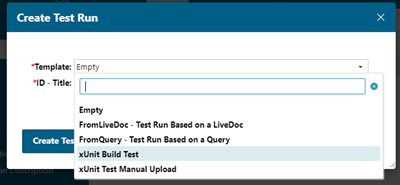
Test runs for xUnit import can be created using the Polarion user interface.
Upon the creation of the test run, results can be imported by selecting the ‘upload results’ button.
SOAP API
Polarion provides SOAP API support to import test results from XML files. + Use the following endpoint for importing test results:
POST /polarion/import/test-results
Content-Type: multipart/form-data
Request body:
file: The JUnit-like XML file containing the test results.
The API will map the test results to corresponding test cases in Polarion. If test cases do not already exist, new test cases will be created based on the JUnit XML data.
Usage example in a gitlab-ci.yml :
stages:
  - test
  - import_to_polarion

test_job:
  stage: test
  script:
    - echo "Running tests"
    - run_tests_command > junit-results.xml
  artifacts:
    paths:
      - junit-results.xml

import_to_polarion_job:
  stage: import_to_polarion
  script:
    - curl -X POST -F "file=@junit-results.xml" https://polarion.dss.thalesdigital.io/polarion/import/test-results
Importing JUnit-Like Test Results with in house Importer
This importer supports more features of JUnit XML format:
- Traceability through properties
- Test steps (the import to Polarion is not yet possible nextgen-cicd/catalog/step/polarion-ci#21)
- Extract properties from console output
The importer is available in [NextGen CICD importer].
Example of YAML using the importer:
include:
  - project: nextgen-cicd/config
    file: config.yml
  - project: 'nextgen-cicd/release'
    ref: 'master' # master reference can be replaced with the released version
    file: 'step/polarion-ci.yml'

variables:
  CICD_POLARION_JUNIT_FILE: junit.xml
  CICD_POLARION_URL: https://server/polarion
  # CICD_POLARION_TOKEN: set as project secret variable
  CICD_POLARION_PROJECT_ID: project_id

stages:
  - import

import:
  stage: import
  extends: .thales_dsaap3_import_junit
The documentation is available in NextGen CICD importer documentation .
Exchange format for Test Results
The exchange file format is inherited from Vivaldi, an in-house testing tool that was previously a component of the Orchestra solution.
This exchange file format (also called pivot format and documented in Junit-Like XML Structure ) is tool-agnostic and provides a comprehensive syntax for detailing test suites, cases, and results.
This format is still supported through the importer available in SYS Releases .