The site that you are currently viewing is a static version of the Software Factory
documentation delivered with the
version v7.2.
For up-to-date documentation, see the
latest version.
How to Enable GitLab Secret Detection
Enable GitLab Secret Detection on your project to identify secrets committed to your repository.
2 minute read
For more information, see Secret Detection practice
.
Configure your pipeline
Add the following to your .gitlab-ci.yml and push to your repository:
include:
  - template: Jobs/Secret-Detection.gitlab-ci.yml
Tip
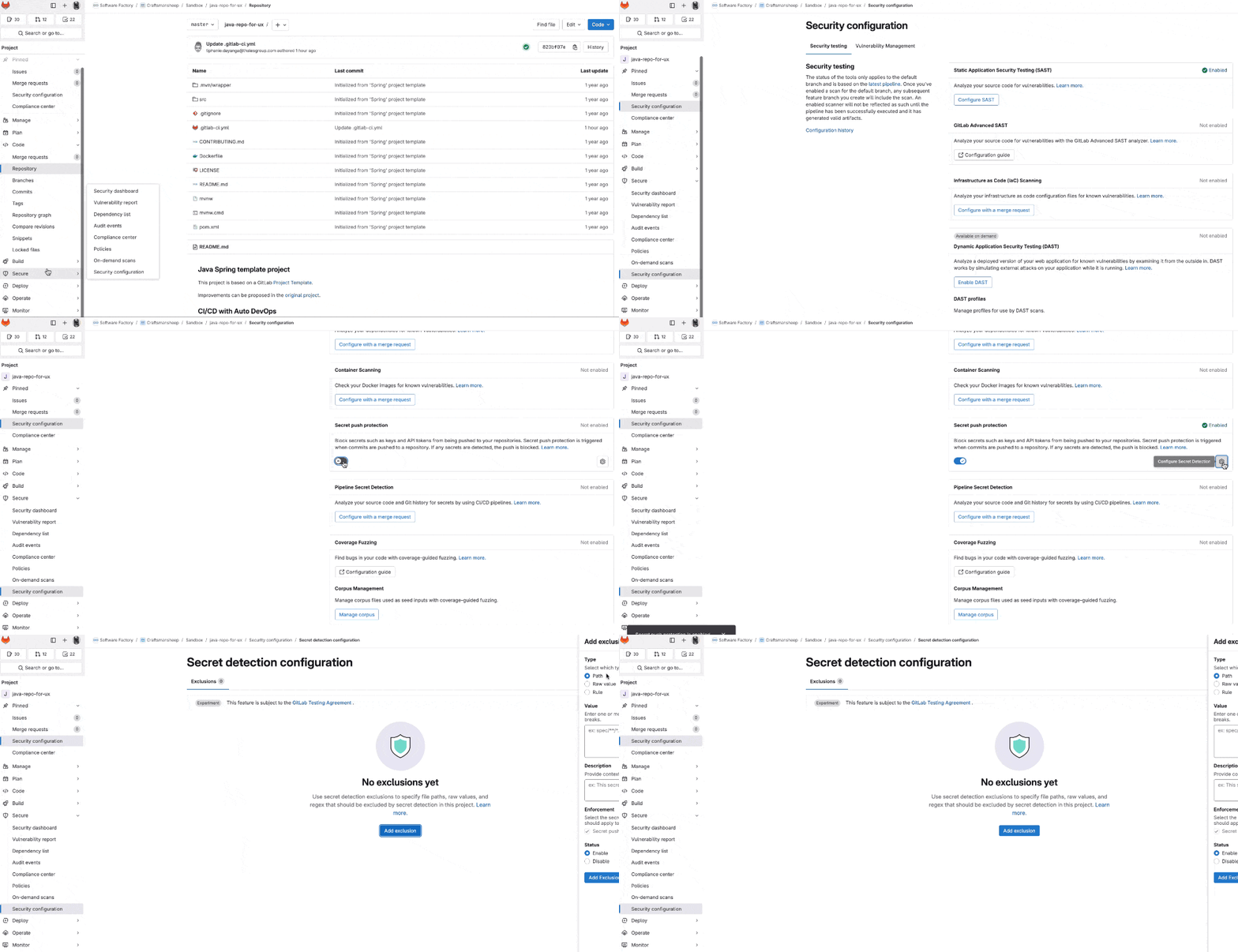
To avoid cloning the repository locally, GitLab can generate this change for you. Requires Maintainer role. Go to Secure > Security configuration , find the Pipeline secret detection row, and select Configure with a merge request .
Extend the detection ruleset
This feature requires GitLab Ultimate — the version delivered on this platform.
To add custom secret patterns to the detection ruleset:
- Create a
.gitlab/directory at the root of your repository if it does not already exist. - Create a file named
secret-detection-ruleset.tomlin this directory. - Add your custom rules:
[extend]
path = "/gitleaks.toml"

[[rules]]
description = "My custom API Key"
id = "my-custom-api-key"
keywords = ["apikey", "api_key"]
regex = "(some-regex-for-this-rule)(?i)[a-z0-9]{32}"
Enable Secret Push Protection
Secret Push Protection blocks commits containing secrets before they reach the repository.
Requires GitLab Ultimate. Secret Detection must be enabled on your project first.
Navigate to your project’s repository:
- In the left sidebar, go to Secure > Security configuration .
Enable Secret Push Protection:
- Find the Secret Push Protection toggle and switch it on.
(Optional) Add exclusions:
- Select the configuration icon to add exclusions based on paths, raw values, or specific rules.
To verify, try pushing a file containing a dummy secret — GitLab should block the push if the feature is configured correctly.