version v7.2.
For up-to-date documentation, see the
latest version.
Continuous Integration
6 minute read
Overview
Continuous Integration (CI) is a software development practice that has revolutionized how teams build and deliver software.
At its core, CI involves frequently integrating code changes into a shared repository, typically several times a day.
Each integration is verified by an automated build and test process, allowing teams to detect and address issues early in the development cycle.
Continuous Integration is a development practice where team members frequently integrate their work, often daily, resulting in multiple integrations per day.
Each integration is verified by an automated build (including test) to detect integration errors as quickly as possible – Martin Fowler
In today’s fast-paced software development environment, teams need to deliver high-quality code rapidly and consistently. Continuous Integration provides a framework to achieve this by promoting frequent code integration, automated testing, and immediate feedback.
This practice helps teams maintain a healthy codebase, reduce integration problems, and accelerate the development process.
Key Benefits
Implementing Continuous Integration offers significant advantages for development teams:
Early Bug Detection: Bugs are caught early when they are easier and less expensive to fix.
Improved Code Quality: Regular integration and automated testing encourage developers to write cleaner, more modular code.
Faster Time-to-Market: CI reduces the time between writing code and deploying it to production.
Reduced Integration Conflicts: Frequent integration minimizes major conflicts when merging code changes.
Continuous Feedback: Developers receive immediate feedback on their changes, allowing them to address issues promptly.
Fundamental Principles
Software systems are complex, and an apparently simple, self-contained change to a single file can have unintended side effects on the overall system. When a large number of developers work on related systems, coordinating code updates is a hard problem, and changes from different developers can be incompatible.
The practice of Continuous Integration was created to address these problems.
To successfully implement Continuous Integration, several foundational practices must be in place:
- Put Everything in Version Control
A developer should be able to build and run a product from a minimal environment, using only the repository’s resources.
This includes source codes, tests, database schema, configuration files, deployment configurations: everything-as-code.
See Git practices and Source Code Management for more details.
- Automate the Build
Automating the process of transforming source code into a running system is crucial for efficiency and error reduction.
The Software Factory provides GitLab CI/CD as the primary automation platform.
- Make the Build Self-Testing
To ensure bugs don’t infiltrate the product in a Continuous Integration environment, a comprehensive test suite is necessary, creating what is referred to as Self Testing Code.
This implies that a programmer’s task isn’t complete until they have automated tests to verify the new feature’s functionality.
Learn more about Shift-Left Testing practices.
- Everyone Pushes Commits To the Mainline Every Day
Continuous Integration is about frequent communication between developers, ensuring changes are compatible. Developers should commit to the mainline daily, if not more frequently, after passing build tests.
See Git Branching and Merge Request practices.
- Every Push to Mainline Should Trigger a Build
Continuous Integration requires every commit to be verified in a reference environment, using a Continuous Integration Service like GitLab CI/CD or GitLab Runner .
This service monitors the mainline and performs a full build with every commit. Only when this build is successful is the integration considered complete.
- Fix Broken Builds Immediately
Maintaining a healthy mainline is crucial and fixing a failed build is a high-priority task, often best addressed by reverting the latest commit to return to the last-known good build.
- Keep the Build Fast
Continuous Integration relies on rapid feedback, making a lengthy build process detrimental. The goal should be a build time of ten minutes or less, achieved through setting up multiple builds done in sequence.
This includes a quick commit build for immediate feedback and slower, more comprehensive tests run on additional machines.
Parallelism and cloud environments can also expedite build times. See GitLab Pipeline best practices for optimization strategies.
CI Workflow in Software Factory
The recommended workflow logic is illustrated in the figure below.
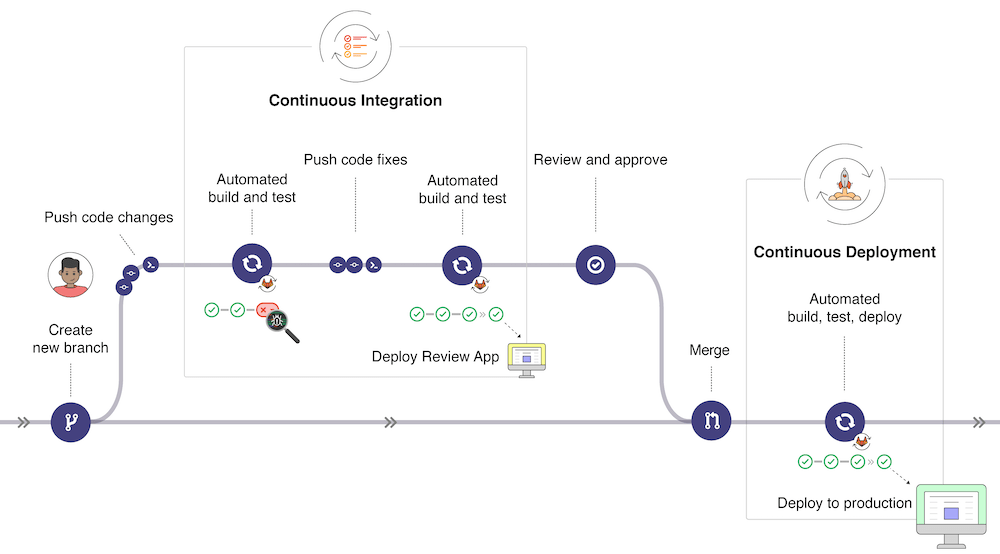
Each development is carried out in a branch of the repository. When pushing to the server, automatic checks are performed through the CI pipeline. As long as errors are detected, the code is not integrable into the main branch (or integration branch or development branch, depending on the chosen branching model) of the repository.
This verification process, often referred to as a quality gate, serves as a checkpoint to ensure that the code meets predefined quality standards before integration.
Quality Gate Concept
A quality gate is a set of conditions that must be met before code can be merged. In the Software Factory, quality gates can be enforced through:
- SonarQube Quality Gates - Code quality and security thresholds
- GitLab Merge Request Policies - Pipeline success requirements and approval rules
- Test Coverage Requirements - Minimum coverage thresholds
The CI Pipeline: Heart of Automation
The sequencing of all automatic actions performed on the code when pushed to the remote is called a pipeline.
A pipeline is the automated sequence of steps executed on every code push. It ensures your code meets quality and security standards before integration.
Pipeline configurations may vary based on branch type (main, development, merge request) and project specifics.

Typical Pipeline Stages
The following stages represent a comprehensive CI pipeline in the Software Factory. Not all stages are required for every project - adapt based on your needs:
Build & Compilation
Compile source code and create binaries using GitLab CI/CD for pipeline orchestration, GitLab Runner to execute build jobs, and NextGen CI/CD for reusable build templates.
See GitLab Pipeline best practices for optimization strategies.
Unit Testing
Execute unit tests, integration tests, and functional tests. See Shift-Left Testing for early testing approach.
Code Quality Analysis
Detect bugs, code smells, and maintainability issues using SonarQube for static code analysis and quality metrics.
See also Code Review and Technical Documentation practices.
Security Analysis
Static Application Security Testing (SAST)
Analyze source code for security vulnerabilities without executing it.
See SAST Practice for detailed comparison and tool recommendations.
Software Composition Analysis (SCA)
Scan dependencies and third-party components for vulnerabilities and license compliance.
See SCA Practice for comprehensive SCA guide and available tools.
Secret Detection
Detect hardcoded secrets, API keys, passwords, and tokens in code.
See Secret Detection Practice for implementation details.
Packaging & Artifact Creation
Create deployable artifacts such as packages, Docker images, or binaries. Build artifacts are stored in Artifactory , the enterprise artifact repository manager for final storage and distribution (Docker images, binary packages, libraries, release bundles).
GitLab Registry can be used to store Docker images temporarily for pipeline use, while Artifactory provides centralized, versioned artifact storage with retention policies.
See Artifact Cleanup for retention policies and storage management.
Staging Deployment (Optional)
Deploy to staging environment for end-to-end testing using GitLab CI/CD for deployment automation.
Dynamic Application Security Testing (Optional)
Test running application for runtime vulnerabilities.
See DAST Practice for implementation guide and best practices.
Pipeline Optimization Strategies
It may be relevant to disable certain checks on certain branches to speed up the feedback loop.
Development Branch Pipeline:
- Keep checks quick and lightweight
- Fast feedback for frequent pushes
- Essential tests only
Merge Request Pipeline:
- Execute maximum checks
- Provide complete information for code review
- Include all quality gates
See GitLab Pipeline best practices for detailed optimization guidance.
Going Further
Key References
Pipeline Examples
The following projects provide complete pipeline examples:
Tutorials
Step-by-step guides to implement your first pipeline:
How-To Guides
Practical instructions for specific CI tasks: