version v7.2.
For up-to-date documentation, see the
latest version.
Conventional Comments
3 minute read
This article is inspired by How to write a more thoughtful code review .
Context
Feedback is essential. It plays a key role in learning and growth. However, providing and receiving feedback can be challenging. In this article, you’ll discover how conventional comments and comment templates in GitLab can help you create a culture of feedback.
Adopt conventional comments
To provide effective and thoughtful feedback, you can try and adopt conventional comments. Conventional Comments is a standard that uses labels to format comments in a way that improves communication and understanding.
The strongly suggested labels are:
praisenitpicksuggestionissuetodoquestionthoughtchorenote
The specific use of each of these labels is described in the standard .
It is important to leave at least one praise comment. While trying to suggest improvements, this part can often be overlooked. The praise comment should be sincere, though. It should not be used to make a feedback sandwich .
For example, a praise comment could look like this:
👏 praise: This new feature is thoroughly tested!
The other comments should be actionable. For example, a chore comment could look like this:
🔧 chore: Lint the code to adhere to our coding conventions.
To provide more context, you can add decorations. For example, a suggestion comment about security could look like this:
💡 suggestion (security): I think that we could shorten the lifetime of this token
Adopting new practices is not easy and can be intimidating. To reduce this mental burden, you can rely on tools like GitLab.
Leverage comment templates in GitLab
To avoid having to look up the labels every time you want to leave a comment and provide feedback, you can leverage comment templates in GitLab .
Create a template for every single label suggested by conventional comments. Use GitLab Flavored Markdown (GLFM) to format the templates.
For example, you can create the following template for a praise comment:
- Title
praise | conventional comments
- Content
**:clap: praise**:
You can use these templates on your own, but you can also use these templates at project-level or group level to improve adoption.
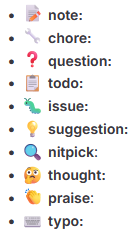
Hereafter, you will find a list of common comment labels used in conventional comments:
* **:memo: note:**
* **:tools: chore:**
* **:question: question:**
* **:clipboard: todo:**
* **:bug: issue:**
* **:bulb: suggestion:**
* **:mag: nitpick**:
* **:thinking: thought:**
* **:clap: praise**:
* **:keyboard: typo:**
Below, you will find an example of how these comments are rendered in GitLab: