version v7.2.
For up-to-date documentation, see the
latest version.
Merge Requests
6 minute read
Objectives & Benefits
Merge requests (MRs) are a critical component in the software development life cycle (SDLC) specially in the GitLab workflow .
They allow developers to:
- Propose code changes from feature branches to be merged into the main branch.
- Get feedback from team members as part of code review workflows.
- Enable approval and check gates before integrating changes into the main codebase.
Merge Requests improve regular collaboration and team spirit because they serve as educational moments and foster team effort.
In an MR, not only is the developer responsible for delivering the User Request, but all MR actors contribute to the process:
- Collaboration and Knowledge Sharing: Encourages collaboration and knowledge sharing among team members.
- Quality Assurance: Ensures that only thoroughly reviewed and tested code gets merged, maintaining the quality and integrity of the codebase.
- Traceability: Provides a detailed history of changes, enhancing the traceability and auditability of the codebase.
A “merge request” should not be confused with the
git mergecommand.
MR workflow
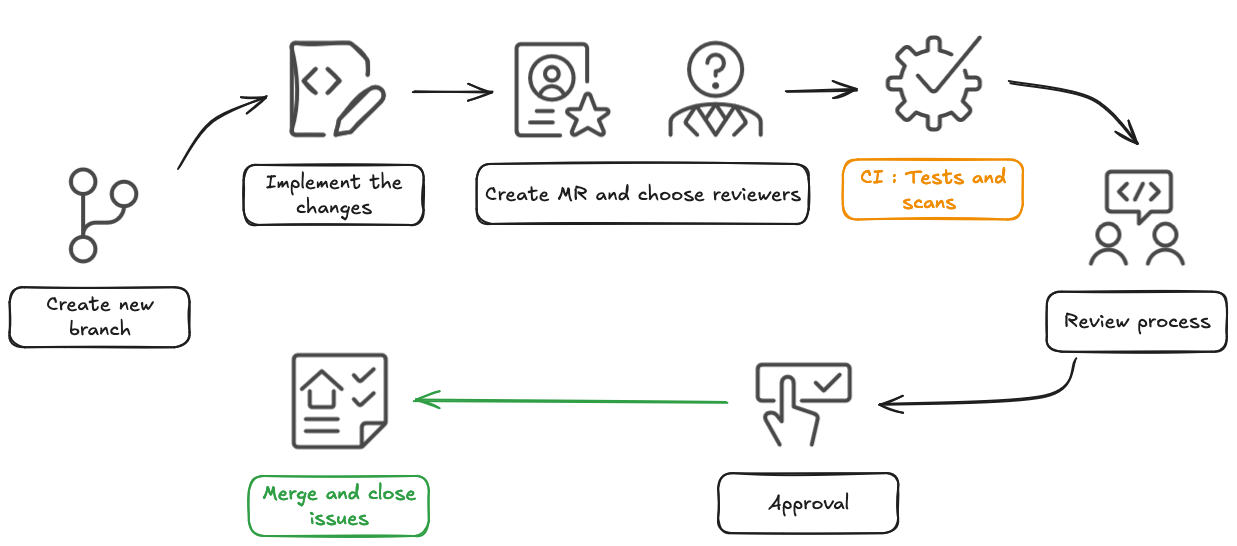
- Create a New Branch: Start by creating a new branch to implement the required changes.
- Make Changes: Develop your feature and commit your changes in the feature branch.
- Create MR: Ensure it is correctly filled with detailed description and linked to an issue.
- Choose appropriate reviewers Select reviewers who have the necessary knowledge
- Automated CI Verification: Verify your changes against unit tests and scans analysis.
- Review process: Engage actively with reviewers, get feedback, and iterate on your changes as needed.
- Approval: Obtain from code owners and/or team leads, once the MR meets all requirements.
- Final Check and Merge: Perform a final check and merge the changes into the main branch.
- Close Linked issues: Close any linked issues to maintain clarity and organization in your project management.
Merge Request Guidelines
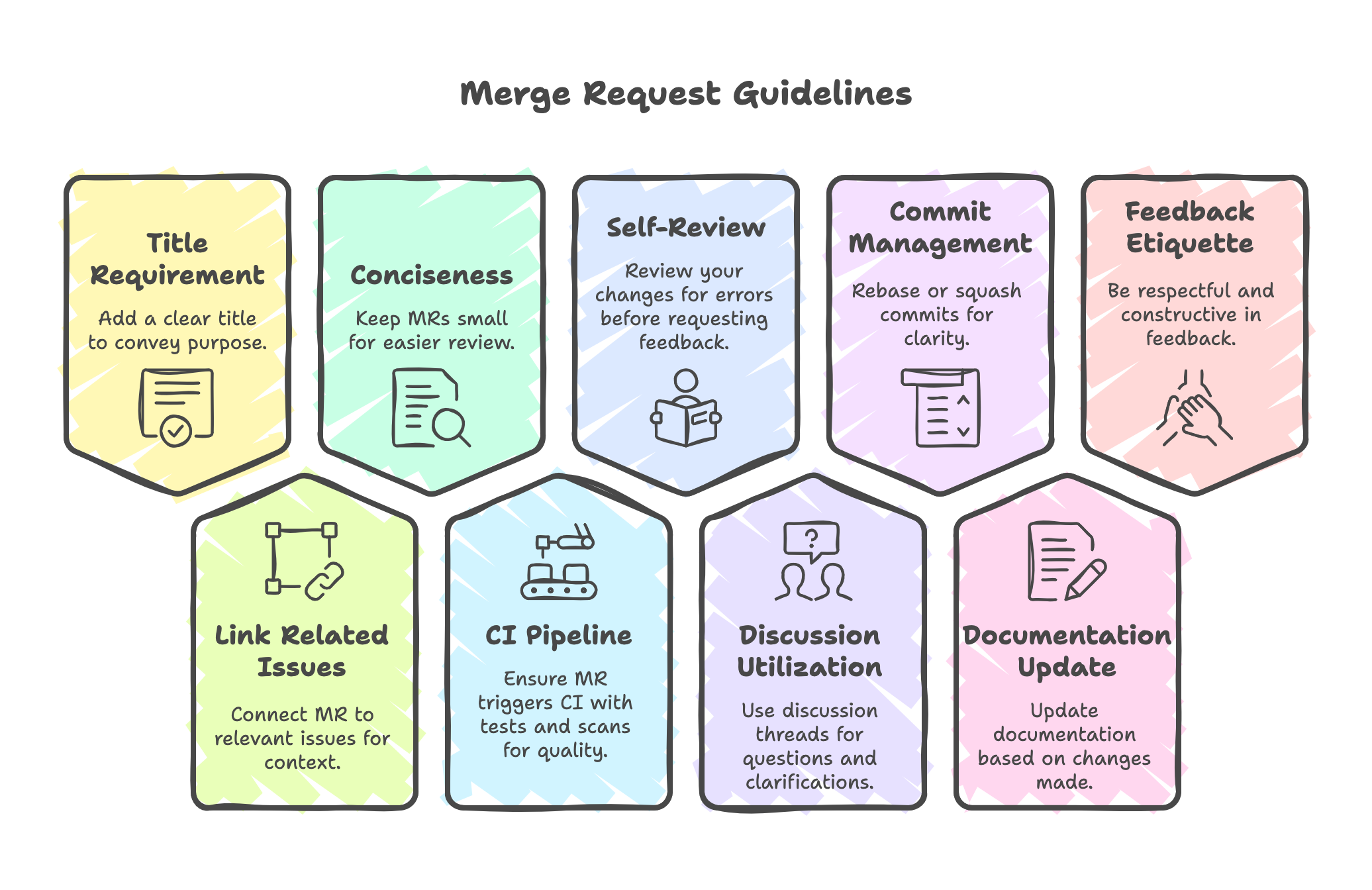
- Add a concise and descriptive title for your MR to clearly convey the purpose of the changes.
- Link your MR to any related issues, tickets, or user stories for better traceability and context.
- Make your MR as small and concise as possible. Large MRs are harder and slower to review.
- Ensure your MR triggers the CI pipeline with unit testing and relevant scans to maintain code quality.
- Before requesting reviews, do a self-review of your changes. Check for typos, unnecessary code, and adherence to coding standards.
- Utilize the discussion thread to ask questions and clarify any doubts
- Consider rebasing or squashing commits to maintain a clean and readable commit history.
- Ensure any relevant documentation is updated based on the changes made.
- Be respectful and constructive when giving and receiving feedback. Find more on code review page.
Common pitfall
Merge too soon
As long as you are working on your MR, you can set the merge request as a draft to compile your thoughts, get feedbacks during the work in progress phase. This will prevent anyone to merge accidently your MR as the button merge will be disabled.
Once it’s ready, selecting “Ready for review” sets the PR to normal mode and sends notifications for further changes.
Skipping the functional review
Merge request and code review are an opportunities to discuss serval aspects to the change. It’s not only a technical review. It’s primarly to discuss functional impacts and the business requirements. The technical review is highly important but should not be the sole purpose of MR or code reivews.
Late Merge
The longer a feature branch diverges from the main branch, the higher the chance of encountering merge conflicts when it’s eventually merged.
As the main branch evolves, the differences between the branches grow. Resolving merge conflicts can be complex, time-consuming, and error-prone and leads to “Integration hell”.
Merge Request (MR) with GitLab
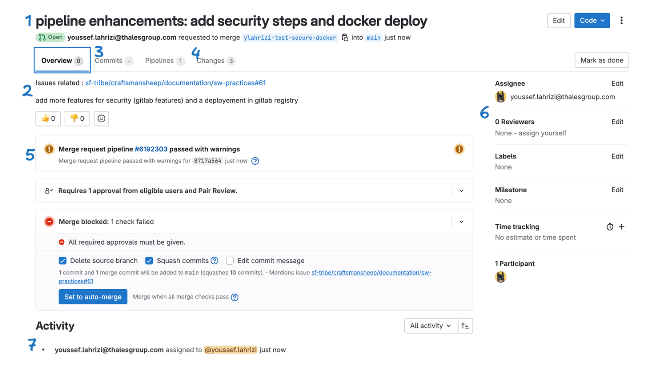
- Title: summarizes the MR, with it current state, the author and the branch.
- Description should contains detailed explanation of what the MR does, including the problem it solves, the solution implemented
- Commits: list of commits included in the MR, each commit typically shows the commit message, author, and date.
- Changes: shows the specific changes made (additions, deletions, and modifications), highlighted to make it easy to see what’s been altered.
- Pipeline Status: The status of the CI/CD pipeline associated with the MR.
- Reviewers and Assignees: people assigned to review the MR and those responsible for progressing it (assignees).
- Activity: historic of discussion threads, required and received approvals …
Merge Request Advanced settings
Merge Method
gitGraph
   commit id:"c1"
   commit id:"c2"
   branch feature
   commit id:"f1"
   commit id:"f2"
   checkout main
   commit id:"c3"
You can configure Merge Method at project level in Settings » Merge Requests » Merge Method.
You have three options:
- Merge Commit
This option forces the use of the 3-way merge method
by using the git merge --no-ff command, ensuring that a merge commit is always created,
even if the merge could be resolved with a fast-forward.
gitGraph
   commit id:"c1"
   commit id:"c2"
   branch feature
   commit id:"f1"
   commit id:"f2"
   checkout main
   commit id:"c3"
   checkout main
   merge feature id:"M"
- Merge Commit with Semi-linear History
This method ensures that your source branch is up-to-date with the target branch before performing a three-way merge. If the source branch has fallen behind the target branch, GitLab will prompt you to rebase first. Once your branch is current, GitLab creates a merge commit using the 3-way merge method , maintaining a clear project history.
gitGraph
   commit id:"c1"
   commit id:"c2"
   commit id:"c3"
   branch feature
   commit id:"f1'"
   commit id:"f2'"
   checkout main
   checkout main
   merge feature id:"M"
- Fast-forward Merge
This method attempts to perform a fast-forward merge whenever possible, directly moving the target branch pointer to the latest commit of the source branch. If a fast-forward merge is not possible because the source branch has diverged from the target branch, GitLab will prompt you to rebase first.
gitGraph
   commit id:"c1"
   commit id:"c2"
   commit id:"c3"
   commit id:"f1'"
   commit id:"f2'"
Merge checks
The “Merge Checks” feature allows you to enforce certain conditions that must be met before a merge request (MR) can be merged.
Types of Merge Checks:
- Pipeline Must Succeed: Require that the CI/CD pipeline passes successfully.
- All thread must be resolved: Verify that there are no unresolved discussions.
- Status checks: Invoke an external API as part of the pipeline process.
This checklist encourages the authors, reviewers, and maintainers of merge requests (MRs) to confirm changes were reviewed and performed in relation to technical defition of done. It could include : quality, performance, reliability, security, observability, and maintainability.
Pleae visit GitLab Merge Request page to learn more.
Merge commit message template
Using commit message template can help enforce consistent and informative commit messages for your project’s merge requests.
Merge request approvals
Enforce that merge requests require approval from one or more designated users or groups before they can be merged.
Within your team, there team members who have substantial experience with a specific technology, product feature, area of the codebase.
For instance, if your Merge request includes changes on database, then you can make as an approval a database maintener. For assistance with security scans or comments, include the application Security member.
More on approval rules
Use automated CI pipeline
By integrating scanning tools like static analysis or code analysis into pipelines to identify vulnerabilities or code standard issues, you can allow to focus on functional and architectural aspect of human review.
Create a pipeline, and add as much possible automated scans :
- SonarQube , for analyzing code quality for efficient, readable, and usable code, detecting code smells and non-compliance with coding rules,
- Coverity , as enhanced static Application Security Testing “SAST”
To be continued
Properly reviewing merge requests is key for maintaining code integrity while enabling collaboration.
✅ You can learn more on how to give effective feedback code review .
✅ You can also find some useful how to .