version v7.2.
For up-to-date documentation, see the
latest version.
Branching
5 minute read

Introduction
A branch is a diverging point in the codebase that allows for parallel development. It enables developers to work on different features, fixes, or updates independently of the main code line, known as the main branch.
Branching is a fundamental concept in Source Code Management (SCM) systems. In the Software Factory, we use Git as our SCM tool, which provides powerful and lightweight branching capabilities.
To gain a deeper understanding of Git’s branching model, please read Git Branching in a Nutshell .
Branching Strategies
By creating branches, developers can isolate their work from the main codebase, ensuring that new features do not interfere with the stable version of the project.
It also allows teams to work on different features or fixes simultaneously and enable experimentations and innovations.
Here is a simple branch model:
- main: Long-living branch for releasing and production.
- develop: Long-living branch for development integration.
- feature or hotfix: Short-lived branches for specific tasks.
Branch Flow Strategies
A branching strategy aims to
- Enhance productivity.
- Enable parallel development.
- Organize structured releases.
- Provide a clear workflow for changes.
There are several well-known and approved branching strategies available. Although these strategies are often named after Git-based platforms (Gitflow, GitHub Flow, GitLab Flow), they represent workflow patterns that apply to any modern SCM system.
Select a branching strategy that aligns with your team’s size, project complexity, and workflow:
Gitflow
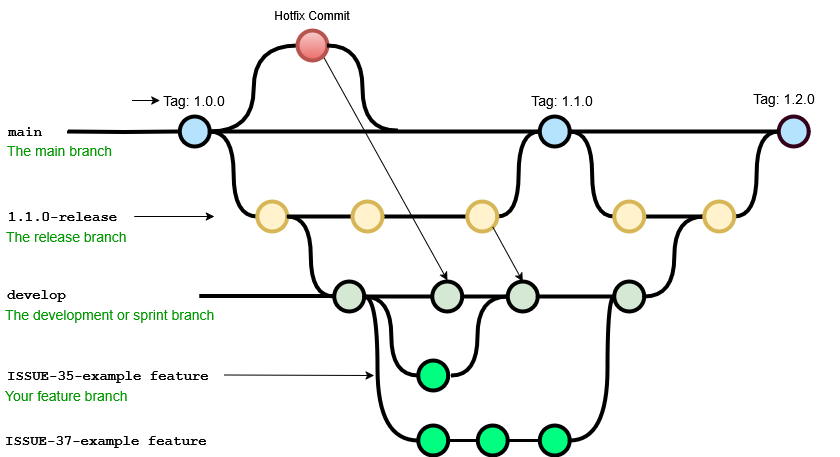 Ideal for projects with scheduled release cycles and a need for multiple types of developmental branches.
This strategy is ideal for large teams and managing multi-product versions. However, it can be complex with many branches, slowing development and release frequency, and necessitates team consensus and commitment.
Structure: main, develop, feature, release, and hotfix branches.
For more information, you can check this Detailed Guide .
Github Flow
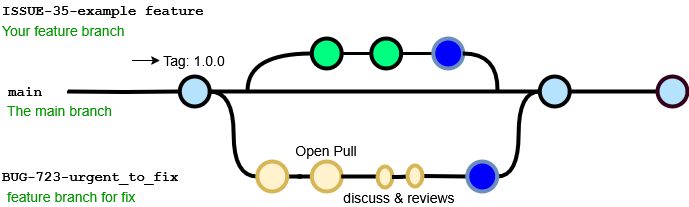
This approach offers faster feedback and shorter production cycles, making it perfect for asynchronous work in smaller teams and more agile than Git-Flow.
However, merging feature branches as production-ready can introduce bugs without thorough testing, long-lived branches complicate processes, it’s challenging to scale for larger teams due to merge conflicts, and supporting multiple release versions concurrently is difficult.
For more information, you can check this Detailed Guide .
GitLab Flow
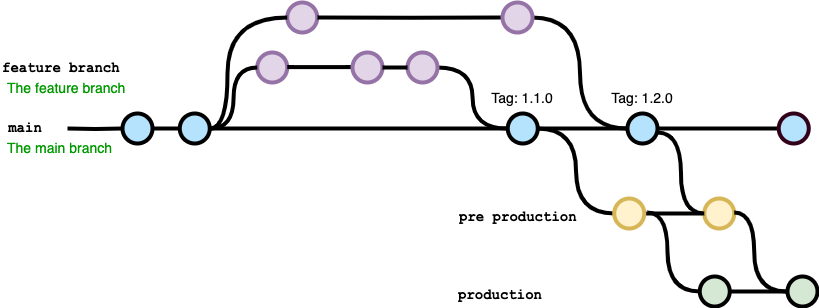
Best suited for environments with continuous integration/continuous deployment (CI/CD) and frequent deployments to multiple environments.
This method efficiently manages multiple release versions or stages, is simpler than Git-Flow, and emphasizes quality with a lean approach. However, complexity rises when maintaining multiple versions, and it is more intricate than GitHub-Flow.
Emphasizes merging into main with environment-specific branches.
For more information, you can check this Detailed Guide .
Trunk-Based Development
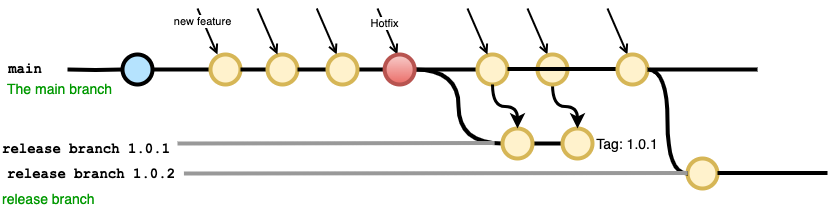
Recommended for projects that require rapid iteration, continuous integration, and minimal merge conflicts. Developers work on a single main branch with feature flags and continuous integration.
This approach promotes DevOps and unit testing best practices, boosts collaboration while reducing merge conflicts, and enables quick releases.
However, it demands an experienced team with strong CI/CD practices to ensure stability.
For more information, you can check this Detailed Guide .
If you’re starting a new project, we recommend a simple and modern branching strategy inspired by GitHub Flow :
- Use a single long-lived branch (main) that always reflects a deliverable state.
- Create short-lived feature or fix branches from main.
- Open a merge request to integrate changes, with automated CI checks.
- Optionally, add a staging branch for intermediate validation environments.
It’s important that the branching workflow be adapted by the team over time to fit their specific context and working habits.
Branch Naming
Certain branch naming conventions are better aligned with specific branching strategies.
Choose meaningful names reflecting the branch’s purpose for instant comprehension and navigability. Good branch names are brief yet informative.
For branch naming:
- Use lowercase and hyphens to separate words (e.g., feature/new-login or fix/header-styling).
- Only use alphanumeric characters and hyphens.
- Avoid continuous hyphens (feature–new-login) as they are confusing or end branch names with a hyphen
Using prefixes in branch names helps to quickly identify the purpose of the branches. Here are some common types of branches with their corresponding prefixes:
- Feature Branches: Used for developing new features. Use the prefix
feature/. For instance,feature/login-system. - Hotfix Branches: Made directly from the production branch to fix critical bugs
in the production environment. Use the prefix
hotfix/. For instance,hotfix/critical-security-issue. - Release Branches: Used to prepare for a new production release,
allowing for last-minute corrections on the scoped issues.
Use the prefix
release/. For example,release/v1.0.1.
Alternatively, you can use a branch naming strategy based on the developer’s name. This makes it easier to identify who created the branch, which is helpful for maintenance tasks like reviewing or cleaning up stale branches.
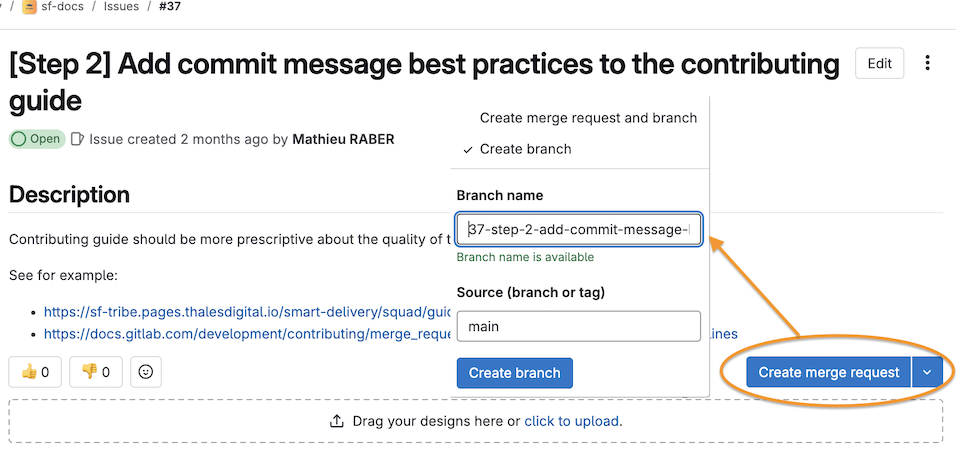
Another popular naming conventions is to include Issue or Ticket Numbers:, for example:
feature/42-user-authentication or hotfix/121-urgent-login-issue.
💡 As a team, decide on the branch naming strategy that best fits your specific needs from the various recommendations provided above.
Related Software Practices
- Discover how merge request help you visualize and collaborate on changes before merging.
- Understand why code reviews are crucial for quality control and knowledge sharing.
- Explore how continous integration -automates testing and deployment of code changes to ensure quality and efficiency.
- You can find some effective steps on how clean your repository in GitLab.