version v7.2.
For up-to-date documentation, see the
latest version.
Traceability, conformity and conformance
9 minute read
Overview & Expected Benefits
Software engineering projects that work with system engineering face key challenges in communication, development processes, and compliance with specifications.
Five specific areas of focus typically arise and require careful attention.
- Specification Transfer and Collaborative Development Processes
One of the primary challenges is the effective transfer of specifications from the system engineering team to the software development team. Clear communication and collaborative documentation are essential to ensure a mutual understanding of requirements. Misinterpretations at this stage can lead to significant setbacks later in the project. In a co-engineering environment, collaboration between system and software teams is essential. Both teams must engage in parallel activities throughout the development phase. This means aligning their engineering efforts and providing real-time feedback to ensure that the project adheres to system specifications.
- Continuous Integration
The implementation of continuous integration processes facilitates ongoing collaboration. Automated testing should be conducted regularly to confirm that the software meets system specifications. Addressing any inconsistency promptly is essential to maintain overall software integrity.
- Agile Work Management
Effective Agile Work Management requires a synchronized approach across teams. The software team coordinates sprints while incorporating system engineering team requirements. Regular communication and updates ensure alignment and shared understanding between all teams.
- Compliance Reporting and Traceability
Compliance with system specifications necessitates generating matrices and coverage reports using traceability. It allows for a clear connection between requirements and testing outcomes, ensuring that all elements are accounted for and confirming that the software aligns with the specified criteria. Comprehensive traceability enables structured and transparent reporting to the system engineering team, facilitating effective assessment.
- System Engineering interaction in the same or different Environments
To maximize the benefits of all available tools, they must be interconnected. In some cases, particularly when data sensitivity differs, the environments at higher and current levels may vary. The toolset must be deployed in each data domain, and data exchanges should be limited to the data contained within Polarion.
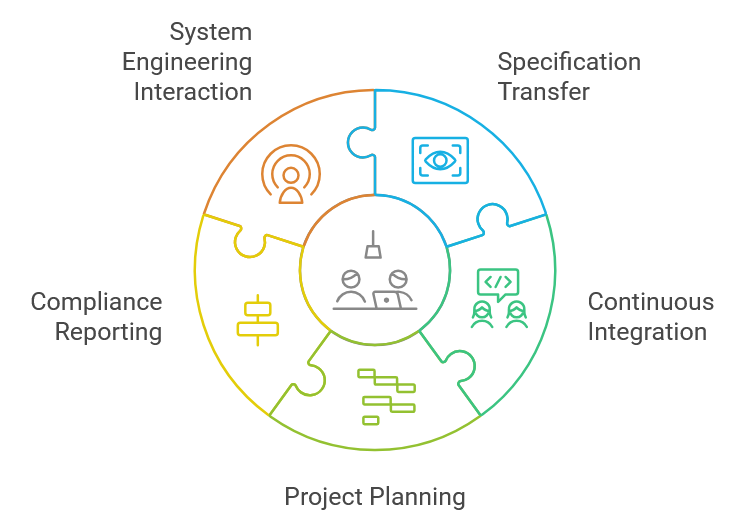
In summary, the dynamics of co-engineering in a software engineering project which is interfacing with system engineering highlight significant challenges. These are related to specification transfer, collaborative development, integration, planning, and compliance reporting. Tools such as Polarion, GitLab, GitLab CI, and Jira support these processes and improve collaboration between the engineering disciplines.
Enhancing collaboration between System and Software Teams
In engineering projects, effective collaboration between system and software teams is essential. It ensures alignment on requirements, design, and implementation. Coordinated efforts within a co-engineering environment enable both teams to work in a structured and integrated manner, which minimizes delays, errors, and miscommunication.
System and software engineering teams often operate in parallel but with different focal points. System engineers concentrate on high-level requirements and specifications, while software engineers focus on implementing these specifications through code. Without a strong collaborative framework, this division can lead to misalignment, causing:
- Mismatched Expectations: System-level requirements may be interpreted differently by the software team. This may result in functionality that doesn’t fully meet the system’s needs.
- Late-Stage Defects: When teams work in isolation, discrepancies between the system design and software implementation are often only discovered during integration, leading to costly rework.
- Inefficiency: Lack of communication and coordination can slow down the development process. Issues that could have been caught early instead compound.
By creating a shared understanding and aligning their work, both teams can minimize these risks and ensure the project’s success.
Key Strategies to Enhance Collaboration
Shared Documentation and Tools
- Collaboration starts with having access to the same source of truth. By using tools such as Polarion, both system and software teams can work from the same set of requirements. This ensures that they interpret them consistently.
- Polarion allows teams to link system-level requirements to corresponding software tasks and tests. This provides full traceability across the engineering stack. It makes it easier to track progress and identify gaps.
Real-Time Feedback Loops
- Effective collaboration requires continuous communication between teams. Implementing real-time feedback loops ensures that system specifications are reflected in software as they evolve. This can be done through tools like GitLab and Jira.
- Tools such as GitLab and GitLab CI allow both teams to see the results of automated testing and code reviews immediately. This ensures that any misalignment with the system specifications is caught and corrected early.
- Integration between Jira and Polarion ensures that any system-level changes or issues are quickly visible to software teams. This allows rapid resolution and minimizing delays.
Regular Joint Review Meetings
- Regular review sessions between system and software teams can highlight any ambiguities in requirements early on. These meetings facilitate ongoing communication, enabling teams to clarify expectations and align on upcoming tasks.
- During these meetings, teams can review traceability reports in Polarion. This allows checking progress.
Cross-Discipline Task Assignment
- To foster a deeper understanding between system and software teams, it can be beneficial to involve both groups in certain tasks that overlap. For example, system engineers can participate in software reviews to ensure that key requirements are being interpreted correctly. Conversely, software engineers can review system requirements to offer insights into how these requirements will be realized in code.
- Using Jira to manage tasks can facilitate this process. It enables cross-discipline teams to collaborate on specific Epics and Stories.
Unified Test Strategy
- One of the most effective ways to align system and software teams is through a unified testing strategy. Both teams should work together to define test cases that verify system-level requirements and map them to software-level tests.
- Polarion’s traceability feature can link test results back to both system requirements and software implementations. This provides clear visibility into which areas are compliant and which need attention.
Practices description
Continuous Integration
Continuous integration fosters collaboration between system and software teams. CI facilitates easy integration of code changes, promoting frequent communication and cooperation. This streamlined approach enables teams to identify and address issues early, ensuring that the software meets overall system specifications.
Continuous Integration enhances software quality, accelerates development cycles, and strengthens collaboration. By incorporating regular automation for testing and deployment, teams can respond swiftly to changes and effectively manage integration challenges.
See Continuous integration practice.
Tools Involved:
GitLab: As a version control system, GitLab allows both system and software teams to collaborate on code changes efficiently. This ensures they remain aligned throughout the development process.
GitLab CI: Integrated CI/CD pipelines automate testing and deployment. This allows teams to run checks on the software continuously. It ensures that any issues are identified and addressed promptly.
Jira: This tool helps in tracking tasks, bugs, and features, providing visibility into ongoing work across teams. Jira ensures that both the system and software teams are synchronized on project milestones and requirements.
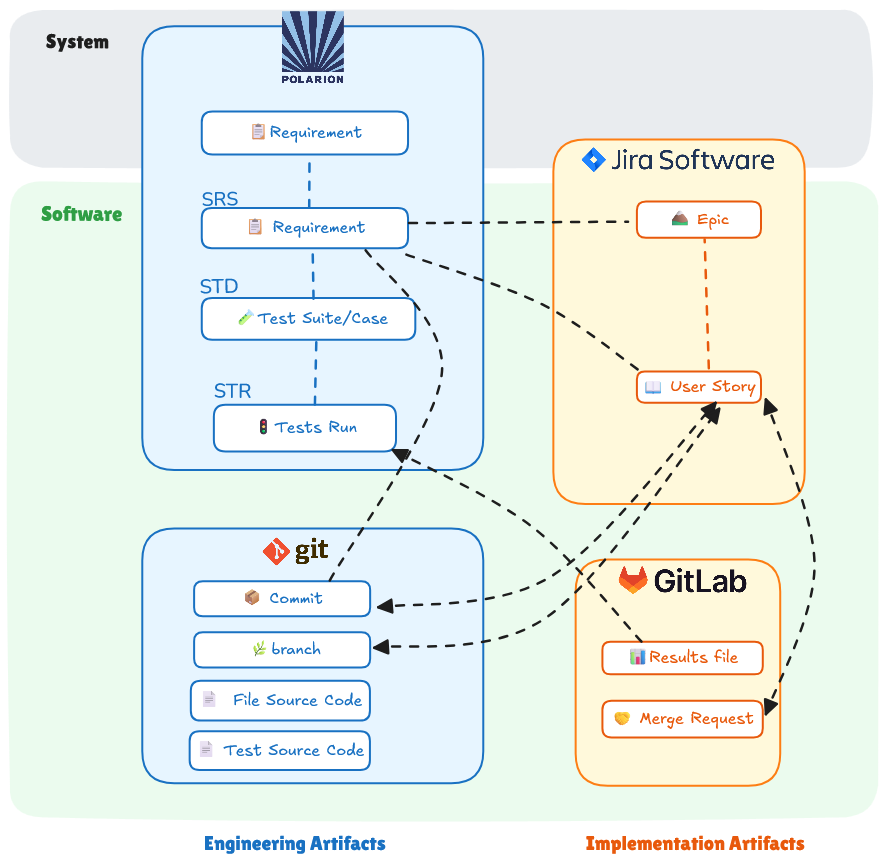
Polarion: Polarion consolidates test results and integrates with GitLab CI. By importing test outcomes, Polarion helps visualize testing progress, linking it directly to system specifications and facilitating better communication between teams.
Agile Work Management
See eTUP backlog refinement practice.
Connection between Jira and Polarion work items
Jira is connected to Polarion to establish traceability between project tasks and system
requirements.
By linking Jira issues (such as Stories and Defects) to specific requirements in Polarion, teams can
ensure that all planned work aligns with their objectives.
See corresponding how-to
.
Connection between Jira and GitLab
Several technical solutions can be combined to connect Jira and GitLab. At a minimum, the GitLab Jira integration must be configured. For teams that need tighter integration, the Jigit plugin provides additional capabilities through the Jira Development Panel.
GitLab Jira integration
The GitLab Jira integration is the baseline connection between the two tools. Once configured, Jira issue IDs mentioned in commit messages and merge requests become clickable links in GitLab, navigating directly to the corresponding Jira issue. In return, links to the associated merge requests are automatically added to each Jira issue. This gives both teams immediate cross-tool visibility.
Jigit plugin (Development Panel)
To go further, the Jigit plugin can be installed in Jira. It adds a Development Panel to Jira issues, providing a consolidated view of related branches, commits, and merge requests directly within the Jira interface. Jigit also enables developers to create Git branches directly from a Jira ticket, streamlining the workflow between project management and code development.
On JFE (Jira for Engineering) instances, the Jigit plugin replaces the DVCS connector and provides additional capabilities. On other Jira Data Center instances, the DVCS connector can still be used.
Connection between Polarion and GitLab CI test results
Automatic test execution during CI produces test results as files. Thanks to
dedicated imports, Polarion can import these results, and during the import
process or afterward, these test results can be linked to the corresponding
requirements.
See corresponding how-to
Compliance reporting and traceability
Compliance with system specifications requires generating matrices and coverage reports. Traceability establishes a clear connection between requirements and testing outcomes. This ensures that all elements are accounted for and confirms that the software aligns with the specified criteria. Comprehensive traceability enables structured and transparent reporting to the system engineering team. This facilitates effective assessment.
Option 1: Using Polarion Data
Polarion serves as a repository for requirements, test cases, and results. By
organizing these elements systematically, teams can effectively track which
requirements have been tested and to what extent. If the system and subsystems
are located on the same server, the system team grants read rights to the
subsystem teams. Subsystem teams using Polarion Collections can directly trace
to a dedicated baseline. If the system and subsystems are located on different
servers, the system team sends an export (ReqIF is the recommended format) of
the allocated requirements to the subsystem. The subsystem team then imports the
data and creates traceability to their local copy. During import the system Ids
must be mapped to User Defined Ids at sub system level. These user defined Ids
will be used by CMG tool.
See How-To - DS Guide for System to SubSystem continuity (TBC)
Option 2: CMG
Data from Polarion is used to construct coverage and conformity matrices. The coverage matrix visually represents the relationship between requirements and their corresponding test cases. It indicates which requirements have been successfully tested.
WI.03- Generate Compliance/Coverage/Conformity Matrix
Common pitfalls
- not manage data in configuration, relying on local or shared files
- time consuming tasks to produce conformity and coverage matrixes if traceability is not consistent
- delayed feedback and rework