version v7.2.
For up-to-date documentation, see the
latest version.
Cleaning Up Artifactory
3 minute read
Introduction
Artifactory, as a central repository for managing your organization’s software artifacts, plays a vital role in ensuring efficient development workflows and reliable deployments.
However, with continuous integration and delivery practices, the volume of artifacts stored in Artifactory can grow rapidly, potentially leading to storage constraints and performance issues.
This document outlines best practices and recommendations for implementing effective cleanup strategies within your Artifactory instance.
By proactively managing your artifacts, you can optimize storage utilization, reduce clutter, and maintain a healthy repository that supports your development teams.
Checkout the official Artifactory recommendation
Recommendation and Best Practices
1. Implement Robust Cleanup Policies
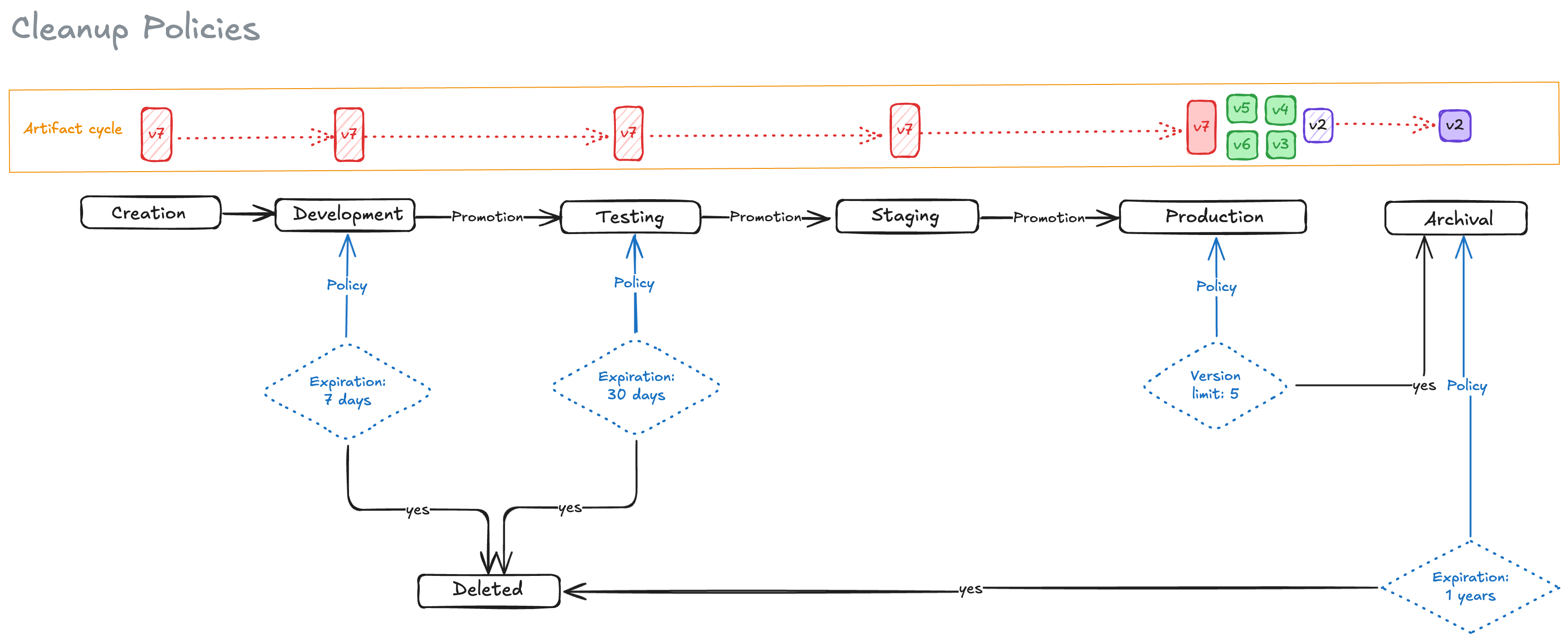
Expiration-Based Cleanup:
- Configure Artifactory to automatically delete artifacts after a specified period of inactivity or a specific date. This is crucial for all artifact types, especially snapshots, nightly builds, or temporary files.
Example: Delete any snapshot artifact older than 30 days.
Version Retention Limits:
- Limit the number of versions retained for each artifact to avoid unnecessary storage consumption. This is particularly useful for release artifacts where older versions might not be needed after a certain point.
Example: Keep only the last 5 released versions of a Java library.
Custom Property-Based Cleanup:
- Utilize custom properties to categorize artifacts (e.g., “development,” “release,” “experimental”).
- Create targeted cleanup policies to remove artifacts based on these properties.
Example: Delete all artifacts with the property “environment: dev” after 7 days.
2. Optimize Artifact Promotion and Metadata
Promote Artifacts Strategically:
- Establish a clear promotion workflow to move artifacts through different lifecycle stages (e.g., development, testing, staging, production).
- Apply stricter retention policies to production artifacts to ensure long-term availability.
Use Meaningful Metadata:
- Employ descriptive names, versions, and custom properties to identify artifacts accurately.
- This makes it easier to search, filter, and manage artifacts, regardless of their type.
3. Leverage Artifact-Specific Optimization Techniques
Minimize Artifact Size:
- Encourage developers to optimize the size of their artifacts.
Example: minify JavaScript files, compress archives, and remove unnecessary dependencies.
Utilize Built-in Features:
- Leverage Artifactory’s built-in features like checksum-based storage to avoid storing duplicate files.
- Explore features like “Include/Exclude Patterns” within cleanup policies to fine-tune which artifacts are deleted.
4. Establish Dedicated Repositories
Isolate Artifacts by Purpose:
- Create separate repositories for different purposes (e.g., development, releases, third-party libraries).
- Apply appropriate cleanup policies to each repository based on the type of artifacts it stores.
5. Continuous Monitoring and Refinement
Regular Review and Adjustment:
- Periodically review and adjust your cleanup policies to ensure they align with your evolving needs.
- Consider factors like team size, project complexity, and release frequency.
Monitor Storage Usage:
- Use Artifactory’s built-in monitoring tools to track storage usage and identify potential bottlenecks.
- Set up alerts to notify you when storage thresholds are exceeded.
Example of Cleanup Implementation