version v7.2.
For up-to-date documentation, see the
latest version.
Security Concepts
4 minute read
Security is fundamental at Thales to protect sensitive data, maintain compliance with international standards, and ensure the safety and reliability of our solutions—especially in critical sectors such as avionics, defense, and transportation.
Key Security Principles
Let’s start by reviewing the 9 Key Rules of Cybersecurity in Thales.
Thales promotes a specific set of Golden Rules of Cyber Security, which focus on organizational and practical behaviors.
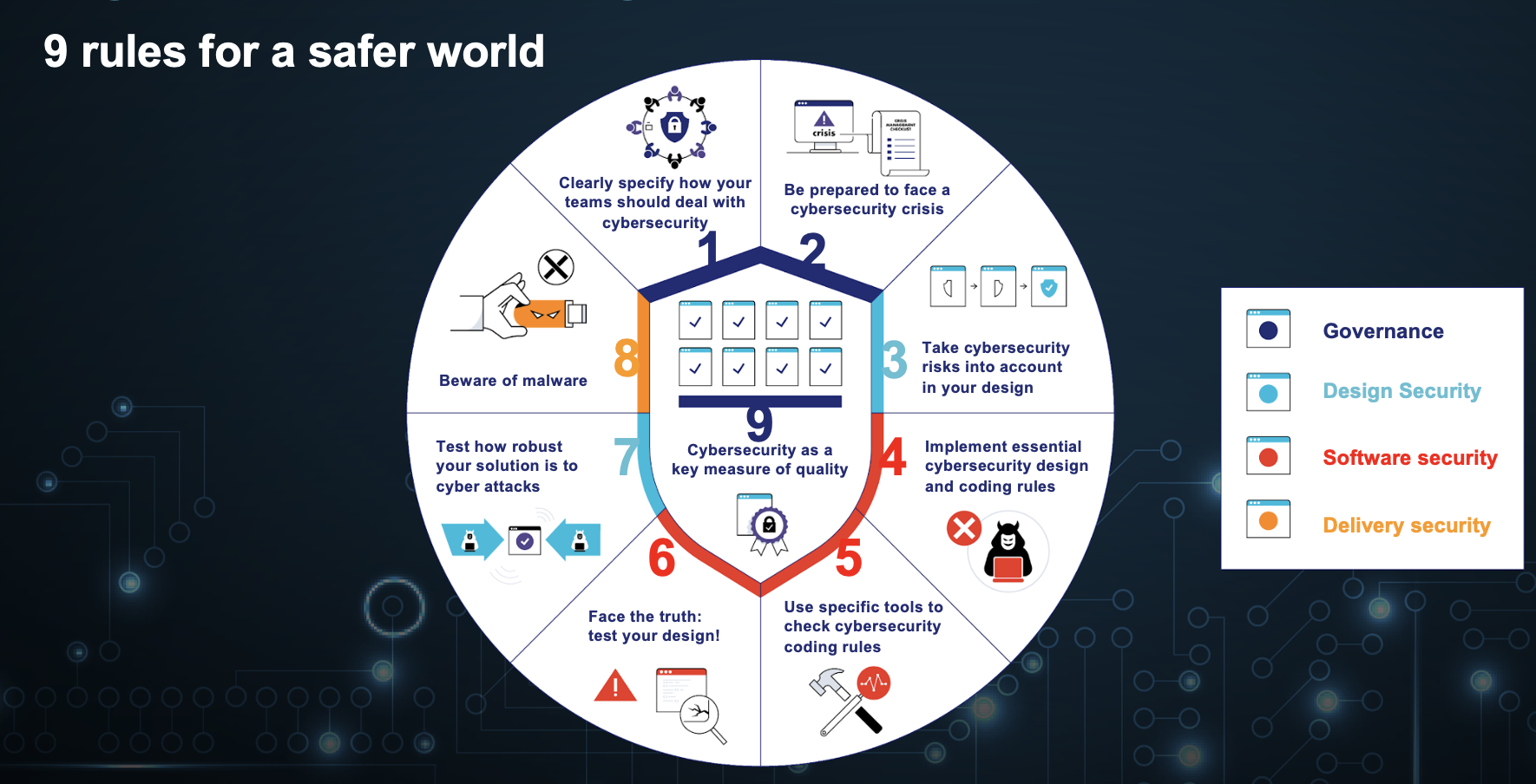
These rules are designed to guide employees in maintaining a high level of security awareness and implementing best practices in their daily activities.
Essential Practices for Ensuring Software Security
Ensuring software security is critical across all Thales solutions. Thales software is often embedded as a critical component in domains such as airborne, rail, space, and defense, where reliability and protection are a paramount.
By integrating security measures throughout the software development lifecycle from requirements to deployment, teams can proactively address vulnerabilities and strengthen the resilience of our products.
The following practices are introduction to some essentials for concepts security.
Limitation of Attack Surface
This security principle focused on reducing the number of ways an attacker can compromise a system. By minimizing exposed interfaces, services, code paths, and entry points (internal and external) developers limit opportunities for exploitation.
This includes for developers building applications to minimize the attack surface:
- Only expose APIs, ports, and services that are absolutely necessary.
- Enable only the functions neccessary by the application’s when shipping to production environments.
- Avoid verbose error messages that could provide clues to attackers about internal structures.
When using the Software Factory, consider the following:
- Limit integrations and exposed services to only what’s necessary.
- Make your repositories private unless public access is absolutely necessary.
Zero Trust Model
This approach, based on the principle of “never trust, always verify” avoids automatic trust for any user or device—inside or outside the organization. Every access request must be continuously authenticated, authorized, and validated.
for developers building applications, this includes:
- Deny access by default; only create explicit, necessary exceptions.
- Apply strict validation and sanitization to all inputs before processing.
- Require authentication/authorization for all users and API calls, even internally.
When using the Software Factory, consider the following:
- provide permissions needed, and no more.
- Use dedicated runners for high-privilege or sensitive tasks.
- Third-party integrations, webhooks, and APIs should require explicit approval.
- Use dedicated, isolated runners for sensitive tasks.
Principle of Least Privilege
- Assign only the permissions users or services absolutely need (e.g., “read only” for most users).
- Avoid granting admin rights broadly.
Audit and Monitoring
- Enable comprehensive audit logging.
- Monitor code changes, artifact uploads/downloads, and all access events.
Security Patch Management
- For platform Administrator, regularly update GitLab, SonarQube, Artifactory, and Xray to the latest SWaaP release.
- Apply security patches promptly.
Separation of Duties
- Use different roles for contributors, reviewers, pipeline maintainers, artifact publishers, etc.
- Prevent a single person from having unchecked control over code and deployments.
Secure by Design
- Integrate security checks (e.g., SAST , DAST , dependency scanning ) into CI/CD pipelines.
- Mandate security reviews as part of the workflow.
Audit & Code Quality Tools
- Use SonarQube to enforce secure coding standards and catch vulnerabilities.
- Use GitLab SCA and Xray to scan dependencies and artifacts for known security issues automatically.
Cryptography (for artifacts and connections)
- Use signed commits and encrypted artifact storage.
- Use encrypted network connections (SSL/TLS) for all tool interfaces and data transfers.
Relevant Standards by Domain
- Avionics: DO-178C (Software for Airborne Systems)
- Rail/Transportation: EN 50128, EN 50129 (Software and Safety for Railway Control)
- Industrial/OT: IEC 62443 (Industrial Automation & Control Systems Security)
- Information Security: ISO/IEC 27001 (Information Security Management)
- General IT: NIST SP 800-53 (Security Controls for Federal Information Systems)
DO-178C
DO-178C, officially titled “Software Considerations in Airborne Systems and Equipment Certification,” is a widely recognized international standard developed by RTCA (Radio Technical Commission for Aeronautics) and EUROCAE.
It defines the guidelines for developing and certifying software used in airborne (avionics) systems, to ensure that software on board aircraft performs safely, reliably, and predictably, especially under fault or failure conditions.
DO-178C does not prescribe specific tools, languages, or methodologies but specifies objectives that must be met (with artifacts and evidence).
DO-178C Requirements Examples
- Configuration management
- requires all software items (code, documents, tests) to be uniquely identified, versioned, and protected against unauthorized changes. All modifications must be tracked and traceable for full auditability.
- Quality Assurance
- Evidence is needed to show all required processes are performed per the plan. Verification activities must be documented, versioned, and stored.
GitLab provides version control, access management with RBAC, change tracking, and process evidence (tests, SBOM) in CI pipelines.
- Software Design & Source Code
- Code should be written according to defined standards (e.g., style, complexity, language restrictions). Must directly implement the LLRs, no “extra code.”
SonarQube and Coverity are tools that can help ensure code quality and the dead code detection.