version v7.2.
For up-to-date documentation, see the
latest version.
Static Application Security Testing
7 minute read
Static Application Security Testing (SAST) is a “white-box” testing methodology that analyzes source code and compiled artifacts (bytecode/binaries) for vulnerabilities without executing the program.
By examining the codebase, SAST tools can identify security flaws such as SQL injection, cross-site scripting (XSS), and buffer overflows early in the SDLC, allowing teams to fix issues before they become expensive production incidents.
How SAST Works
SAST tools do not just “read” code, they understand its behavior using two primary methods:
- Pattern Matching: Fast scanning for known bad syntax or unsafe configurations.
- Data & Control Flow Analysis: Deep simulation of how data moves through the application logic to find complex bugs like Taint Analysis .
Why use SAST ?
- 🛡️ Detect Vulnerabilities Early: Identifies critical flaws such as SQL Injection, Cross-Site Scripting (XSS), Buffer Overflows, and authentication bypasses.
- ⚖️ Ensure Compliance: Helps projects meet strict industry standards by locating code-level violations that could lead to fines or legal risks.
- 🎓 Educate Developers: Acts as an automated coach. By providing immediate feedback on unsafe patterns, SAST helps developers improve their secure coding skills over time.
SAST Tools in Software Factory
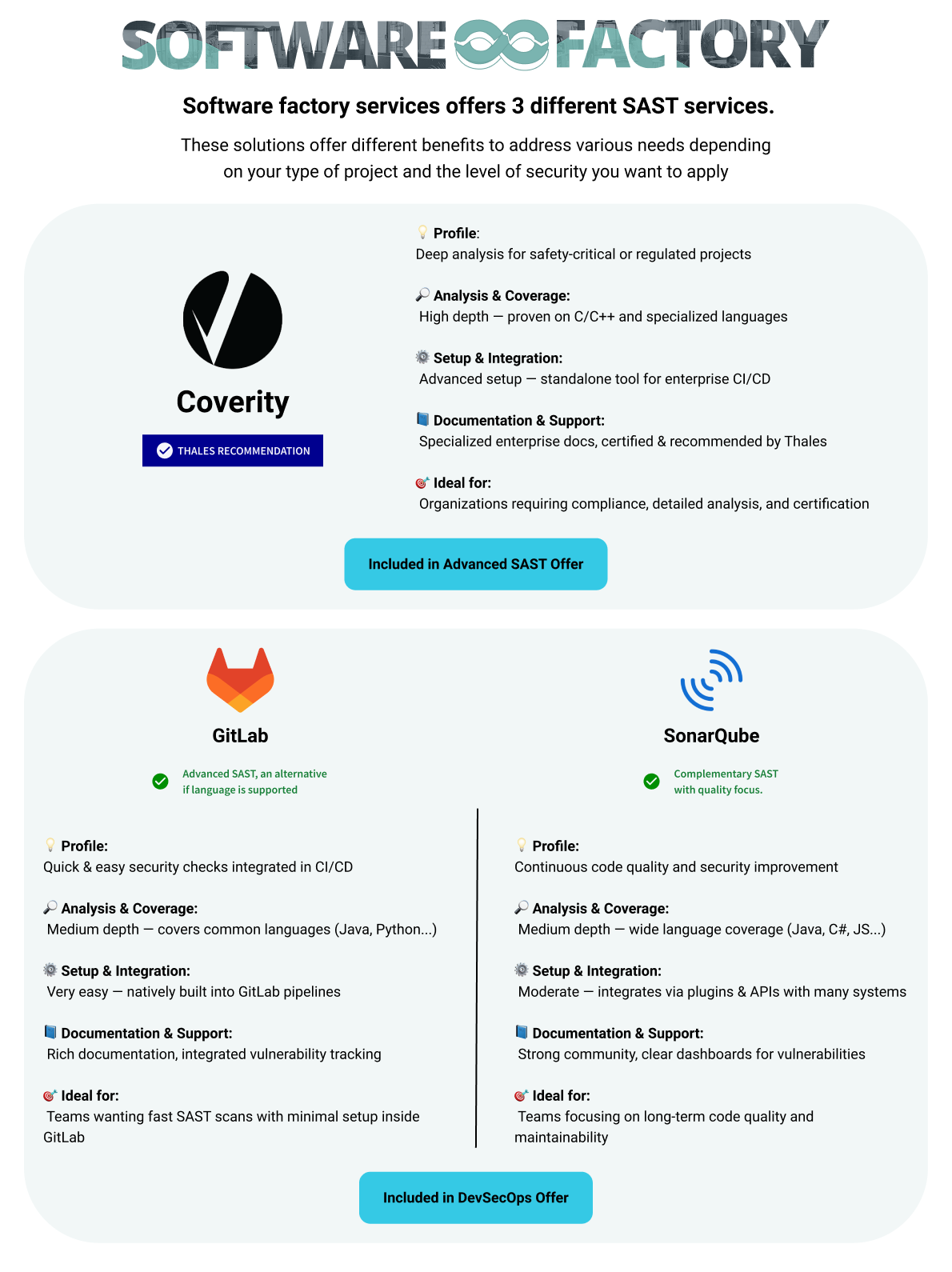
The Software Factory suite includes three SAST analysis tools:


Although they share similar goals, they operate at different levels of depths and precision.
Thales Group has chosen Coverity as a reference for the entire Group. However, some Thales Entities have already started to work with others SAST tools. This fact is taken into account on the Software Security and Secure Coding Community platform.
SAST Comparison
Global Overview
| SAST Tool | Analysis Depth | Setup & Learning effort | Comments |
|---|---|---|---|
| Coverity | ⭐️⭐️⭐️⭐️ Deep | ⭐️ Challenging | For deep, high-accuracy analysis and strong compliance needs. Especially C/C++ and complex, security critical code |
| SonarQube | ⭐️⭐️ Medium | ⭐️⭐️ Moderate | For code quality governance with moderate security rules. A complement, rather than a replacement for SAST tools. |
| GitLab SAST | ⭐️⭐️(⭐️) Medium | ⭐️⭐️⭐️⭐️ Very Easy | For fast feedback directly in GitLab with minimal setup. Prefer Advanced SAST if your language is supported. |
It is important to choose the right tool because they “read” code differently:
Pattern Matching (Linting)
- Used by: GitLab SAST (Basic), SonarQube.
- How it works: It looks for “bad shapes” in the code, like using a banned function or a hardcoded password.
- Pros/Cons: It is extremely fast but cannot understand complex logic, leading to false positives.
Data Flow & Control Flow Analysis
- Used by: Coverity, GitLab Advanced SAST and SonarQube.
- How it works: It simulates the execution of the program. It tracks a variable from user input (source) to usage (sink) to see if it becomes dangerous.
- Pros/Cons: It detects complex bugs like NullPointer Exceptions or Injection attacks across different files. It is much slower but necessary for Critical Software.
Languages overview
The table below shows which languages are supported by each SAST tool, but the level of coverage and depth of analysis may differ significantly between tools and languages.
| Language | GitLab SAST | GitLab Advanced SAST | SonarQube | Coverity |
|---|---|---|---|---|
| Java | ✅ | ✅ | ✅ | ✅ |
| JavaScript | ✅ | ✅ | ✅ | ⚠️ |
| TypeScript | ✅ | ✅ | ✅ | ⚠️ |
| Python | ✅ | ✅ | ✅ | ⚠️ |
| Ruby | ✅ | ✅ | ✅ | ⚠️ |
| C | ✅ | ✅ Since GitLab 18.8 | ✅ | ✅ |
| C++ | ✅ | ✅ Since GitLab 18.8 | ✅ | ✅ |
| C# | ✅ | ✅ | ✅ | ✅ (up to 13.0) |
| Go | ✅ | ✅ | ✅ | ⚠️ (Go compilers ) |
| Kotlin | ✅ | ❌ | ✅ | ✅ |
| Rust | ✅ | ❌ | ❌ | ❌ |
Legend:
- ✅ Full support - Production-ready, comprehensive coverage
- ⚠️ Limited/Basic - Partial support, may miss some vulnerabilities
- ❌ Not supported - No coverage available
Standards & Compliance Support
| 🏛️ Target Standard / Regulation | GitLab Advanced SAST | SonarQube | Coverity | Why? |
|---|---|---|---|---|
| OWASP Top 10 / CWE Top 25 | ✅ | ✅ | 🏆 | Coverity is generally considered the more powerful. SonarQube provides solid OWASP coverage for every day use. |
| DO-178C (Avionics) / IEC 61508 (Industrial) | 🏆 | Coverity is certified for “Functional Safety” (FuSa). It provides the deep Data Flow analysis | ||
| MISRA C / C++ | ✅ | 🏆 | Coverity has the highest coverage of MISRA rules, even if SonarQube now covers 100% MISRA for C++ | |
| CERT C / C++ | ✅ | 🏆 | Both cover CERT rules well. Use Coverity for strict enforcement, SonarQube for educational guidance. | |
| PCI-DSS (Payments) | ✅ | ✅ | ✅ | Coverity provides specific compliance reporting for PCI-DSS , SonarQube includes a dedicated PCI-DSS Report |
| GDPR (Data Privacy) | 🏆 | ✅ | ✅ | “Secret Detection” and “Taint Analysis” are often sufficient here. |
🏆 = Advanced/Leader and ✅ = Supported according of vendor.
For Official Audits: If your project requires an official certification audit, Coverity is generally the required tool within Thales.
Recommendations by criticality
| Criticality Level | Languages | Recommended Tools |
|---|---|---|
| Prototypes / Internal Tools | All languages | GitLab SAST |
| Production | Java, C#, JavaScript, TypeScript, Python, Ruby, Go | GitLab (Advanced) SAST + SonarQube |
| Critical Software | Java, C#, Go, Kotlin | (Coverity or GitLab Advanced SAST ) + SonarQube |
| Production & Critical Software | C, C++ | Coverity + SonarQube |
| Production & Critical Software | Rust | GitLab SAST |
GitLab SAST
GitLab SAST is a security feature that is directly integrated into the GitLab CI/CD pipeline.
By using open-source analyzers such as Semgrep and Bandit , it is capable of detecting common OWASP Top 10 security issues and insecure coding patterns.
The results of these analysis are conveniently displayed both in Merge Requests and the Security Dashboard, providing developers with immediate and actionable feedback.
One of the primarily strengths of GitLab SAST is its seamless integration with GitLab, allowing for minimal setup and enabling quick feedback and early security insights.
However, GitLab SAST has some limitations, such as a relatively shallow coverage, higher rate of false positives, especially in complex applications.
GitLab Advanced SAST addresses several of these limitations and offers advanced detection techniques including cross-file, cross-function, and taint analysis while remains easy to use and integrate.
SonarQube
SonarQube was primary designed for code quality then it added a security analysis of source code.
Its function is to help teams detect bugs, code smells, and security vulnerabilities early in SDLC.
SonarQube provides rule sets aligned with industry standards such as the OWASP Top 10, CWE, SANS, and more recently MISRA.
SonarQube is focused on developer usability and provides visibility into both quality and security aspects of code.
It enforces quality and security requirements through configurable quality gates, and supports analysis on branches and merge requests.
This ecosystem is further enhanced by SonarLint , an IDE extension that allows developers to shift left by detecting issues in real-time within their code editor before even being committed.
SonarQube also allows for customization and tuning of detection rules to match specific project contexts.
The main limitation of SonarQube is that its security coverage is rule-based, which may not identify more complex or deep dataflow vulnerabilities. As such, it may not be suitable for all security requirements.
Regularly review and tune your SonarQube rules. SonarQube offers flexibility to disable noisy rules. Maintain your quality profiles to reduce false positives and alert fatigue
Coverity
Coverity is a static analysis tool designed for deep semantic and dataflow analysis across files, functions, and modules. It is particularly suited for code that must meet safety and compliance requirements.
Coverity can detect critical vulnerabilities such as buffer overflows and taint propagation. It supports a wide range of industry standards, including CWE, CERT, MISRA, OWASP, and ISO 26262.
The tool is suitable for large and complex codebases. It provides detailed remediation guidance and is designed to minimize false positives, helping teams address issues efficiently.
Coverity integrates with IDEs, build systems, and CI/CD pipelines to streamline its use throughout the development workflow.
However, Coverity requires initial setup and configuration, and scan times can be longer compared to lightweight analysis tools.
How to Perform SAST in Software Factory
➡️ To implement SAST with Coverity, refer to Coverity tutorials .
➡️ To implement SAST with GitLab, refer to Howto enable GitLab SAST .
Avoid overlapping configurations: Running multiple SAST tools in the same pipeline without coordination, can create duplicate findings and cause confusion.
If you use SonarQube for C#, disable the C# rules in GitLab SAST to avoid seeing the same error twice
TL;DR