version v7.2.
For up-to-date documentation, see the
latest version.
Shift Left Testing
6 minute read
This guide provides a definition of Shift Left, outlines its benefits, explains how to implement it and presents some pitfalls to avoid.
Definition
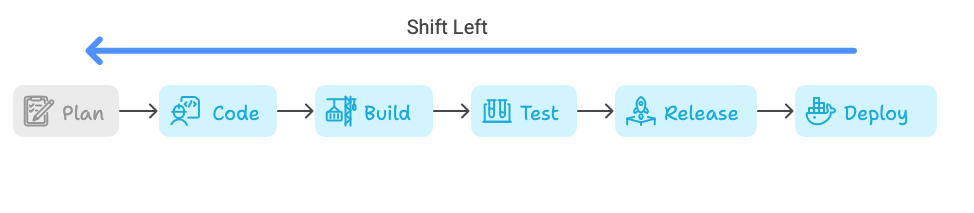
Shift Left refers to the practice of moving testing activities earlier in the software development process.
Instead of waiting until the end of the development cycle to test for defects, Shift Left advocates for testing activities to begin as soon as possible.
This approach is aligned with Agile and DevOps methodologies, promoting ongoing testing throughout the development lifecycle.
Benefits
Implementing the Shift Left testing approach offers several significant benefits:
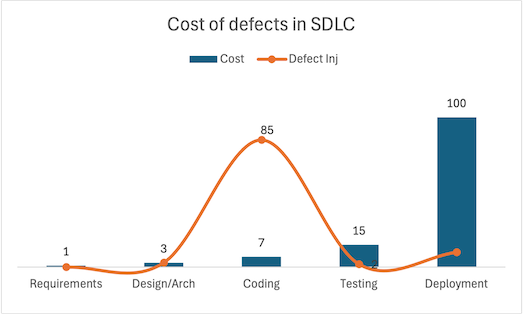
Early Defect Detection: Identifies bugs and issues earlier in the development process, reducing the cost and effort required to fix them.
Cost Efficiency: Fixing defects early is cheaper and less time-consuming than addressing them later in the development cycle or post-release.
Improved Quality: Continuous testing throughout development ensures that quality is built into the product from the start, leading to more reliable and robust software.
Faster Time-to-Market: By catching and addressing issues earlier, the overall development process becomes more efficient, resulting in quicker releases.
Enhanced Collaboration: Promotes collaboration between development, QA, and operations teams, fostering a shared responsibility for quality.
How to Implement Shift Left
The Software Factory provides a set of tools to help you successfully implement the following practices to adopt shift left approche:
Integrate Testing in Early Stages: Incorporate testing activities from the initial stages by creating test cases, acceptances tests and identifying potential risks early on. With GitLab Plan you can seamlessly include these testing-related tasks directly in user stories (issues), ensuring that test design, and execution are integral parts of the development process.
DevOps Practice with Automate Testings: Embrace DevOps practices to ensure continuous integration (CI) and continuous delivery (CD). These practices facilitate automattion of unit tests, integration tests, and even UI tests to ensure quick feedback loops.
Use Static Code Analysis: Utilize static code analysis tools to detect code quality issues and vulnerabilities early in the development cycle.
Continuous Feedback: Establish continuous feedback mechanisms to provide developers with immediate insights into the quality of their code. This includes integrating testing tools with CI/CD pipelines.
Figures
The following figures highlight the impact and importance of implementing the Shift Left testing approach:
- Cost of Fixing Defects:
- According to IBM Systems Sciences Institute, the cost to fix a defect found after product release is 4-5 times higher than one identified during design, and 100 times higher than one identified in the maintenance phase.
- Early Defect Detection:
- Research by Capers Jones suggests that early defect detection can reduce defect propagation by 60-80%, leading to significant improvements in product quality.
- Time-to-Market:
- Organizations that implement Shift Left practices report a reduction in time-to-market by 15-20% due to increased efficiency and reduced rework.
- Development Costs:
- Projects utilizing Shift Left testing have been shown to reduce overall development costs by up to 30%, primarily due to fewer defects and less rework.
Test-Driven Development (TDD)
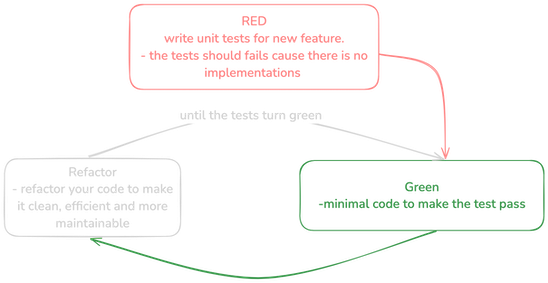
Test-Driven Development (TDD) is a software development approach where tests are written before the actual code. The development process follows a cycle of writing a test, writing code to fulfill the test, and then refactoring the code.
Benefits of TDD
- Improved Code Quality: Writing tests first ensures that the code is designed to be testable and meets the specified requirements.
- Reduced Bugs: Continuous testing during development helps in catching defects early.
- Clear Documentation: Tests serve as documentation for the expected behavior of the code.
How to Implement TDD approch
- Red-Green-Refactor Cycle: Follow the TDD cycle of writing a failing test (Red), writing code to pass the test (Green), and then refactoring the code while keeping tests green.
- Automated Testing Tools: Use testing frameworks and tools to automate the execution of tests, ensuring quick feedback.
Behavior-Driven Development (BDD)
Behavior-Driven Development (BDD) extends TDD by focusing on the behavior of the application as perceived by the end user.
BDD uses natural language constructs to define test scenarios, promoting better understanding among stakeholders.
Benefits of BDD
- Enhanced Collaboration: BDD fosters collaboration between developers, testers, and business stakeholders by using a common language to describe tests.
- Clear Requirements: Test scenarios written in natural language ensure that requirements are clearly defined and understood by all parties.
- Early Defect Detection: Like TDD, BDD promotes writing tests early, which helps in identifying and fixing defects sooner.
How to Implement BDD approch
- Gherkin Syntax: Write test scenarios using Gherkin syntax (Given-When-Then) to describe the behavior of the application.
Feature: User login

   Scenario: Successful login with valid credentials
      Given the user is on the login page
      When the user enters valid credentials
      Then the user should be redirected to the dashboard
- Tools: Use BDD frameworks like Cucumber for Java, SpecFlow for .NET, or Behave for Python to automate and execute BDD scenarios.
💻 If you want to learn more, you can find a tutorial on BDD for Java.
Common Pitfalls
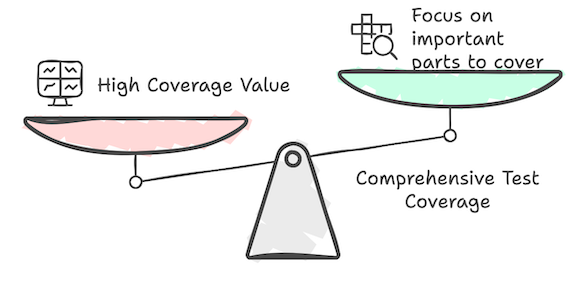
Inadequate Test Coverage
Pitfall: Focusing too much on specific areas of the code while neglecting others can lead to inadequate test coverage, leaving parts of the code untested and potentially buggy.
Solution: Strive for comprehensive test coverage by identifying critical areas, various test scenarios, and edge cases.
Use code coverage tools to assess the extent of your test coverage and ensure it meets your quality standards.
Over-Reliance on Automated Tests
Pitfall: Relying solely on automated tests and neglecting manual testing can be risky, as certain issues—especially those related to user experience and usability—are best identified through manual testing.
Solution: Maintain a balanced approach by combining both automated and manual testing. Perform exploratory testing, usability testing, and other manual tests alongside automated tests.
Lack of Maintenance
Pitfall: Over time, automated test suites can become outdated, with tests that no longer align with the current state of the codebase.
This can result in the development team becoming accustomed to incorrect results, making it difficult to identify real issues when they occur.
Consequently, the development team may struggle to distinguish genuine problems.

Solution: Regularly review and update your test suite to keep it in sync with the codebase. Remove obsolete tests and refactor tests as needed to ensure their reliability.
Ignoring Test Performance
Pitfall: Automated tests that take too long to execute can slow down the development process and discourage developers from running them frequently.
Solution: Optimize your test suite for performance by focusing on faster-running tests, parallelizing test execution, and offloading non-critical tests to run less frequently.
Inadequate Test Data Management
Pitfall: Poor handling of test data can result in inconsistent test results, making it difficult to diagnose and fix issues.
Solution: Manage test data effectively by using mock data, setting up dedicated test databases, or using data provisioning tools to ensure consistency and reliability in your test environment.
Lack of Clear Reporting
Pitfall: Without clear and actionable reporting, it can be challenging to interpret test results and take the necessary actions to address failures.
Solution: Use reporting tools and dashboards that provide clear, concise, and actionable test results. Ensure that test reports highlight failures, their potential causes, and any patterns or trends.
Flaky Tests
Pitfall: Flaky tests, which occasionally pass and occasionally fail without any changes to the code, can undermine the confidence in the test suite and the overall quality process.
Solution: Investigate and address the causes of flaky tests, such as dependencies on external services, timing issues, or resource constraints. Consider isolating tests to avoid dependencies and making them more deterministic.
By being aware of these pitfalls and actively addressing them, you can improve the effectiveness and reliability of your automated testing efforts, leading to higher software quality and more efficient development processes.
To be continued
🧰 For more insights on BDD and automated testing, please visit our tutorials .