version v7.2.
For up-to-date documentation, see the
latest version.
Code Companion - Context Providers
9 minute read
Context Providers
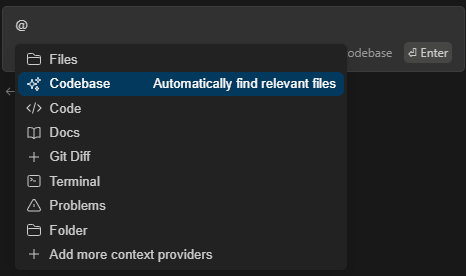
Context Providers allow you to type ‘@’ and see a dropdown of content that can all be fed to the LLM as context. Every context provider is a plugin, which means if you want to reference some source of information that you don’t see here, you can request (or build!) a new context provider.
Migrating from Deprecated Context Providers
If you were previously using the @Codebase or @Docs context providers, here’s how to migrate to
the new approach:
Migrating from @Codebase
The @Codebase context provider has been deprecated. Instead:
- Use built-in tools: Agent mode can now use file exploration and search tools to understand your codebase
- Add rules: Create
.continue/rulesfiles to provide context about your project structure
see codebase section for more information
Migrating from @Docs
The @Docs context provider has been deprecated. Instead:
- Add documentation links in rules: Create rules that reference documentation URLs
The new approach provides better integration with Agent mode features and more intelligent context selection.
see docs section for more information
Configuration Formats
Both YAML and JSON formats are valid for adding Context Providers. The format you use depends on which version of Code Companion you have:
Recent versions: YAML is the preferred format. As updates bring changes to configurations, users are encouraged to use YAML.
Older versions: JSON examples are provided for users still using older versions or those who have maintained older configurations.
- YAML:
~/.continue/config.yaml - JSON:
~/.continue/config.json(deprecated, see this section to migrate)
With newer versions, everyone should be transitioning to YAML.
Note that Code Companion can read both YAML and JSON configuration files, but if both are present, it will prioritize YAML.
Built-in Context Providers
You can add any built-in context-providers in your config file as shown below:
@File
Reference any file in your current workspace.
context:
  - provider: file
{
  "contextProviders": [
    {
      "name": "file"
    }
  ]
}
@Code
Reference specific functions or classes from throughout your project.
context:
  - provider: code
{
  "contextProviders": [
    {
      "name": "code"
    }
  ]
}
@Git Diff
Reference all of the changes you’ve made to your current branch. This is useful if you want to summarize what you’ve done or ask for a general review of your work before committing.
context:
  - provider: diff
{
  "contextProviders": [
    {
      "name": "diff"
    }
  ]
}
@Current File
Reference the currently open file.
context:
  - provider: currentFile
{
  "contextProviders": [
    {
      "name": "currentFile"
    }
  ]
}
@Terminal
Reference the last command you ran in your IDE’s terminal and its output.
context:
  - provider: terminal
{
  "contextProviders": [
    {
      "name": "terminal"
    }
  ]
}
@Docs
Reference the contents from any documentation site.
context:
  - provider: docs
{
  "contextProviders": [
    {
      "name": "docs"
    }
  ]
}
Note that this will only enable the @Docs context provider.
To use it, you need to add a documentation site to your config file. See the docs page for more information.
@Open
Reference the contents of all of your open files. Set onlyPinned to true to only reference
pinned files.
context:
  - provider: open
    params:
      onlyPinned: true
{
  "contextProviders": [
    {
      "name": "open",
      "params": {
        "onlyPinned": true
      }
    }
  ]
}
@Web
Reference relevant pages from across the web, automatically determined from your input.
Optionally, set n to limit the number of results returned (default 6).
context:
  - provider: web
    params:
      n: 5
{
  "contextProviders": [
    {
      "name": "web",
      "params": {
        "n": 5
      }
    }
  ]
}
@Codebase
Reference the most relevant snippets from your codebase.
context:
  - provider: codebase
{
  "contextProviders": [
    {
      "name": "codebase"
    }
  ]
}
Read more about indexing and retrieval in the Codebase page .
@Folder
Uses the same retrieval mechanism as @Codebase, but only on a single folder.
context:
  - provider: folder
{
  "contextProviders": [
    {
      "name": "folder"
    }
  ]
}
@Search
Reference the results of codebase search, just like the results you would get from VS Code search.
context:
  - provider: search
{
  "contextProviders": [
    {
      "name": "search"
    }
  ]
}
This context provider is powered by ripgrep .
@Url
Reference the markdown converted contents of a given URL.
context:
  - provider: url
{
  "contextProviders": [
    {
      "name": "url"
    }
  ]
}
@Clipboard
Reference recent clipboard items
context:
  - provider: clipboard
{
  "contextProviders": [
    {
      "name": "clipboard"
    }
  ]
}
@Tree
Reference the structure of your current workspace.
context:
  - provider: tree
{
  "contextProviders": [
    {
      "name": "tree"
    }
  ]
}
@Problems
Get Problems from the current file.
context:
  - provider: problems
{
  "contextProviders": [
    {
      "name": "problems"
    }
  ]
}
@Debugger
Reference the contents of the local variables in the debugger. Currently only available in VS Code.
context:
  - provider: debugger
    params:
      stackDepth: 3
{
  "contextProviders": [
    {
      "name": "debugger",
      "params": {
        "stackDepth": 3
      }
    }
  ]
}
Uses the top n levels (defaulting to 3) of the call stack for that thread.
@Repository Map
Reference the outline of your codebase. By default, signatures are included along with file in the repo map.
includeSignatures params can be set to false to exclude signatures. This could be necessary for
large codebases and/or to reduce context size significantly. Signatures will not be included if
indexing is disabled.
context:
  - provider: repo-map
    params:
      includeSignatures: false # default true
{
  "contextProviders": [
    {
      "name": "repo-map",
      "params": {
        "includeSignatures": false // default true
      }
    }
  ]
}
Provides a list of files and the call signatures of top-level classes, functions, and methods in those files. This helps the model better understand how a particular piece of code relates to the rest of the codebase.
In the submenu that appears, you can select either Entire codebase, or specify a subfolder to
generate the repostiory map from.
@Operating System
Reference the architecture and platform of your current operating system.
context:
  - provider: os
{
  "contextProviders": [
    {
      "name": "os"
    }
  ]
}
@Database
Reference table schemas from Sqlite, Postgres, MSSQL, and MySQL databases.
context:
  - provider: database
    params:
      connections:
        - name: examplePostgres
          connection_type: postgres
          connection:
            user: username
            host: localhost
            database: exampleDB
            password: yourPassword
            port: 5432
        - name: exampleMssql
          connection_type: mssql
          connection:
            user: username
            server: localhost
            database: exampleDB
            password: yourPassword
        - name: exampleSqlite
          connection_type: sqlite
          connection:
            filename: /path/to/your/sqlite/database.db
{
  "contextProviders": [
    {
      "name": "database",
      "params": {
        "connections": [
          {
            "name": "examplePostgres",
            "connection_type": "postgres",
            "connection": {
              "user": "username",
              "host": "localhost",
              "database": "exampleDB",
              "password": "yourPassword",
              "port": 5432
            }
          },
          {
            "name": "exampleMssql",
            "connection_type": "mssql",
            "connection": {
              "user": "username",
              "server": "localhost",
              "database": "exampleDB",
              "password": "yourPassword"
            }
          },
          {
            "name": "exampleSqlite",
            "connection_type": "sqlite",
            "connection": {
              "filename": "/path/to/your/sqlite/database.db"
            }
          }
        ]
      }
    }
  ]
}
Each connection should include a unique name, the connection_type, and the necessary connection
parameters specific to each database type.
Available connection types:
postgresmysqlsqlite
@Postgres
Reference the schema of a table, and some sample rows
context:
  - provider: postgres
    params:
      host: localhost
      port: 5436
      user: myuser
      password: catsarecool
      database: animals
      schema: public
      sampleRows: 3
{
  "contextProviders": [
    {
      "name": "postgres",
      "params": {
        "host": "localhost",
        "port": 5436,
        "user": "myuser",
        "password": "catsarecool",
        "database": "animals",
        "schema": "public",
        "sampleRows": 3
      }
    }
  ]
}
The only required settings are those for creating the database connection: host, port, user,
password, and database.
By default, the schema filter is set to public, and the sampleRows is set to 3. You may unset
the schema if you want to include tables from all schemas.
@Google
Reference the results of a Google search.
context:
  - provider: google
    params:
      serperApiKey: <YOUR_SERPER.DEV_API_KEY>
{
  "contextProviders": [
    {
      "name": "google",
      "params": {
        "serperApiKey": "<YOUR_SERPER.DEV_API_KEY>"
      }
    }
  ]
}
For example, type “@Google Python tutorial” if you want to search and discuss ways of learning Python.
Note: You can get an API key for free at serper.dev .
@Gitlab Merge Request
Reference an open MR for this branch on GitLab.
context:
  - provider: gitlab-mr
    params:
      token: "..."
{
  "contextProviders": [
    {
      "name": "gitlab-mr",
      "params": {
        "token": "..."
      }
    }
  ]
}
You will need to create a
personal access token
with
the read_api scope.
Using Self-Hosted GitLab
You can specify the domain to communicate with by setting the domain parameter in your
configuration. By default this is set to gitlab.com.
context:
  - provider: gitlab-mr
    params:
      token: "..."
      domain: "gitlab.example.com"
{
  "contextProviders": [
    {
      "name": "gitlab-mr",
      "params": {
        "token": "...",
        "domain": "gitlab.example.com"
      }
    }
  ]
}
Filtering Comments
If you select some code to be edited, you can have the context provider filter out comments for
other files. To enable this feature, set filterComments to true.
@Jira
Reference the conversation in a Jira issue.
context:
  - provider: jira
    params:
      domain: company.atlassian.net
      token: ATATT...
{
  "contextProviders": [
    {
      "name": "jira",
      "params": {
        "domain": "company.atlassian.net",
        "token": "ATATT..."
      }
    }
  ]
}
Make sure to include your own
Atlassian API Token
, or use your
email and token, with token set to your password for basic authentication. If you use your own
Atlassian API Token, don’t configure your email.
Jira Datacenter Support
This context provider supports both Jira API version 2 and 3. It will use version 3 by default since
that’s what the cloud version uses, but if you have the datacenter version of Jira, you’ll need to
set the API Version to 2 using the apiVersion property.
context:
  - provider: jira
    params:
      apiVersion: "2"
{
  "contextProviders": [
    {
      "name": "jira",
      "params": {
        "apiVersion": "2"
      }
    }
  ]
}
Issue Query
By default, the following query will be used to find issues:
assignee = currentUser() AND resolution = Unresolved order by updated DESC
You can override this query by setting the issueQuery parameter.
Max results
You can set the maxResults parameter to limit the number of results returned. The default is 50.
@Discord
Reference the messages in a Discord channel.
context:
  - provider: discord
    params:
      discordKey: "bot token"
      guildId: "1234567890"
      channels:
        - id: "123456"
          name: "example-channel"
        - id: "678901"
          name: "example-channel-2"
{
  "contextProviders": [
    {
      "name": "discord",
      "params": {
        "discordKey": "bot token",
        "guildId": "1234567890",
        "channels": [
          {
            "id": "123456",
            "name": "example-channel"
          },
          {
            "id": "678901",
            "name": "example-channel-2"
          }
        ]
      }
    }
  ]
}
Make sure to include your own Bot Token , and join it to your related server . If you want more granular control over which channels are searched, you can specify a list of channel IDs to search in. If you don’t want to specify any channels, just include the guild id(Server ID) and all channels will be included. The provider only reads text channels.
@HTTP
The HttpContextProvider makes a POST request to the url passed in the configuration. The server must return 200 OK with a ContextItem object or an array of ContextItems.
context:
  - provider: http
    params:
      url: "https://api.example.com/v1/users"
{
  "contextProviders": [
    {
      "name": "http",
      "params": {
        "url": "https://api.example.com/v1/users"
      }
    }
  ]
}
The receiving URL should expect to receive the following parameters:
{
  query: string,
  fullInput: string
}
The response 200 OK should be a JSON object with the following structure:
[
  {
    "name": "",
    "description": "",
    "content": ""
  }
]

// OR
{
  "name": "",
  "description": "",
  "content": ""
}
@Commits
Reference specific Git commit metadata and diff or all of the recent commits.
context:
  - provider: commit
    params:
      Depth: 50
      LastXCommitsDepth: 10
{
  "contextProviders": [
    {
      "name": "commit",
      "params": {
        "Depth": 50,
        "LastXCommitsDepth": 10
      }
    }
  ]
}
The depth is how many commits will be loaded into the submenu, defaults to 50. The LastXCommitsDepth is how many recent commits will be included, defaults to 10.