version v7.2.
For up-to-date documentation, see the
latest version.
Runners
10 minute read

GitLab Runners are essential components of GitLab’s CI/CD system. While your project’s pipeline defines what should be done (build, test, deploy steps), runners are the agents responsible for where and how those jobs are actually executed.
They enable teams to automate processes, enforce consistent environments, and scale their software delivery.
Runners execute your CI/CD job from the following options:
- Instance Runners: aka Shared runners Available to all projects in a GitLab instance. For some security reason they may not be available on all platforms . On TDP C2 ,they are provided as a free managed service for quick testing or prototyping.
- Managed Dedicated Runners: a managed service that guarantees the best quality of life, freeing time for developpers to focus on their projects.
- Self-managed Dedicated Runners: Deploy and manage your own project or group runners on your infrastructure.
Runner Architecture
Runners are installed processes (services or daemons) that interact with the GitLab server.
You can install runners on almost any infrastructure like your laptop, a server, a virtual machine, or cloud platforms.
Common Runner Hosting Models:
- Self-managed (on-premise or cloud VM)
- Dynamic (Kubernetes, auto-scaling cloud runners)
For Security Considerations, regularly update your runners and Monitor runner health.
Executors
A runner doesn’t execute jobs directly—it delegates them to an executor.
An executor is the environment or method the runner uses to run CI/CD jobs.
The choice of executor determines isolation, scalability, and compatibility with your workloads.
Main GitLab Runner Executors:
- Shell: Runs jobs directly in the shell of the host machine (good for simple setups).
- Docker: Starts a new Docker container for each job, providing isolation and reproducible environments.
- Kubernetes: Runs jobs in Kubernetes pods, ideal for elastic scaling and cloud-native workflows.
- Others: Includes Docker Machine for auto-scaling, as well as VirtualBox, or custom executors for specialized use cases.
- Use Docker for most CI/CD pipelines due to its ease of use, isolation, and flexibility
- choose Shell for full host access and trusted jobs;
- Select Kubernetes for dynamic resource management if you are familiar with;
- consider VirtualBox for tests requiring full VM isolation
Runner Tags
Tags in GitLab Runner are a powerful tool for directing jobs to the correct execution environment.
Tags act as labels, can be assigned both to runners and to individual jobs within your .gitlab-ci.yml.
When you register a runner, you can assign one or more tags that describe its capabilities (e.g., Docker, Linux, GPU).
You can also specify tags for jobs that indicate what kind of runner should execute them.
When a job is ready to be executed, GitLab matches the job’s tags to the tags assigned to available runners.
Runners Execution Workflow
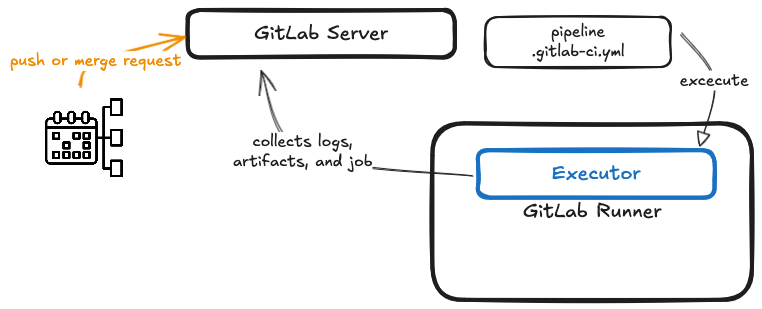
Here’s a simplified look at how GitLab Runners operate within the pipeline workflow:
- Pipeline Triggered: An event such as a push or merge requests starts a new pipeline, the GitLab server creates and queues jobs.
- Runner Polls Server: Registered runners periodically ask the server if there are any jobs matching their capabilities.
- Job Assignment: The GitLab server selects suitable jobs for each runner based on tags, runner type, and configuration.
- Executor Runs the Job: The runner passes the job to its configured executor, which prepares the environment and executes the job steps.
- Results and Reporting: After execution, the runner collects logs, artifacts, and job status and sends them back to the GitLab server.
The server then updates the pipeline status and surfaces results to users.
Kubernetes Executor
The Kubernetes executor is designed for cloud-native teams requiring scalability and resource efficiency. Here’s how it stands out:
- Elasticity: Every CI/CD job launches in its own Kubernetes pod. Resources can be dynamically allocated.
- Isolation: Each job runs in a fresh, isolated environment, minimizing interference between jobs.
- Customization: You can specify container images and pod configurations, ensuring your jobs always run with the required dependencies.
- Cloud-Native: Ideal for organizations already using Kubernetes.
➡️ Learn to configure GitLab Runner on the Thales network .
➡️ If you facing 429 Too Many Requests Error, consider to use Artifactory to pull images
.
Software Factory Runner Offer
Refer to Getting Started for pricing and how-to subscribe.
The Managed Dedicated runners feature on TDP is currently on hold.
You can comment on GitLab issue 340
to express your interest.
Windows Managed Dedicated Runner
Maturity: Early Adopter Platform: TDP [C2] Availability: SLA to come in General Availability
The Windows Managed Dedicated Runner allows to run GitLab pipeline jobs on Windows machines , enabling Windows-based projects to be built, tested, and deployed.
The need for Windows Runner arises because many software projects are developed using Windows-based tools and frameworks.
Without a Windows Runner, GitLab CI/CD pipelines would not be able to run the necessary jobs on Windows machines, making it difficult to integrate and deploy these projects.
By using the Windows Runner, GitLab users can take advantage of the benefits of CI/CD , such as automated testing, continuous integration, and continuous deployment, for Windows-based projects.
This helps teams to release software more frequently, with higher quality and stability, and reduces the manual effort required for building, testing, and deploying software.
Overall, the Windows Runner is an essential component of GitLab’s CI/CD pipeline for Windows-based projects and helps to streamline the software development and deployment process.
Supported Windows Operating Systems
The Docker executor for GitLab Runner on Windows is supported only on the Windows OS listed here
.
However since Microsoft lifecycle strategy does not include anymore the semi-annual channel
(Microsoft provide only long term service channel since 2022),
we support only Windows 2019 and 2022 for GitLab Runner docker-windows executor.
It is important to note that the version of Windows that is being used for the Docker host must match the version of Windows that is being used in the container image (for example: On a Windows 2022 VM only windows server 2022 container could be executed). We provide in Artifactory, a Docker image for:
- Windows 2022
based on
mcr.microsoft.com/windows/servercore:ltsc2022 - Windows 2019
based on
mcr.microsoft.com/windows/servercore:ltsc2019
That allow to use Docker command inside your pipelines. Obviously you can build your own image base our custom images or on Microsoft images.
What are the limitations
There are few limitations to consider when using the GitLab Runner Docker executor on Windows:
- Windows container image compatibility
- The availability of container images for Windows is less than for Linux , requiring potential custom image creation, which is time-consuming and needs expertise.
- Licensing issues may restrict the use of specific Windows versions , affecting certain container images and applications.
- Interactive web terminals are unsupported.
- Host device mounting is not available.
- A directory must exist to mount a volume.
- Linux containers cannot run on Windows.
- Due to a Docker limitation, paths for
builds_dir,cache_dir, andvolumesare unsupported if the destination drive is notc:(e.g.,f:\\cache_diris not supported, butf:is). Paths on thec:drive are supported (e.g.,c:\\cache_dir).
It’s important to consider these limitations when planning to use the GitLab Runner Docker executor on Windows .
How to request
Managed Dedicated Runners requests are currently under construction. We are doing our upmost to make this service available as soon as possible. You can comment on the dedicated issue to express your interest.
The information that will be requested at the time of provision will be :
- The link to the group or project you want your runner attached to
- The Windows version you want for your runner (2022 or 2019)
- runner identifier : 10 characters without special characters, combining the initials of your BL and your project name. Used to name the cluster and tag your runner.s
- The system requirement you want for your runner:
| Size | CPU | RAM | Concurrent jobs |
|---|---|---|---|
| small | 2 | 8GB | 4 |
| medium | 4 | 16GB | 8 |
| large | 8 | 32 | 12 |
| xlarge | 16 | 64 | 16 |
How to use
Once you runner is present on your project or group CI/CD settings page you can you use it in your
pipeline by tagging the specific jobs that require the Windows runners with docker-windows-yourunnerid.
Below an example where the runner identifier is “prodsfrunner22”
build22:
    stage: test
    image:
      name: artifactory.thalesdigital.io/docker-public/windows-cli/windows-server-core-ltsc2022-docker-cli:1.0.0
      entrypoint: ["powershell.exe"]
    script:
        - echo "something"
        - docker images
    tags:
        - docker-windows-prodsfrunner22
Service Maintenance
The Windows operating system is updated weekly each sunday at 2:00 AM UTC. The gitlab-runner executor running on the operating system is upgraded during planned maintenance windows of Software Factory team.
Linux Managed Dedicated Runner
Maturity: Early Adopter Platform: TDP [C2] Availability: SLA to come in General Availability
The Linux Managed Dedicated Runner is a specialized computing resource dedicated to executing Continuous Integration/Continuous Deployment (CI/CD) pipelines within your organization’s GitLab environment. It provides a scalable and efficient way to automate software development processes , ensuring faster and more reliable software delivery.
The Linux Managed Dedicated Runner is a pivotal component within the Software Factory Product , facilitating the execution of GitLab pipeline jobs on Linux-based machines. It empowers projects reliant on Linux environments to undergo seamless building, testing, and deployment processes.
The necessity for a Linux Managed Dedicated Runner stems from the prevalent utilization of Linux-based tools and frameworks in software development.
Absent a Dedicated Linux Runner, GitLab’s CI/CD pipelines would be incapable of executing essential tasks on Linux platforms, hindering the integration and deployment of such projects.
By harnessing the Dedicated Linux Runner, GitLab users can leverage the full spectrum of CI/CD advantages, including automated testing, continuous integration, and continuous deployment, tailored for Linux-based projects.
This facilitates more frequent software releases with heightened quality and stability , while diminishing the manual labor associated with software building, testing, and deployment.
Performance and Reliability
- Provides consistent and reliable performance due to the exclusive allocation of resources for organizational projects.
- Eliminates the risk of interference with other projects, ensuring predictable runtime without delays.
Overall, the Linux Managed Dedicated Runner provides significant advantages in terms of performance , control, security, and scalability. These benefits contribute to enhancing the efficiency and quality of the software development process for your organization.
Supported Linux Operating Systems
The Linux Managed Dedicated Runner supports the following Linux distributions:
- Ubuntu 20 (x64 and arm64 architecture)
- Ubuntu 22 (x64 and arm64 architecture)
Custom Docker Images
- You have the freedom to build and utilize custom Docker images tailored to your specific requirements. These images can be based on popular Linux distributions such as Ubuntu, Debian, CentOS, or Alpine, among others and used on your CI/CD jobs.
Interactive web terminal is supported
What are the limitations
While the Linux Managed Dedicated Runner streamlines your CI/CD workflows and offers managed VM upgrades for enhanced security and reliability, it’s important to note a limitation regarding GitLab Runner updates.
To ensure your GitLab Runner stays up-to-date with the latest features and improvements , we may need to recreate the VM from scratch.
While this process guarantees a clean and updated environment , it comes with a caveat – all cached Docker images on the VM will be removed.
This means that Docker images will need to be re-pulled during pipeline execution , potentially leading to longer build times for the first few runs after the VM recreation.
However, we aim to minimize disruption and ensure a seamless experience for your CI/CD pipelines. Our team is committed to providing timely updates and support to help you make the most out of your CI/CD infrastructure.
How to request
Managed Dedicated Runners requests are currently under construction. We are doing our upmost to make this service available as soon as possible.
To express your interest, you can comment on the dedicated issue .
The information that will be requested at the time of provision will be :
- The link to the group or project you want your runner attached to
- The Ubuntu version you want for your runner (20 or 22)
- The Ubuntu architecture you want for your runner (x64 or arm64)
- runner identifier : 10 characters without special characters, combining the initials of your BL
- and your project name. Used to name the cluster and tag your runner.
- The system requirement you want for your runner:
| Size for x64 architecture | CPU | RAM | Concurrent jobs |
|---|---|---|---|
| Small (Standard_D2as_v4) | 2 | 8GB | 4 |
| Medium (Standard_D4s_v3) | 4 | 16GB | 8 |
| Large (Standard_D8s_v3) | 8 | 32GB | 12 |
| xLarge (Standard_D16ads_v5) | 16 | 64GB | 16 |
| Size for arm64 architecture | CPU | RAM | Concurrent jobs |
|---|---|---|---|
| Small (Standard_D2pds_v5) | 2 | 8GB | 4 |
| Medium (Standard_D4pds_v5) | 4 | 16GB | 8 |
| Large (Standard_D8pds_v5) | 8 | 32GB | 12 |
| xLarge (Standard_D16pds_v5) | 16 | 64GB | 16 |
How to use
Once you runner is present on your project or group CI/CD settings page you can use it in your
pipeline by tagging the specific jobs that require the Linux runners with docker-linux-yourunnerid.
Below an example where the runner identifier is “prodsfrunner22”
build22:
    stage: test
    image:
      name: <your image>
    script:
        - echo "something"
    tags:
        - docker-linux-prodsfrunner22
Service Maintenance
The gitlab-runner executor running on the operating system is upgraded during planned maintenance windows of Software Factory team.