version v7.2.
For up-to-date documentation, see the
latest version.
Software Composition Analysis (SCA)
5 minute read

Both require GitLab Ultimate, which is included in the Software Factory at no additional cost.
For background on SCA concepts, see the SCA practice page.
Inventory Coverage
The table below maps GitLab SCA’s capabilities to the analysis approaches defined in the SCA practice.
Dependency Scanning parses language-specific lockfiles to build the dependency graph and produces a Source SBOM in CycloneDX format. It currently relies on the Gemnasium-based analyzer, which is deprecated by GitLab but remains the only generally available option. A newer SBOM-based analyzer is in development but not yet GA. See Supported languages and package types for the full list of supported ecosystems.
Container Scanning
uses Trivy
(open-source, by Aqua Security) to analyze the OS
package manager databases (dpkg, rpm, apk; …) inside the container images referenced in
your CI job.
Language-level packages inside the container can be included with
CS_DISABLE_LANGUAGE_VULNERABILITY_SCAN set to false.
This only works if the manifest files are present
in the final image which is not the case for
static builds or multi-stage Dockerfiles.
Note that this may produce duplicate findings if Dependency Scanning
is also running in the same
pipeline.
It produces an Analyzed SBOM
in CycloneDX
format.
| Analysis type | Tool | SBOM type |
|---|---|---|
| Source — manifest / lockfile | Dependency Scanning | Source (CycloneDX) |
| Source — snippet matching | ❌ | — |
| Build | ❌ | — |
| Analyzed — OS packages | Container Scanning | Analyzed (CycloneDX) |
| Analyzed — binary fingerprinting | ❌ | — |
GitLab SCA runs exclusively in the CI pipeline — there is no IDE integration and no registry-triggered scanning. Artifacts already pushed to a registry are not continuously monitored: new CVEs will only be detected when the next pipeline runs.
Analysis Capabilities
Vulnerability Detection
Both tools identify known vulnerabilities (CVEs) by cross-referencing inventoried packages against the GitLab Advisory Database , a GitLab-maintained feed aggregating NVD and other advisory sources.
Each finding surfaces three signals to help prioritize remediation:
- CVSS — static severity score (Critical / High / Medium / Low) based on the vulnerability’s characteristics at disclosure time
- EPSS — probability (0–1) that the vulnerability will be actively exploited in the wild within the next 30 days; more actionable than CVSS for triage
- KEV — flag from CISA’s Known Exploited Vulnerabilities catalog, indicating active exploitation has already been confirmed in the wild
Operational Risks
GitLab does not detect end-of-life, unmaintained, or deprecated dependencies. The scanners are purely advisory-driven: a completely abandoned package with no recorded CVE will report zero vulnerabilities. A dedicated tool is required for EOL and obsolescence monitoring.
License Compliance
License scanning reads the CycloneDX SBOM produced by Dependency Scanning
.
For each component, it uses the license data already present in the SBOM when available,
and falls back to a lookup by package name in an external license database
synced from public registries (npm, Maven Central, PyPI, RubyGems, NuGet…).
Detected licenses are surfaced in the Dependency List
.
When a package is absent from both the SBOM and the database, the license appears as unknown.
Container Scanning
does not include license data by default — set
CS_INCLUDE_LICENSES: "true" to enable it.
Only SPDX-compliant license identifiers are captured; proprietary or non-standard strings
may not be recognized.
Policy Management
Merge Request Approval Policies
GitLab can enforce security and license requirements at the merge request level through Merge Request Approval Policies . When a policy matches SCA findings, approvers are added to the MR and the merge is blocked until the required approvals are obtained.
Both Security Approval Policies (triggered by vulnerability severity or scanner type) and License Approval Policies (triggered by disallowed licenses found by SCA) are available. See Security Policies for configuration details.
Vulnerability Triage
Vulnerabilities can be triaged manually from the Vulnerability report :
- Dismiss — suppress a vulnerability with a mandatory justification (accepted risk, false positive, etc.). Dismissed vulnerabilities remain visible but are excluded from policy counts.
- Create issue — open a GitLab issue linked to the vulnerability for team-based tracking and remediation.
GitLab has no expiry date on dismissals — a dismissed vulnerability stays dismissed until manually reopened.
Continuous Monitoring
GitLab does not offer continuous monitoring without a pipeline execution. Scans only run when a pipeline is triggered — if a new CVE is published between two pipeline runs, it will not be detected until the next execution.
One way to mitigate this is to schedule a recurring pipeline on the default branch. GitLab’s pipeline schedules allow running security scans at a fixed frequency (e.g. nightly or weekly), independent of code changes, so that new vulnerabilities are detected sooner.
Results and Reporting
Security Scanning Widget
The security scanning widget appears directly in every merge request. It lists vulnerabilities newly introduced by the branch compared to the target branch, allowing developers to review security impact without leaving the MR.

Vulnerability Report
The Vulnerability report is the main view for security triage. It lists all vulnerabilities detected on the default branch, with their severity, status, and scanner origin.
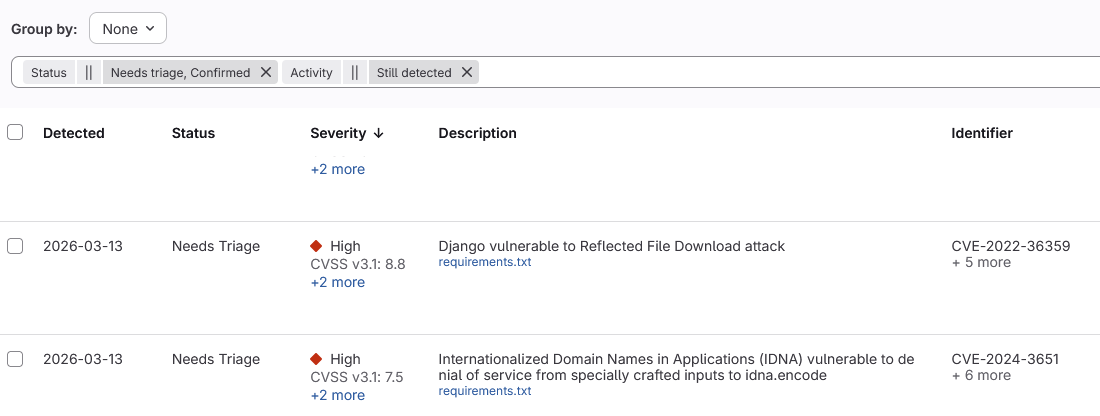
The Vulnerability Report only reflects the default branch. A vulnerability only appears in this report once the MR that introduced it has been merged. Branch-specific findings are visible in the security scanning widget only.
From this view, vulnerabilities can be dismissed or linked to a GitLab issue (see Policy Management ).
Dependency List
The Dependency List provides an inventory of all dependencies detected by the most recent successful pipeline on the default branch, showing for each:
- The detected license
- The number of vulnerabilities found
SBOM Exports
Both Dependency Scanning and Container Scanning produce a CycloneDX SBOM as a CI job artifact, available in the pipeline artifacts after each run. These can be downloaded and consumed by external tools or shared with legal and compliance teams.
For background on SBOM types and formats, see the SCA practice page.
Enable SCA on your project
- How to Enable GitLab Dependency Scanning — configure the pipeline template, browse the dependency inventory, and download the CycloneDX SBOM artifact.
- How to Enable GitLab Container Scanning — configure the pipeline template, scan your Docker images, and download the CycloneDX SBOM artifact.