version v7.2.
For up-to-date documentation, see the
latest version.
Vulnerability Report
3 minute read

At the group level, in addition to the vulnerability report, there is a Security Dashboard that provides an overview of the group’s security posture. To access it: in the left sidebar, select Secure > Security Dashboard .
Vulnerability Report Overview
The vulnerability report provides a detailed breakdown of vulnerability counts by severity level and includes a comprehensive list of each vulnerability identified in your project or group.
A search bar helps you filter the report based on various parameters. By default, the report displays all vulnerabilities that need triage or have been confirmed and are still detected in the project.
You can also attach an issue to a vulnerability or create a new issue related to it.
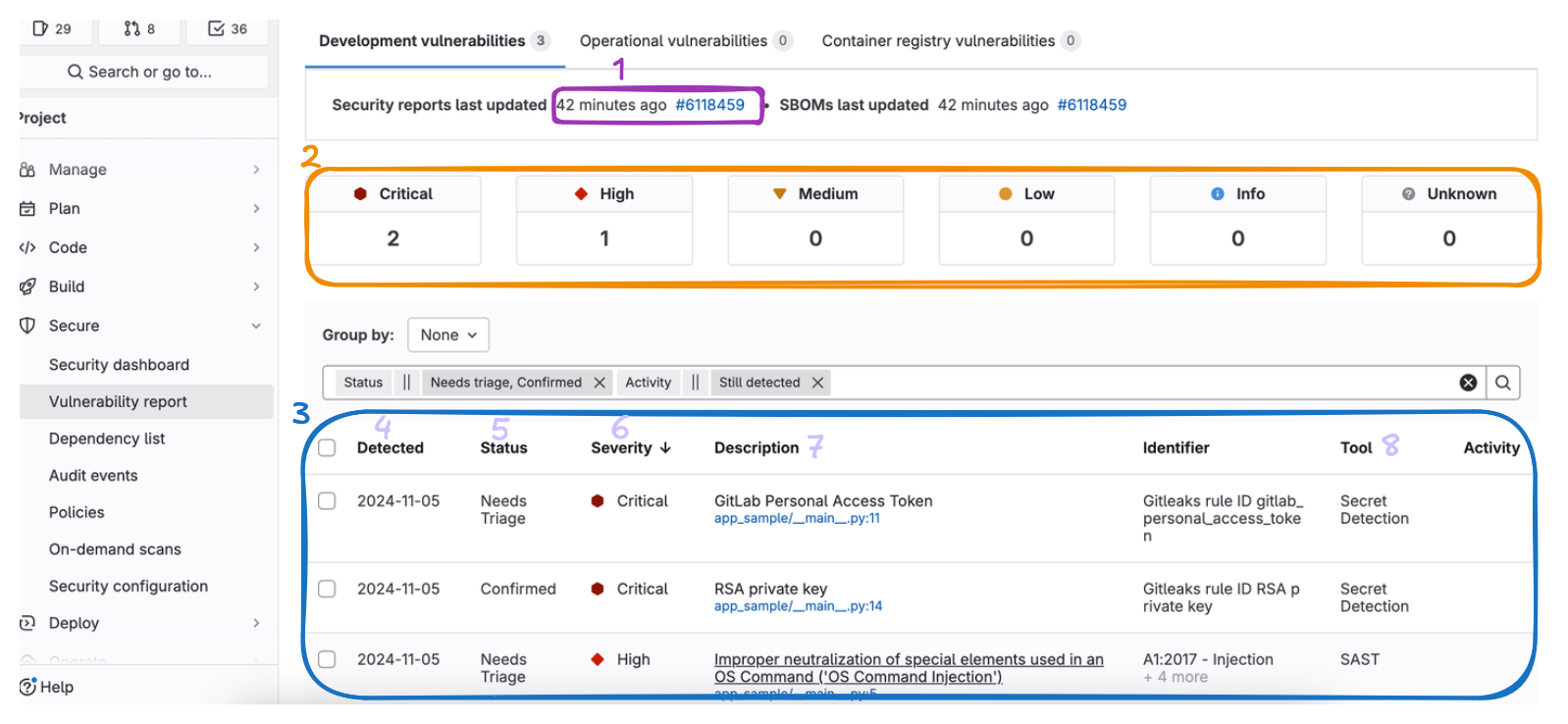
| Elements | Description |
|---|---|
| 1 | Last security analysis with the pipeline id |
| 2 | Global view of number vulnerabilities grouped by severity |
| 3 | Overview table of detected vulnerabilities |
| 4 | Date of the first detection |
| 5 | Current status of the vulnerability. New vulnerability is set to Needs triage |
| 6 | Severity level of the vulnerability |
| 7 | Detail and the filename with line number of the vulnerability |
| 8 | Scanner that detected the vulnerability |
Vulnerability Details Page
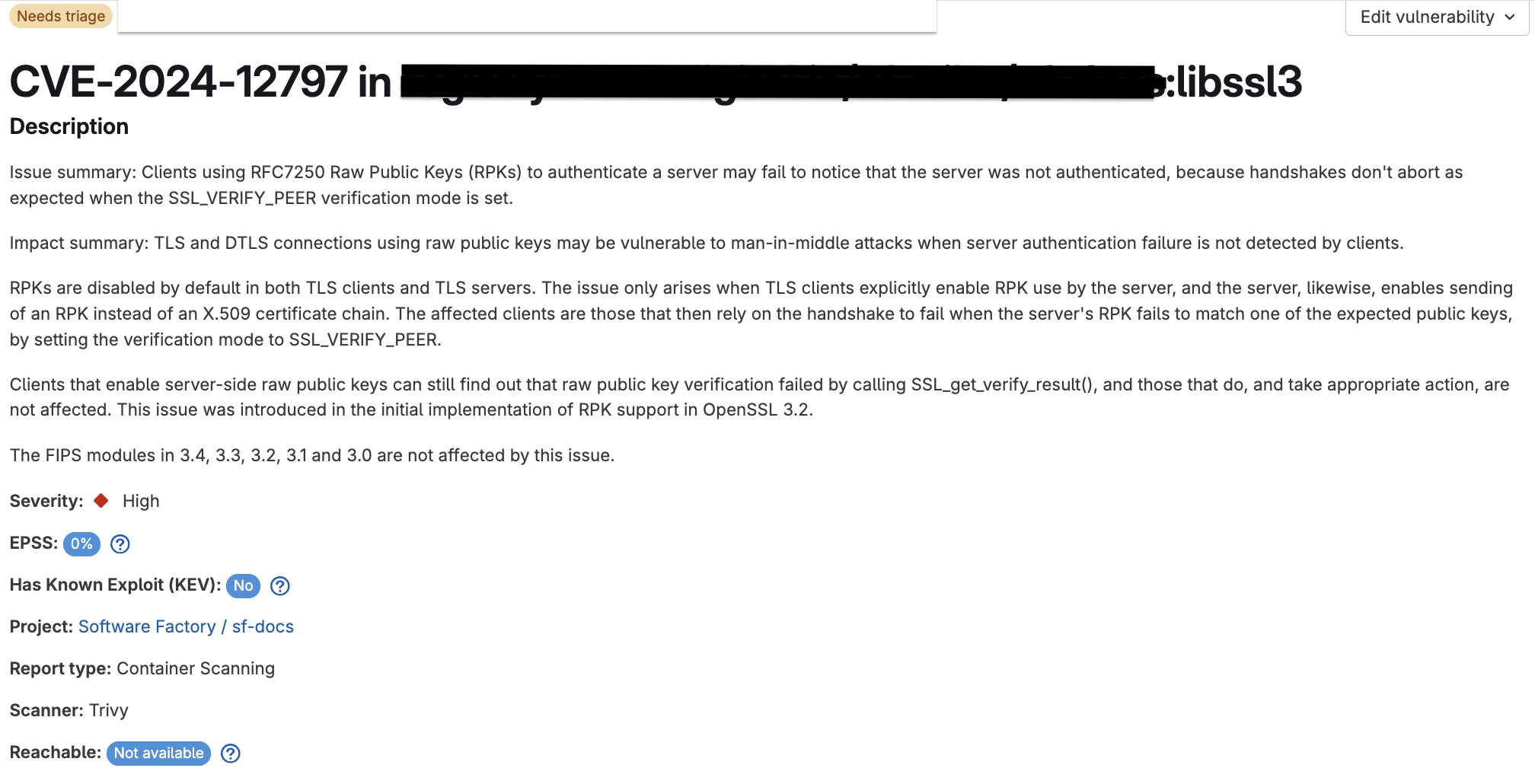
The Vulnerability Details page provides detailed information about each detected vulnerability within your project or group.
This includes the severity level, relevant descriptions, affected files or dependencies, and suggested remediation steps.
The page also allows you to attach or create an issue and change the severity.
| Elements | Description |
|---|---|
| Severity | The severity of the vulnerability: low, medium, high, or critical |
| CVSS | General CVSS score. The score may differ depending on your application use case |
| EPSS | The likelihood of a vulnerability being exploited in the next 30 days |
| Has Known Exploit | Yes or No — whether a public exploit exists for this vulnerability |
| Reachability | Not available: reachability unknown. Yes: vulnerability can be reached. No: vulnerability cannot be reached |
| Location | Location of the vulnerability within the codebase, including the file name and line number |
Issue and Vulnerability Tracking
Through the vulnerability report, it is possible to create a new issue or associate an existing issue with a vulnerability.
Remediation Process
GitLab generates detailed reports for any detected vulnerabilities, accessible directly within the merge request and pipeline reports.
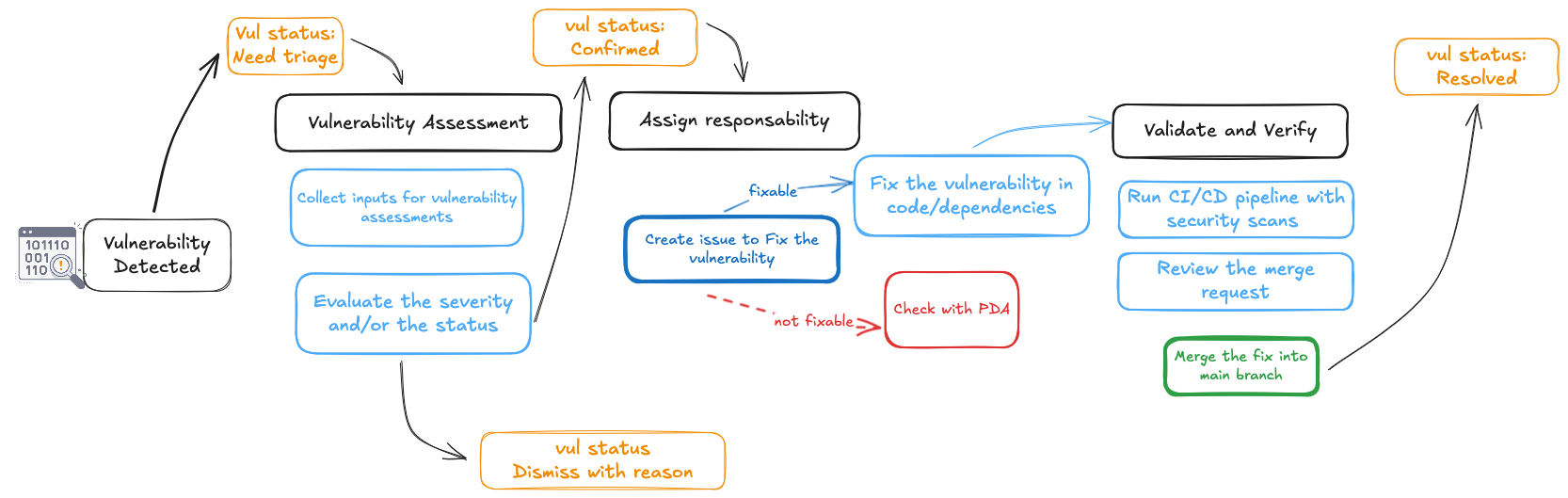
Assessment of the vulnerabilities.
- Collect information about the vulnerabilities from the vulnerability details page.
- Analyze the impact and severity of each vulnerability to prioritize remediation efforts.
Assign the issue to the appropriate team member for resolution.
Fix vulnerabilities by changing the code or dependencies.
- Make the necessary code changes or update dependencies to fix the detected vulnerabilities.
- Communicate with your Product Design Authority (PDA) to confirm the appropriate next steps in cases where no immediate fix is available.
Review the issue and determine the appropriate remediation steps.
Conduct additional scans and tests to verify that vulnerabilities have been properly addressed.
Once verified, code changes can be merged into the main branch.
Regularly run security scans as part of the CI/CD pipeline to detect new vulnerabilities.