version v7.2.
For up-to-date documentation, see the
latest version.
JFrog Xray
13 minute read
This page describes the tool independently of any platform-specific details. For the service URL and other platform-specific configuration, please refer to your platform’s dedicated page .
Inventory Coverage
JFrog Xray covers three of the analysis approaches defined in the SCA practice — Source, Build, and Analyzed — depending on what artifact is analysed.
Source Code Scanning (jf audit, JFrog IDE extension
) invokes the local package manager
(mvn, gradle, npm, go, etc.) to resolve the full transitive dependency tree from the
project’s source manifests.
The package manager must be installed and available on the machine or CI runner.
Binary Scanning decomposes compiled artifacts — JARs, archives, container images — to extract their embedded package metadata, then checks each package against the JFrog Security Database .
“Binary” refers to packaged software (compiled JARs, container images, archives…) as opposed to source code — not to machine code analysis.
Both approaches can be combined: source code scanning provides early feedback during development, while binary scanning reflects the ground truth of what is actually built and deployed.
Scanning before publishing
Xray can be used standalone via the JFrog CLI or the JFrog IDE extension , without requiring artifacts to be stored in Artifactory.
| Scan mode | Command | When to use | SBOM type |
|---|---|---|---|
| Source code scanning | jf audit | On every commit, before any build | Source SBOM |
| Binary scanning | jf scan | After build, on a local artifact | Analyzed SBOM |
| Container scanning | jf docker scan | After docker build, before push | Release SBOM |
A connection to the JFrog platform is always required — the CLI and IDE extension does not perform analysis locally. It sends component metadata to Xray, which queries the JFrog Security Database and returns results.
jf audit — source scanning
jf audit invokes the local package manager (mvn, gradle, npm, yarn, go, etc.) to
resolve the full transitive dependency tree from the project’s source manifests. The package
manager must be installed and available on the machine or CI runner.
Because it reads manifests rather than compiled artifacts, jf audit reflects what is
declared — not necessarily what is actually bundled at build time.
Results are visible in Xray under Xray > OnDemand Scanning > Source Code .
jf scan — binary scanning
jf scan targets already-built artifacts (JARs, archives, tarballs…) on the local filesystem,
decomposing them to extract their embedded package metadata — before they are pushed to
Artifactory.
Because it reads the compiled output, jf scan reflects what was actually resolved and
bundled by the build tool, which may differ from what source manifests declare.
For example, if pom.xml declares jackson-databind:2.9.10.8 but Maven resolves it to 2.15.2,
jf scan reports 2.15.2 while jf audit reports 2.9.10.8.
Results are visible in Xray under Xray > OnDemand Scanning > Binary Scans .
jf docker scan — container scanning
jf docker scan targets container images via the Docker daemon. Unlike jf scan, which reads
a local filesystem archive, jf docker scan resolves the image by name (myimage:tag) — using
the local daemon cache or pulling from a remote registry if needed.
It decomposes every layer of the image to extract three categories of components:
- OS packages — Debian, Alpine, RPM packages from the base image
- Runtime — Node.js, JDK, or other runtimes included in the image
- Application libraries — your code’s dependencies, found inside the application layer
This produces the most complete inventory of what actually runs in production.
Use jf docker scan myimage:tag when the image is already available locally or in a registry.
Results are visible in Xray under Xray > OnDemand Scanning > Binary Scans .
Comparing the three scan modes
| Dimension | jf audit (source) | jf scan (binary) | jf docker scan (container) |
|---|---|---|---|
| Input | Manifest (pom.xml, package.json…) | Compiled artifact (jar-with-dependencies) | Image by name / tag |
| Requires build? | No | Yes - mvn install or npm run build | Yes — docker build first |
| Libraries detected | What is declared in the manifest | What was actually resolved and bundled | Same as jf scan + OS + runtime |
| Dependency tree | Full tree with dependsOn relationships | Flat list — no parent-child relationships | Layer → package tree |
| Hash coverage | Partial | Full — SHA-1 and SHA-256 for every lib | Full — SHA-1 and SHA-256 for every lib |
| License data | Partial | Richer — present for all identified libs | Very rich |
| OS packages | No | No | Yes |
| Runtime (JDK, Node…) | No | No | Yes |
| SBOM type | Source [SBOM] | Analyzed [SBOM] | Release [SBOM] |
Scanning artifacts stored in Artifactory
Coupling Xray with Artifactory unlocks capabilities that go beyond standalone CLI scanning.
Xray uses indexing as the underlying mechanism to decompose artifacts stored in Artifactory and extract their embedded package metadata (e.g., listing all packages within a Docker image).
Repository Scanning triggers automatically on every artifact push: Xray indexes it, extracts its packages, and scans them against the JFrog Security Database — no manual trigger required. Watch actions can then enforce policies directly at the registry level, for example by blocking the download or promotion of a non-compliant artifact.
Build Scanning (BuildInfo) provides traceability at the build level. The JFrog CLI records a BuildInfo — a full trace of every package resolved from Artifactory during the build. Once published, Xray produces a build-level security report reflecting the actual transitive dependencies and version conflict resolutions at build time, which may differ from what source manifests declare.
| Scan Mode | How | SBOM type |
|---|---|---|
| Binary Scanning — repository | Artifactory indexing (Admin configuration) | Analyzed |
| Binary Scanning — build | BuildInfo generation + jf build-publish | Build |
If you cannot enable Xray indexing on an Artifactory repository for a given technology, it means that technology has no binary representation indexable by Artifactory — binary scanning is not available for it.
Examples:
Swift (Package.swift), Helm (Xray scans the referenced Docker/OCI images —
enable indexing on the Docker repos, not on Helm itself), Terraform.
See Xray Supported Technologies
for the full list.
Integration Points
| Stage | How |
|---|---|
| IDE / local | JFrog IDE extension
(VSCode, IntelliJ) or JFrog CLI
(jf audit) |
| CI pipeline | jf audit (source scanning) or BuildInfo + jf build-scan (build scanning) |
| Artifact registry | Repository indexing (Admin-configured); results surfaced in the Xray UI |
Analysis Capabilities
Xray analyzes every scanned package across three axes: vulnerability detection, operational risks, and license compliance.
Vulnerability Detection
Xray checks all packages in the dependency graph against the JFrog Security Database , which aggregates the NVD, security advisories, open source issue trackers, and JFrog’s own proprietary research, synchronized daily.
Each finding includes:
- CVE identifier and description
- CVSS severity score — a standardized score computed from fixed criteria (attack vector, complexity, privileges required, etc.)
- JFrog Research Severity — an independent severity rating assigned by JFrog’s Security Research team, based on real-world exploitability analysis. It can differ from the CVSS score: a CVE with CVSS 9.8 (Critical) may be rated High by JFrog Research if exploitation requires uncommon conditions in practice.
- Affected versions and remediation suggestion (fixed version, when available)
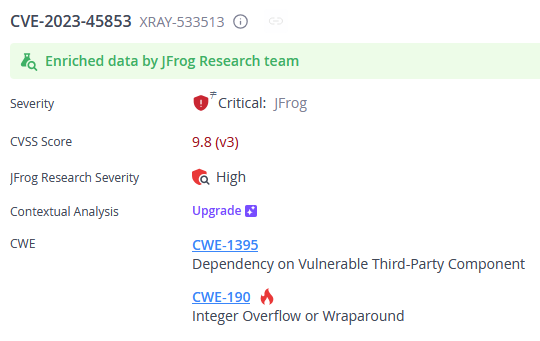
Vulnerability detection covers 25+ package ecosystems including npm, Maven, Go, PyPI, NuGet, Docker, and more — see Xray Supported Technologies for the full list.
Operational Risks
Xray’s Operational Risk feature detects dependencies that are no longer actively maintained, flagging:
- End-of-life (EOL) packages — no longer receiving security updates
- Deprecated packages — explicitly marked as unsupported by their maintainers
- Unmaintained packages — no updates in over 12 months
- Version age and lag — how old the used version is and how many newer versions exist
Operational Risk is currently limited to Java/Kotlin and JavaScript/TypeScript.
License Compliance
Xray detects the license of each package in the dependency tree by reading its metadata
(e.g., pom.xml, package.json).
Detected licenses are identified using standard identifiers (MIT, GPL-3.0, Apache-2.0, etc.).
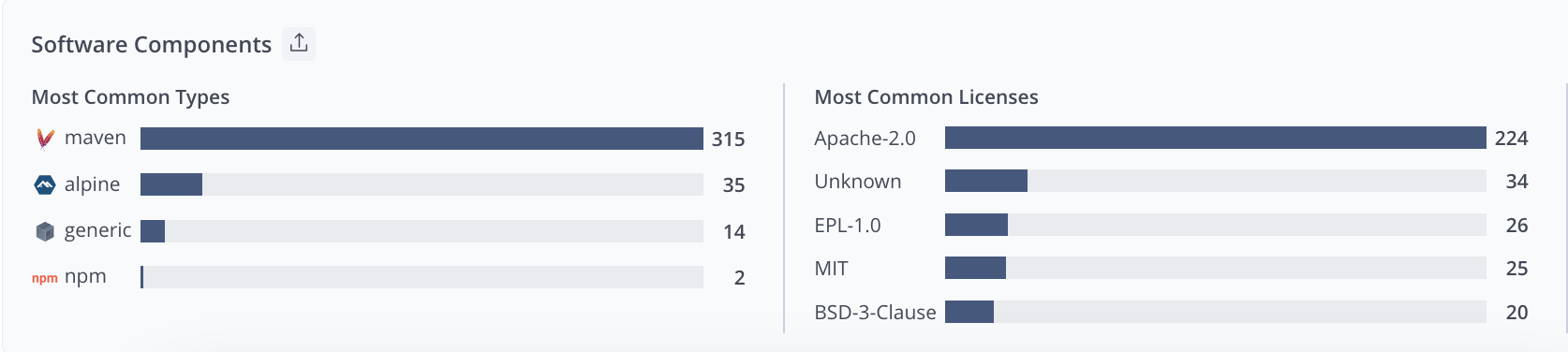
A license policy defines which licenses are allowed or banned in your projects. A violation is raised when a package’s license matches a banned identifier — or when the license is unknown (not declared in the package metadata), which is common in practice and can be treated as a violation in strict policies.
A typical use case: flagging any GPL license in a proprietary codebase, or blocking packages
with unknown licenses from reaching production.
License compliance covers the same ecosystems as vulnerability detection — see Xray Supported Technologies for the full list.
Policy Management
In Xray, security governance can be configured at different scopes:
- Project level — configuration applies only to the resources belonging to a given JFrog Project
- Instance level — configuration applies globally across the JFrog platform
In the Software Factory, this documentation focuses on the project-level model.
In the Software Factory, end users typically configure Xray Policies and Watches at Project level.
Instance-level (global) Policies and Watches are not covered here and are managed separately by platform administrators.
In this page, project refers to a JFrog Project scope.
Project-level configuration
At project level, users can typically:
- create and manage Policies
- create and manage Watches
- target resources belonging to their JFrog Project
- define rule actions such as reporting, notifications, or CI gating
This is the recommended scope for application teams, as it allows each team to manage its own security and compliance rules independently. For step-by-step instructions on setting this up, please see our tutorial on How to create a project-level policy .
Policies and Watches
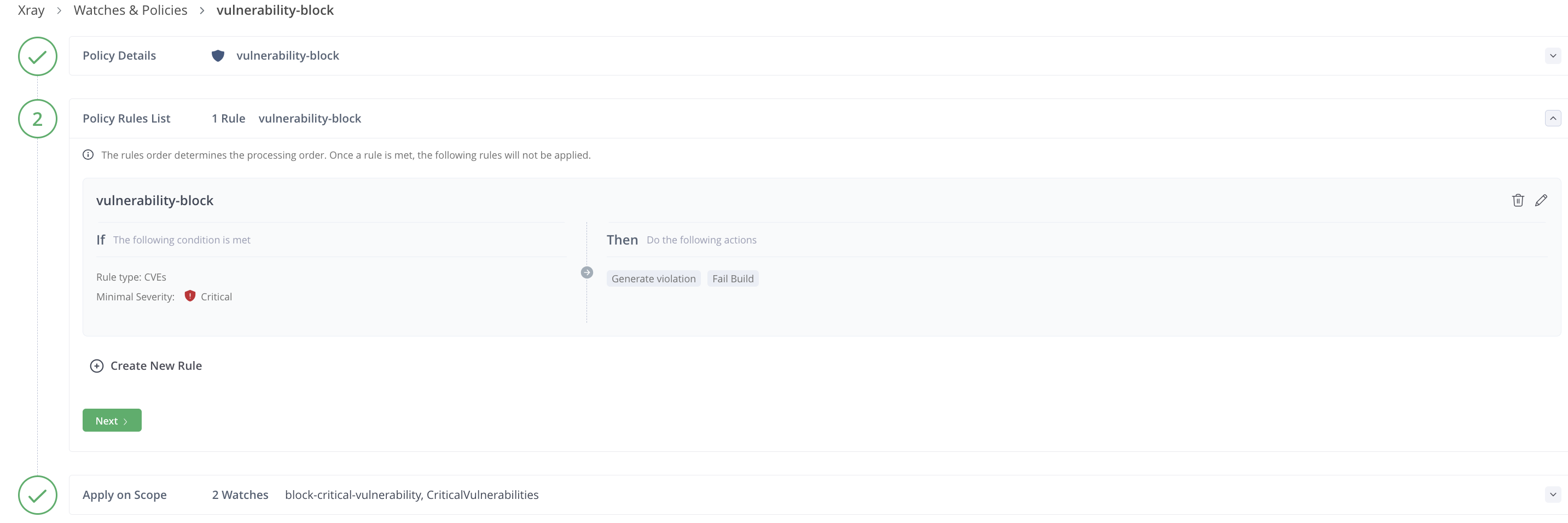
A Policy defines what Xray should detect and what action to trigger when a violation is found. Three policy types are available, each corresponding to a detection axis above:
- Security — based on vulnerability criteria: minimum severity, CVSS score range, specific CVEs
- License — based on license identifiers: allowed or banned licenses (
MIT,GPL-3.0, etc.) - Operational Risk — based on component health: EOL status, release age, etc.
Each policy contains one or more rules, each with:
- Criteria — the condition that triggers a violation (e.g., CVSS score ≥ 7)
- Actions — what happens when the rule fires (see below)
A Watch defines which resources a set of policies applies to within the selected scope: repositories, builds, release bundles, or all resources of a given JFrog Project. A policy is inert until assigned to at least one Watch. Multiple policies of any type can be combined in a single Watch.
Policies and Watches are configured under Xray > Watches & Policies .
Actions
When a rule’s criteria are met, one or more of the following actions can be triggered:
| Action | Description |
|---|---|
| Report violation | Violation is surfaced in the Xray UI |
| Fail the build | CI/CD build is failed |
| Block artifact download | Download of the violating artifact is blocked |
| Block Release Bundle | Distribution or promotion of a Release Bundle is blocked |
| Create Jira ticket | A Jira issue is automatically created |
| Notify via email | Email sent to the deployer, Watch recipients, or a custom list |
| Trigger webhook | A configured webhook integration is called |
Fail the build works as a CI gate, not a real-time interrupt.
The build itself has already completed when Xray analyzes the BuildInfo.
The pipeline explicitly calls jf build-scan after jf build-publish:
if a policy violation is detected, the command returns a non-zero exit code and the CI job fails.
Ignore Rules
Violations can be suppressed via Ignore Rules — useful for accepted risks or known false positives. An ignore rule can be scoped to a specific CVE, license, component, artifact, build, or Watch, and can be permanent or set to expire on a given date.
Ignore rules apply to future scans only. To retroactively suppress existing violations, trigger Apply on Existing Content on the relevant Watch.
Issue Tracking
Xray has no native assignment or lifecycle management for violations. Team-based workflows (assignment, status tracking, comments) are handled via the Jira integration: policy rules can automatically create Jira tickets when a violation is detected, and Jira ticket statuses are synced back into Xray periodically.
When a Policy Blocks an Artifact Download
When an artifact download is blocked by a policy, the first action should always be to check whether a remediated version of the artifact is available. The standard and preferred resolution is to upgrade to a version that fixes the issue. A derogation must never be considered the default path and should only be requested when no other viable option exists.
Two situations are possible:
No remediated version exists
If no available version of the artifact resolves the issue, the user may submit a request to the platform team to have the artifact opened on the platform.A remediated version exists
If one or more versions of the artifact already fix the issue, the user is expected to upgrade to one of those versions. In that case, continuing to use the blocked version is only possible through a derogation formally approved by the security referent. Without this approval, no exception can be granted.
Upgrading to a compliant version must always be the default behavior whenever such a version exists. A derogation is an exceptional measure and must be treated strictly as a last resort.
Continuous Monitoring
Xray continuously synchronizes with the JFrog Security Database (aggregating NVD, security advisories, and JFrog’s own research). When a new CVE enters the database, Xray’s Impact Analysis automatically cross-references it against the dependency graph built during indexing, and identifies all affected artifacts — without requiring a new push or pipeline run.
This means that an artifact scanned months ago can trigger a violation today if a new CVE is published for one of its dependencies.
Continuous monitoring only works for indexed artifacts covered by a Watch. Impact Analysis identifies the affected artifacts, but no alert fires unless a Watch with the appropriate Policy and notification actions is configured for that resource.
When a violation is detected, notifications are sent according to the actions configured in the matching Policy rule: email (to the Watch recipients, the deployer, or a custom list), webhook, or automatic Jira ticket creation.
Results and Reporting
Scan List
Xray > Scan List provides a centralized view of all scanning results, organized by resource type:
| View | Content |
|---|---|
| Git Repositories | Scanning results from FrogBot — not available in the Software Factory |
| Repositories | Artifacts scanned via Artifactory indexing |
| Builds | Build-level results from BuildInfo |
| Release Bundles | Release bundle scanning results |
| Packages | Individual package-level results |
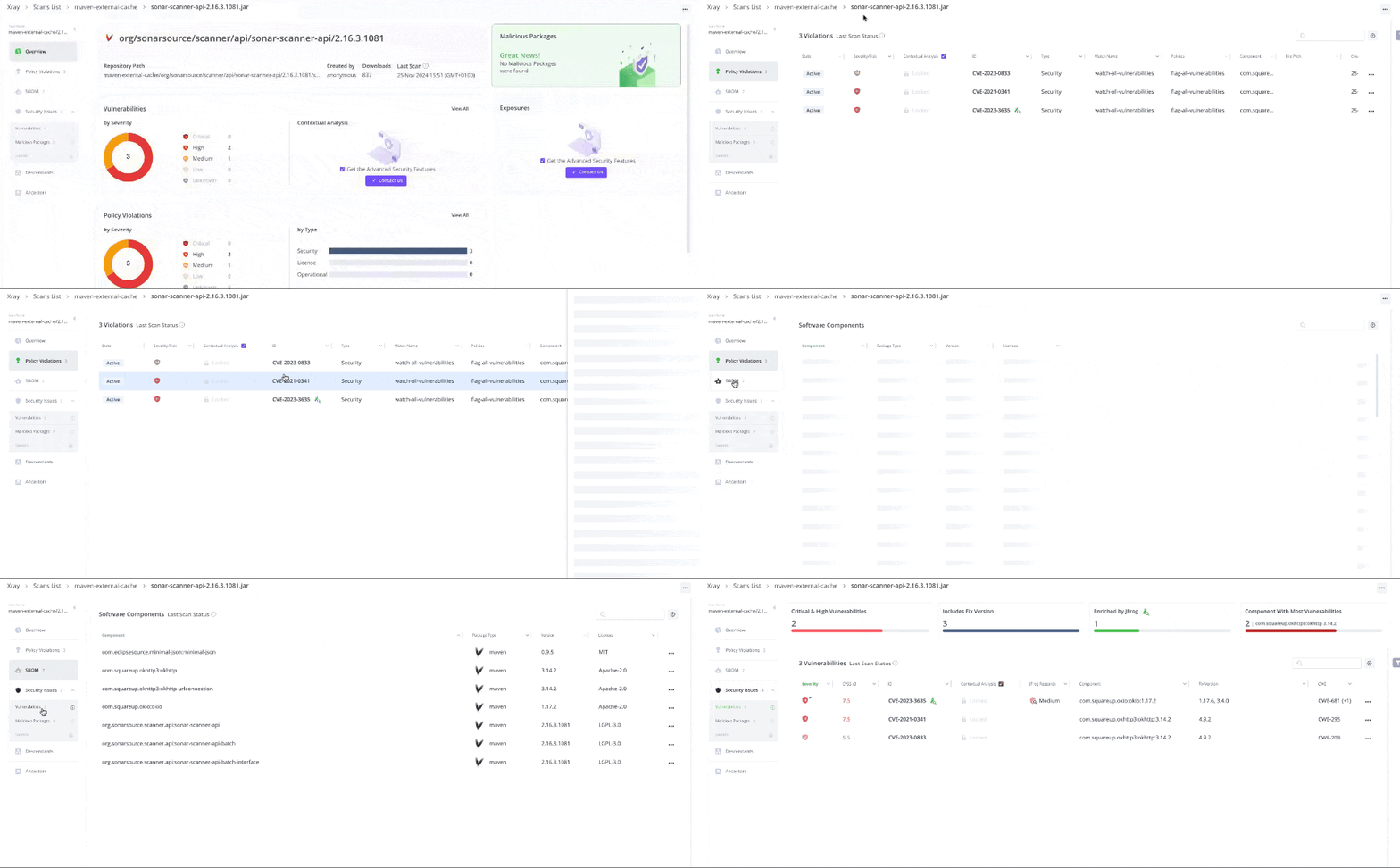
Watch Violations
Xray > Watch Violations lists all violations triggered by configured Watches — across all resource types and policy types (security, license, operational risk). This is the primary view for triaging and managing active violations.
The Artifactory UI shows a contextual summary per artifact (Xray tab) covering vulnerabilities, licenses, and operational risks. This is not a full dashboard — it is a quick view scoped to a single artifact in the repository.
Reports
Xray > Reports allows generating and exporting reports as PDF, JSON, or CSV, covering violations (security and license), operational risk, and vulnerabilities.
SBOM export produces a CycloneDX (JSON or XML) or SPDX (JSON or tag-value) document scoped to a specific artifact. In the UI, navigate to Xray > Scan List , select the scan of interest, and open the SBOM section. It is also available via API.
Getting Started
Binary scanning requires configuring indexing before policies can apply:
For source code scanning (IDE / CLI):
For CI/CD pipeline integration without custom scripts:
- Use the NextGen CI/CD Artifactory step — it handles both source and build scanning.
For build scanning with BuildInfo (Artifactory-integrated):
- Configure your CI build to resolve dependencies from Artifactory and collect BuildInfo
(e.g.,
jf mvn,jf gradle,jf npm) - Publish the BuildInfo:
jf build-publish - Configure Policies and Watches targeting builds
For availability, SLAs and support, see the Platform Documentation .
Useful Xray Resources
- JFrog Xray Official Website
- Xray Best Practices